
Software conversion
How to Convert PDF to Word on an Android Phone
Convert a PDF to an editable Word file on Android, verify generic document-viewer apps safely, handle scanned pages with OCR, and check the result.
Browse more Find practical software and app guides, setup instructions, troubleshooting steps and productivity tips for popular desktop and online applications.
Convert a PDF to an editable Word file on Android, verify generic document-viewer apps safely, handle scanned pages with OCR, and check the result.
Convert PDF files with Google Docs or Xodo in a browser, choose OCR for scans, protect sensitive documents, and verify the resulting Word file.
Save a Word document as PDF in the Android or iOS Microsoft Word app, use a browser converter safely, and verify the mobile export before sharing.
Understand the risks of an unverified legacy PDF converter, recognize its old workflow, choose a maintained alternative, and verify the Word output.
Create PDFs with Word, Microsoft Print to PDF, or LibreOffice instead of an unverified legacy converter, and check the finished document carefully.

Use Solid Converter to export PDF to Word, create PDFs, combine files, choose an editable layout, understand trial limits, and verify the output.

Save Word as PDF locally or compare iLovePDF, Smallpdf, and Convertio, with practical privacy, pricing, formatting, and verification checks.

Extract PDF tables with Excel Power Query, Smallpdf, or maintained desktop tools, then clean data types, verify totals, and protect sensitive files.

Compare Word, Smallpdf, Google Docs, and Solid Converter for PDF-to-Word conversion, including OCR, privacy, font errors, and output checks.

Choose the right image format and resolution, export PDF pages locally or online, convert selected pages, and preserve text clarity and privacy.

Share a document through a QR code by creating a secure cloud link, choosing static or dynamic codes, testing permissions, and designing for reliable scanning.

Learn the correct home-row hand position, follow a focused online practice routine, and improve typing speed without sacrificing accuracy.

Measure WPM and accuracy consistently, compare online typing tests, and turn the results into a focused touch-typing practice routine.

Compare six browser-based typing tests by language support, test length, practice style, and the results they report.
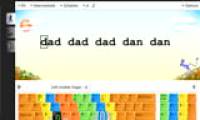
Set up RapidTyping, learn the correct finger zones, complete guided lessons, and use accuracy statistics to improve touch-typing skills.
Download the correct RapidTyping build, install or run it portably, configure your keyboard, and complete the first touch-typing lesson.

Build faster, more accurate typing with correct home-row technique, focused drills, a comfortable setup, and a repeatable 15-minute routine.

Download the official portable RapidTyping build, run it without installation, choose the right keyboard course, and preserve your practice data.

Compare seven typing games and courses for children by age, lesson style, progress tracking, classroom tools, and offline support.

Compare ten touch-typing websites by lesson structure, language and layout support, classroom tools, games, and progress tracking.