Table of Contents
This updated guide explains how to protect Google chrome from rust malware eddiestealer with clear steps, practical tips, and useful context. Rust is one of the systems programming languages used in the backend of Google Chrome. Recently, a Rust-based malware called EDDIESTEALER has started attacking Chrome users through fake CAPTCHA verification pages.
Why Is Rust Malware in Chrome So Effective?
Rust-based malware is effective in Google Chrome because it hides its code using social engineering while bypassing Chrome's application link encryption, introduced in version 127. Rust uses string and API obfuscation, self-destruction, and multi-stage payloads to sneak malware into web browsers. Chrome's widespread use and user trust make it a prime target.
EDDIESTEALER is a Rust-based information stealer recently analyzed by Elastic Security Labs on May 30, 2025. It targets Chrome users via fake CAPTCHA prompts on compromised websites, tricking Windows users into pasting a malicious PowerShell command into Run. It downloads an obfuscated JavaScript payload ('gverify.js') to the PC's Downloads folder.
Taking advantage of Rust's stealth capabilities, the malware evades Chrome's sandbox (similar to CVE-2025-2783) and self-destructs. Its payload steals data from cryptocurrency wallets like Bitcoin and WasabiWallet, password managers like Bitwarden and KeePass, and apps like Telegram Desktop.
EDDIESTEALER is following the pattern of previous Rust malware that have targeted Chrome, such as 'Fickle Stealer', which appeared in mid-2024, and 'StealC', which was discovered in early 2023. All three used social engineering like fake CAPTCHAs, phishing, and malvertising to launch multi-stage attacks.
Use Chrome's Enhanced Protection
On the Chrome browser page, choose the three-dot menu in the top right, then Settings -> Privacy and security -> Security -> Enable Enhanced protection .
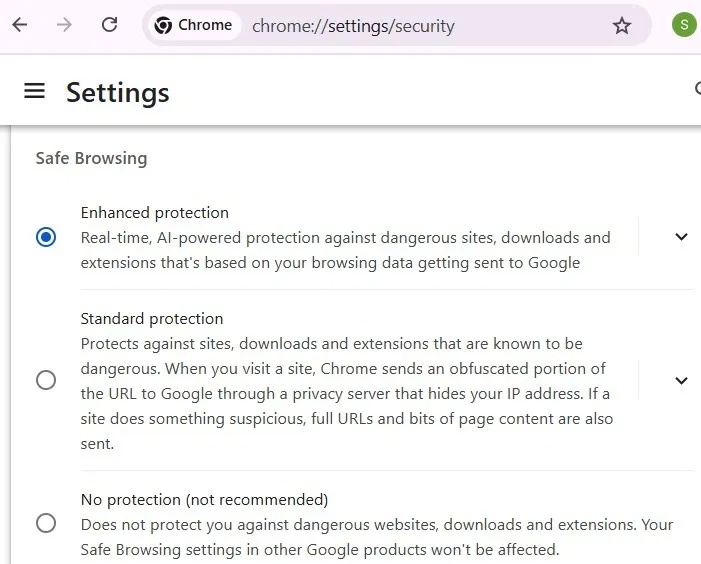
Enhanced Protection uses Machine Learning and AI to detect threats in real time. While Rust malware threats are user-initiated, enhanced mode is more effective at identifying fake CAPTCHAs and unverified websites, and displays an 'unsafe download blocked' warning. Also, avoid visiting Chrome sites marked as Not Secure for added peace of mind.
Disable JavaScript for Untrusted Sites (Optional)
This setting is optional for Chrome users who only visit a few websites or have separate Chrome profiles designated to block JavaScript entirely.
open Settings -> Privacy and security -> Site Settings -> Content -> JavaScript. Select do not allow JavaScript . You can then add more trusted sites to the exceptions under this setting by clicking Add next to Allowed to use JavaScript .
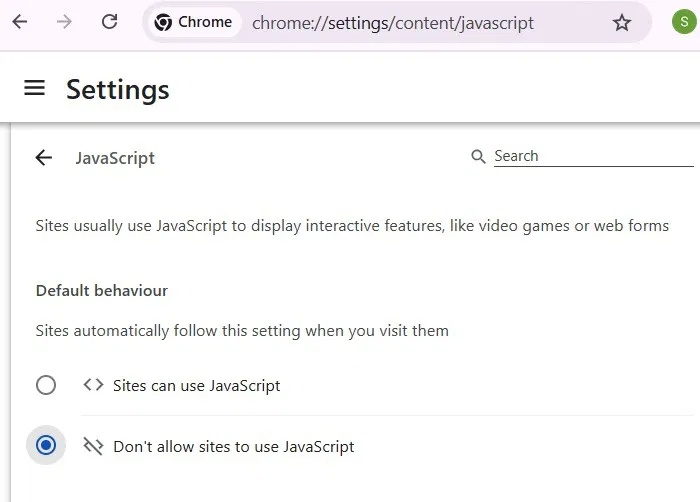
All of the Rust-based malware examples we've seen so far use JavaScript to push the payload to the Chrome browser. The minimal JavaScript setup above is an easy way to completely block it. Still, it can be inconvenient to keep a whitelist for JavaScript sites. But then again, many modern sites, such as DuckDuckGo, offer JavaScript-free versions.
Prevent Websites from Automatically Downloading Multiple Files
to avoid whitelisting JavaScript, you can instead restrict uncontrolled downloads.
First, open Settings -> Downloads -> Enable Ask where to save each file .
Then open Settings -> Privacy and security -> Site Settings -> Additional permissions -> Automatic downloads. Select do not allow sites to automatically download multiple files .
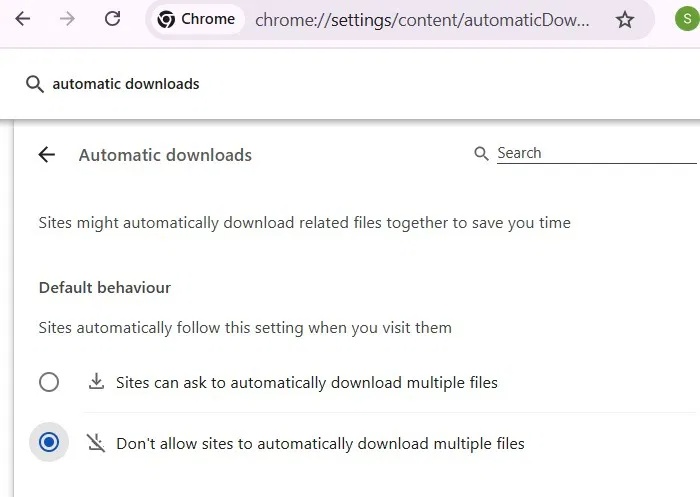
The above setting prevents malicious JavaScript payloads, such as "gverify.js" in EDDIESTEALER, from downloading in the background without your knowledge.
Prevent Rust Malware with Strict Site Isolation
In the Chrome address bar, type Chrome://flags and press Enter. Now, open the flag named Disable site isolation and ensure that this flag is kept at Default .
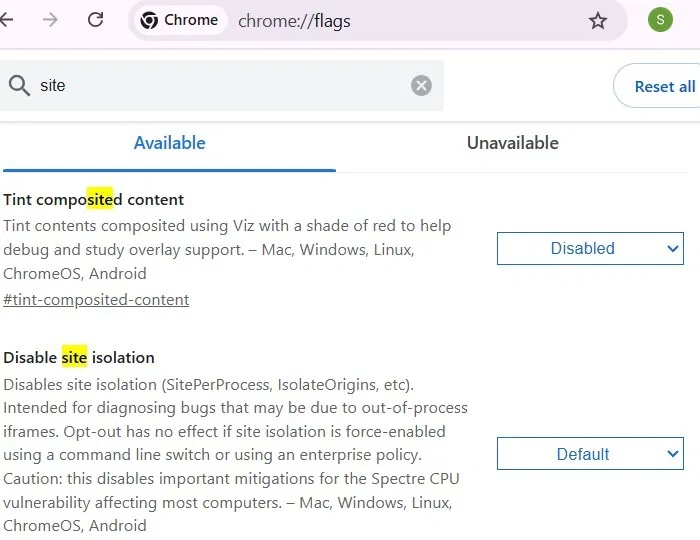
Set up isolation on web processes to limit memory-based exploitation of all web-based malware, including Rust malware. You can achieve this isolation through other methods such as Chrome Properties in Windows.
Only Download Extensions from the Chrome Web Store
Chrome supports third-party extensions, but downloading them from the Chrome Web Store helps protect against malware that uses hidden APIs to launch attacks. EDDIESTEALER used this tactic, leveraging Rust's hidden programming to bypass Chrome's sandbox detection and other flags.
To increase security against Chrome-based malware, Google has begun phasing out SMS-based two-factor authentication. Instead, Google offers more secure alternatives like passcodes and authenticator apps, which should be enabled Once possible.
FAQ
What should I prepare before I protect google chrome from rust malware eddiestealer?
Review the requirements and options in the guide first. Having the correct device, app version, account access, or materials ready helps prevent avoidable errors.
How long does it take to protect google chrome from rust malware eddiestealer?
The time depends on the task and your setup. Most basic steps can be completed quickly, while downloads, updates, scans, or troubleshooting may take longer.
What should I do if the steps do not work?
Repeat the instructions in order, confirm that your software or device is supported, and check permissions, connectivity, and available updates before trying again.
Related Articles
 Google Chrome Temporarily Prevents Sideload of Extensions3 minutes read
 Chrome 17 Blocks Malware That Helps Users3 minutes read
 What Is Unsafe Rust?6 minutes read
 Ways to Handle Errors in Rust9 minutes read
 Things to Know About Fearless Concurrency in Rust8 minutes read
 Documenting a Rust Project with Mdbook6 minutes read
Reader Comments 0
Sign in with email or Google to join the discussion.