Table of Contents
This updated guide explores learn about Google meet's new camera tools that will help your next call with practical details, clear explanations, and useful takeaways. Google Meet has added a handy new feature that lets you present content directly from your camera feed. This means you can share live video from external devices like document cameras or professional video tools.
Present Live with External Camera
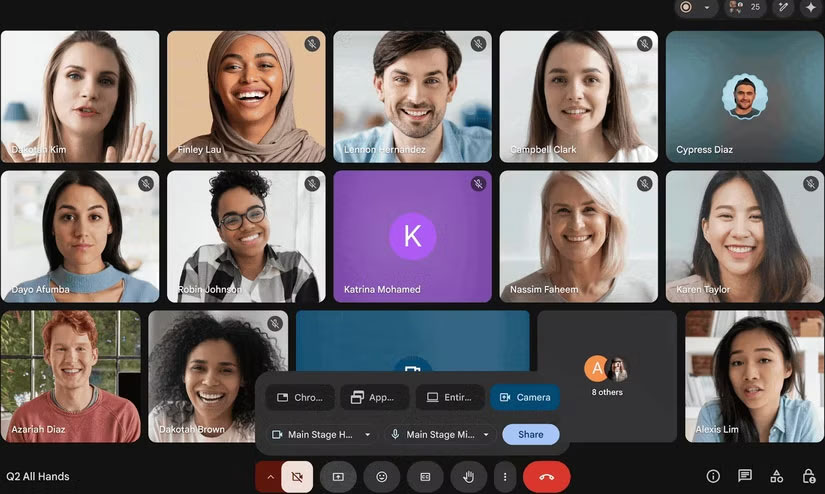
Instead of just sharing your screen, Google Meet now lets you choose an external camera as your primary presentation source. Whether it is a document camera displaying physical paperwork or a high-quality video production device, you can stream it live at up to 1080p resolution and 30 frames per second.
The update opens up exciting possibilities for educators to present hands-on lessons or experts to showcase products and demos more clearly. Organizations can even stream polished video content into meetings for events like auditoriums by arranging alternative cameras.
Sharing PowerPoint slideshows via Google Meet sounds rudimentary.
Experience Even Sharper Screen Sharing
Along with that, Google has improved the overall screen sharing experience. Screen sharing now starts faster, so you will not have to wait for your presentation to start. Video quality is sharper, especially when sharing dynamic content like scrolling text or embedded videos. If another participant starts sharing their screen, your presentation will automatically resume after they're done, reducing interruptions. Also, the screen sharing button has been made larger and easier to find in the interface.
Who Can Use This Feature?
The update is rolling out gradually, according to Google Workspace. Users on rapid release domains will start receiving the feature on June 4, 2025, with full availability expected within two weeks. Scheduled release domains will receive the feature on June 11.
This feature is available for all Google Workspace plans, including Business Standard, Enterprise, Education Plus, and Workspace Individual editions.
This is important for virtual collaboration activities.
This update bridges the gap between physical and digital content in virtual meetings. People who participate in multiple video calls find sharing physical documents or demos a challenge. This new option frees everyone from the constraints of a webcam and desktop.
Teachers can incorporate real-world materials into online lessons. for instance, teachers can use external cameras to demonstrate lab experiments, complex diagrams, or physical models to remote students.
An expert can demonstrate how the product works in real-time during a virtual meeting.
As collaborative work and remote learning become more common, tools like these make online meetings and collaboration more natural. By seamlessly integrating live camera feeds and document cameras, Google Meet can become a hub for additional cameras to provide different angles or close-ups. We'd love to see how creators put this to work.
FAQ
What is the main takeaway about Learn About Google Meet's New Camera Tools That Will Help Your Next Call?
The key is to understand the core idea, compare the available options, and apply the practical guidance that matches your situation.
What should beginners know about Learn About Google Meet's New Camera Tools That Will Help Your Next Call?
Start with the essential steps and terminology. Avoid changing advanced settings until you understand how they affect performance, privacy, cost, or compatibility.
How can I use this information in practice?
Follow the relevant section in order, test one change at a time, and confirm the result before moving to the next step or recommendation.
Related Articles
 What Is Google Camera Mod? What Devices Are Supported and Where6 minutes read
 The Best Camera App for Android14 minutes read
 How to Convert the Camera When FaceTime Video Call on iPhone or iPad4 minutes read
 Learn Google Input Tools, Download Google Input Tools9 minutes read
 2 Steps to Make Video Calls on Facebook6 minutes read
 The iPhone 16e Camera Has More Features Than Meets the Eye5 minutes read
Reader Comments 0
Sign in with email or Google to join the discussion.