
Email reader
How to Not Save Sent Email in Outlook 2016: Outlook 2016 Tips
Outlook 2016 Tips is the focus of this article. On Outlook versions, users can choose to save email messages so that you can easily search them later.
Browse more Explore practical Email reader guides, useful tools, setup instructions and troubleshooting tips for common tasks, features and problems.
Outlook 2016 Tips is the focus of this article. On Outlook versions, users can choose to save email messages so that you can easily search them later.

Insert Emoticon into Outlook Email is the focus of this article. Sometimes, inserting smileys can express your emotions directly in an email.

Within the scope of Email application, Microsoft Outlook is one of the most commonly used services today.

When encountering email errors when sending, you should carefully read the details of the error messages included in the email to find solutions.

Outlook Data Backup is the focus of this article. As a basic rule, all the received email data is in the *.

If multiple emails are received from the same sender every day, why not create a separate folder for that address.

Each email usually contains many different information to use in retrieving the origin of the email when needed.
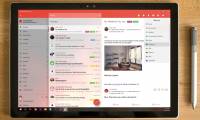
WunderMail for Gmail is a Gmail management application for Windows 10, which allows you to log in to multiple Gmail accounts.

Outlook is the focus of this article. What is worse than being unable to meet with someone when needed?. Follow the main steps and troubleshooting guidance.

The PST file in Microsoft Outlook contains all inbox data. Review the key facts and practical impact.

These are email browsing applications that can help you control many different types of emails and incorporate effective work management features.

After a long time of use, your Outlook mailbox will fill up significantly. Follow the main steps and troubleshooting guidance.
Suppose in some case when you try to connect an Outlook account to a Gmail account, but an error cannot be reached.
Outlook error 0x8004060C occurs when the Outlook PST file (file Outlook. See the cause, risk, and recommended response.

Outlook 20016 is the focus of this article. We can easily add signatures in Outlook 2016 with linked images as well as company logos.

Outlook Shortcut is the focus of this article. You can move quickly to see Outlook 2016 messages, calendar, contacts and tasks with shortcuts.

How to Change Outlook Startup Folder is the focus of this article. By opening Outlook, by default we will go to the Inbox folder, with messages sent to.
By default on Outlook 2016 do not mark messages you have read even when we have selected and are reading them.

The need to write an email reply with too many content makes you spend a lot of time or you want to send an email in the future but are afraid to forget what.

The confirmation message deletion dialog box in Outlook will always appear even if the user has e-mailed the trash, or set up the email delivery rules.