Table of Contents
This practical guide explains how to convert money amounts to words in excel, no add-in needed. Follow the steps in order, review the requirements first, and use the troubleshooting notes when a setting or option does not work as expected.
- Summary of valuable shortcuts in Microsoft Excel
Previously, Network Administrator introduced to readers how to convert numbers to words in Excel using the VnTools tool. The advantage of this tool is that it can be installed in Excel and convert numbers to words quickly, convenient when you need to write the amount in words in Excel. However, this add-in only supports the 32-bit Excel version and cannot be installed on the 64-bit version.
There is another tool called Accounting Helper, which supports both 32 and 64-bit Excel versions, but when scanned with Virus Total, it reported a Trojan. Actually, it is not a big deal that macros are reported to have viruses. If your data is not important, you can still use this add-in to convert numbers to words in Excel.
If the data is sensitive, important and you need to be careful with third-party add-ins, use the following method from Network Administrator. Use the formula written in a sample Excel file. You can convert numbers to words in Excel with any version from 2003 to 2016, 32-bit or 64-bit, even in free Excel software like WPS Office.
This file can count up to billions. In the article I did on WPS Office.
How to convert numbers to words in Excel safely
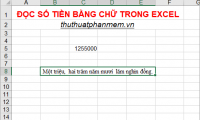
You download this Excel file to convert numbers to words. Thank you, Facebook nick Trinh Ba Ngoc, for helping me complete this file. The numbers 2004005, 100010000011, read as expected.
Open the file, cut from A8:N13, paste into another sheet in the Excel file that needs to convert numbers to words. In this example, it is the TipsMake.com sheet.
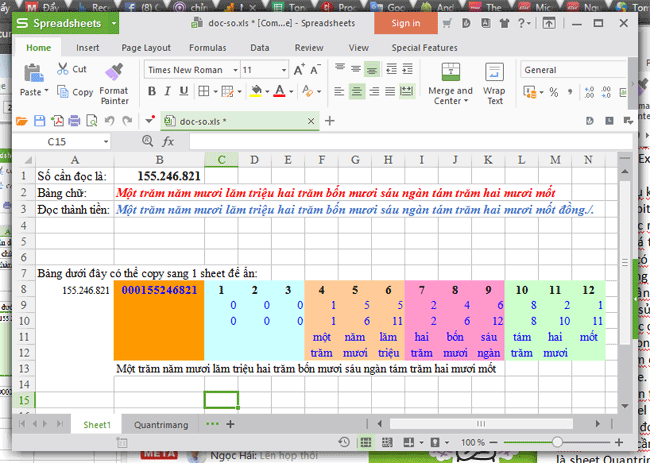 Cut from cell A8 to N13 to new sheet TipsMake.com
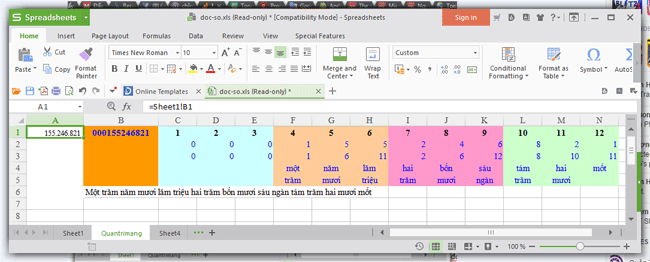
Then, in cell A1, the TipsMake.com sheet, you enter the cell address that has the number you want to read. By typing =, then clicking on the cell with the number in Sheet1, in this example B1, cell A1 will now become =Sheet1! B1 .
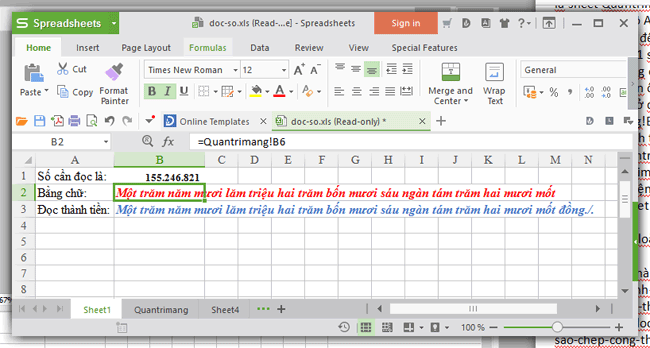
Next, in the cell that reads numbers in words (B2) in Sheet1, you type =, select the cell that reads words in the TipsMake.com sheet, here is B6, at this time cell B2 will become "=TipsMake! B6".
Cell B3 (read as money) in Sheet1, type =, point to cell B6 of sheet TipsMake.com, add &" đồng./." , this cell B3 will become =TipsMake! B6&" đồng./".
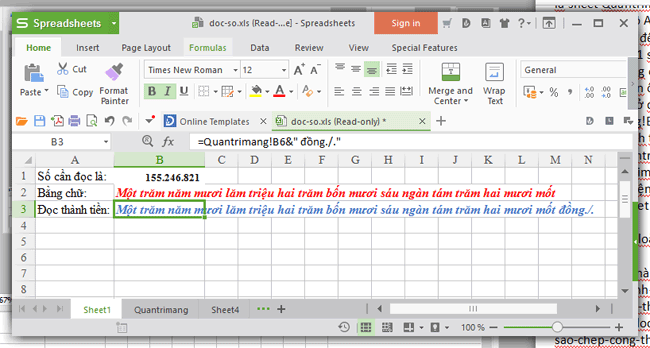
After completing all the above operations, You only need to type the number into cell B1 in Sheet1, the remaining operations will be performed automatically.
It sounds complicated, but once you download the file, you will see it is very easy. I wish you success in converting numbers to words and hope the article helps your work.
See also:
- Instructions for printing double-sided paper in Word, PDF, Excel
- Simple way to convert PDF file to Word
FAQ
How to convert numbers to words in Excel safely?
You download this Excel file to convert numbers to words. Thank you, Facebook nick Trinh Ba Ngoc, for helping me complete this file. The numbers 2004005, 100010000011, read as expected.
What does this guide cover?
This guide explains convert money amounts to words in excel, no add-in needed, including the main steps, important details, and practical considerations.
Who is this guide for?
It is designed for readers who want a clear, practical overview and a reliable process they can follow without unnecessary complexity.
Related Articles
 How to Convert Money into Words in Excel, Without an Add-in4 minutes read
 How to Convert Numbers into Words in Excel?3 minutes read
 How to Read the Amount in Words in Excel6 minutes read
 5 Ways to Convert Numbers to Words in Excel8 minutes read
 How to Convert Currency in Microsoft Excel7 minutes read
 How to Convert Numbers to Words in Excel5 minutes read
Reader Comments 0
Sign in with email or Google to join the discussion.