Article on the subject of "outlook 2007"
-
Create a Rule to move and store email to another folder in Outlook
if multiple emails are received from the same sender every day, why not create a separate folder for that address.
-
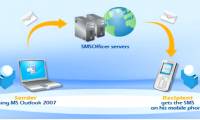
Instructions for sending free SMS via Outlook
on microsoft outlook 2007, you can easily send (or receive) sms messages on your computer to any phone, just compose a new sms (the same way you compose an email on outlook), then then click send to finish.
-
Assign Background image to email in Outlook
in the tutorial below, we will show you some basic steps to insert a background image or add color in an email via microsoft outlook 2007 or 2010 application. but you need to keep in mind that the sender and receive to enable html mode to view the background image and color ...
-
Declare Gmail on Outlook 2007
declaring to add a gmail account into outlook 2007 is too simple and this article will show you how to do it.
-
Search email easily in Outlook
the following article will show you how to search all messages along with deleted messages in search feature in 2010 and 2007.
-
Encrypt email in Outlook 2007
the following article will guide you step by step to encrypt email in outlook 2007.
-
Automatically resize the attached image in Outlook 2007
users who regularly send image attachments via email with outlook will be delighted with this feature ..
-
Manage Outlook 2007 through Group Policies - Part 1
in this article, i will show you how to configure outlook 2007 through active directory group policies.
-
Use and share Calendar in Outlook 2007
if you have never tried to learn about the features of calendar in outlook 2007, you will think it is a superfluous and rather boring feature.
-
4 ways to manage email effectively
if your email inbox is out of control, you may have to reconsider the methods for organizing email and deleting the mailbox you used.
-
7 ways to filter, classify and search effective email
users can use one or more of the tools included in this article to collapse your inbox and make it easy to find the information you need.
-
Microsoft has just released the 2007 Outlook 2007 update
last week, microsoft removed an update for outlook 2007 that was released just two days earlier. the cause of this unusual move is due to performance and connectivity issues.
-
Microsoft re-released the Outlook 2007 update
nearly a month after removing the outlook 2007 update due to connectivity and performance issues, microsoft has released a patch to correct its mistake in december 2010.
-
Manage Outlook 2007 through Group Policies - Part 2
in this article, i will show you how to manage some outlook 2007 features using group policy.
-
Manage Outlook 2007 through Group Policies - Part 3
in this section, i will show you some additional features that can be configured in outlook 2007 using group policies.
-
Configure Outlook 2007 with Exchange Server 2007
in this article, we will show you how to configure outlook 2007 with exchange server 2007. we will also discuss how to work with the new exchange 2007 autodiscovery service with outlook 2007 and some new features in outlook 2007 as oof -
-
Speed up Microsoft Outlook 2007
outlook 2007 (also known as outlook 12) is not like the 'elder' 2003 in terms of processing speed by integrating too many utilities. so if you are used to the 2003 version and have updated to the 2007 version, it is too annoying.
-
Instructions for sending free SMS via Outlook
on microsoft outlook 2007, you can easily send (or receive) sms messages on your computer to any phone, just compose a new sms (the same way you compose an email on outlook), then then click send to finish.
-
Microsoft has just released the 2007 Outlook 2007 update
last week, microsoft removed an update for outlook 2007 that was released just two days earlier. the cause of this unusual move is due to performance and connectivity issues.
-
How to Archive in Outlook 2007
archiving and autoarchive are features in microsoft outlook 2007 that allow you to move old items to an archive location at scheduled intervals. by default, outlook 2007 automatically archives items every 14 days, but you can either choose...
-
Configure Web Services URL of Exchange Server 2007
exchange server 2007 has a new feature called autodiscover, which provides outlook 2007 with configuration information. these configuration information are sent as xml files and include all the information needed to create profiles automatically like the urls used by outlook 2007.
-
Declare Gmail on Outlook 2007
declaring to add a gmail account into outlook 2007 is too simple and this article will show you how to do it.
-
Encrypt email in Outlook 2007
the following article will guide you step by step to encrypt email in outlook 2007.
-
Microsoft re-released the Outlook 2007 update
nearly a month after removing the outlook 2007 update due to connectivity and performance issues, microsoft has released a patch to correct its mistake in december 2010.
-
Use and share Calendar in Outlook 2007
if you have never tried to learn about the features of calendar in outlook 2007, you will think it is a superfluous and rather boring feature.
-
Manage Outlook 2007 through Group Policies - Part 3
in this section, i will show you some additional features that can be configured in outlook 2007 using group policies.
-
Manage Outlook 2007 through Group Policies - Part 1
in this article, i will show you how to configure outlook 2007 through active directory group policies.
-
Instructions for basic steps to backup Outlook data
as a basic rule, all the received email data is in the * .pst file of outlook and therefore we just need to copy the * .pst file to a safe location.
-
Manage Outlook 2007 through Group Policies - Part 2
in this article, i will show you how to manage some outlook 2007 features using group policy.
-
Automatically resize the attached image in Outlook 2007
users who regularly send image attachments via email with outlook will be delighted with this feature ..
-
7 ways to filter, classify and search effective email
users can use one or more of the tools included in this article to collapse your inbox and make it easy to find the information you need.
-
Exchange 2007 Availability Services
the availability service in exchange 2007 is an important service in practice, it is responsible for collecting updates about the busy / free status of users, and allowing them to run over outlook. 2007 and exchange 2007. in the future
-
Assign Background image to email in Outlook
in the tutorial below, we will show you some basic steps to insert a background image or add color in an email via microsoft outlook 2007 or 2010 application. but you need to keep in mind that the sender and receive to enable html mode to view the background image and color ...
-
Search email easily in Outlook
the following article will show you how to search all messages along with deleted messages in search feature in 2010 and 2007.
-
Outlook error 0x8004060C during sending / receiving mail, this is how to fix it
outlook error 0x8004060c occurs when the outlook pst file (file outlook.pst) exceeds the default maximum size limit. in principle, all received email data is stored in the .pst file. for example, in outlook 2007, the maximum size limit of pst files is 20 gb. if this limit has reached the