Table of Contents
Microsoft released a new Dev Channel update for Windows 11, bringing Dark Mode to the Run dialog, improving the Settings interface, and fixing a bunch of system bugs.
Windows 11 Overview
Microsoft is continuing to refine the Dark Mode experience on Windows 11, and the latest Dev Channel update officially brings dark mode to the Run dialog – a small but worthwhile change that helps make the entire operating system more consistent and pleasant.
The Run dialog box is a familiar tool for power users, providing quick access to system commands. However, the Run window's bright light in the middle of Windows' dark interface has long been an annoyance for many people. Now, that 'mismatch' has finally been fixed with Run supporting Dark Mode - one of many small components in Windows that have been 'revived' after decades of little attention.
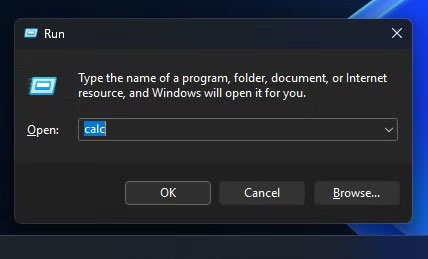
In addition to adding dark mode to Run, this new build also brings A number of other small improvements For Insiders who have enabled early updates. For example, The OneDrive icon Has been updated in The Accounts And Homepages Sections of Settings. The Administrator Protection Feature in Windows Security Under Account protection Is also back.
Microsoft is also tweaking The Settings UI To help users find and change settings faster. When you search in Settings, more results appear right in the search box, allowing for instant editing. If an option can't be changed, a message will appear explaining why and providing an alternative option if available — making the interaction smoother and more transparent.
The Click to Do Feature on Copilot+ PCs Also gets a small but useful upgrade. Elements like emails and spreadsheets will now automatically stand out on the screen, making them easier to spot and quicker to act on with smart action suggestions.
As usual with Insider Preview builds, this update also comes with a number of bug fixes. The File Explorer issue in the previous build has been fixed, as well as the WIN + [number] key combination not switching app windows as expected.
The Start menu has also been given a bit of a makeover: Microsoft has fixed a bug where the context menu wouldn't open on touch, and a bug where the menu would automatically scroll to the top when the user clicked. If you were having trouble with the app crashing in the previous version, the good news is that this has been fixed.
That said, Microsoft said that the animation effect on the taskbar preview is temporarily disabled because it affects the ability to share windows from the preview. The company promised to re-enable this effect in an upcoming update after completion.
FAQ
What is new about Windows 11 adds dark mode to the run dialog box and other improvements?
In practical terms, Microsoft released a new Dev Channel update for Windows 11, bringing Dark Mode to the Run dialog, improving the Settings interface, and fixing a bunch of system bugs.
Why does this update matter?
The article highlights that now, that 'mismatch' has finally been fixed with Run supporting Dark Mode - one of many small components in Windows that have been 'revived' after decades of little attention.
Is the change available to everyone?
Availability may depend on the product version, region, account, or rollout stage described in the article.
Related Articles
 Experience the Main Dark Mode on Android 9 Pie3 minutes read
 How to Activate Dark Mode on Windows 10?4 minutes read
 Why Doesn't Dark Mode Help Improve Battery Life on Your Laptop?6 minutes read
 How to Use Mojave's Dark Mode on Mac Right Now?5 minutes read
 What Is the Dark Mode (Dark Mode)? Benefits and Harms That Dark8 minutes read
 Chrome 74 Officially Launched, Supporting the Dark Mode Interface, Lite Mode Saves Data3 minutes read
Reader Comments 0
Sign in with email or Google to join the discussion.