Table of Contents
Get a clear answer to why is it easier to use Linux for local LLMs than Windows, including the key facts, causes, options, and practical takeaways.
For a long time, running large local language models seemed only for those with desktop GPUs as big as toaster ovens. If you were using a modest Linux laptop, the implicit message was pretty clear: High ambitions, but unsuitable hardware. That reality has changed. Quietly, and much faster than many people realize.
Let's Start with Realistic Expectations!

Let's be clear from the start. A laptop running Linux Mint with 8GB of RAM can certainly run local models. However, it cannot handle every complex model you see on Reddit using "brute force".
With hardware in this segment, the stable performance will be as follows:
- Models 3B to 4B run smoothly.
- The 7B models are feasible but significantly heavier.
- Any larger model will begin to test your patience and the cooling system.
The good news is that small models in 2026 aren't what they used to be. For everyday tasks like drafting, summarizing, brainstorming, and light programming support, a well-tuned 3B model still works surprisingly well.
There's also the GPU issue. With AMD's integrated graphics on the Mint, the least frustrating solution currently available is CPU inference using quantization models. It's not flashy, but it's stable and predictable, and for an everyday computer, predictability is crucial.
Address Memory Overload Issues Before Doing Anything Else
This Step Subtly Determines Whether the User Experience Will Be Smooth or Frustrating
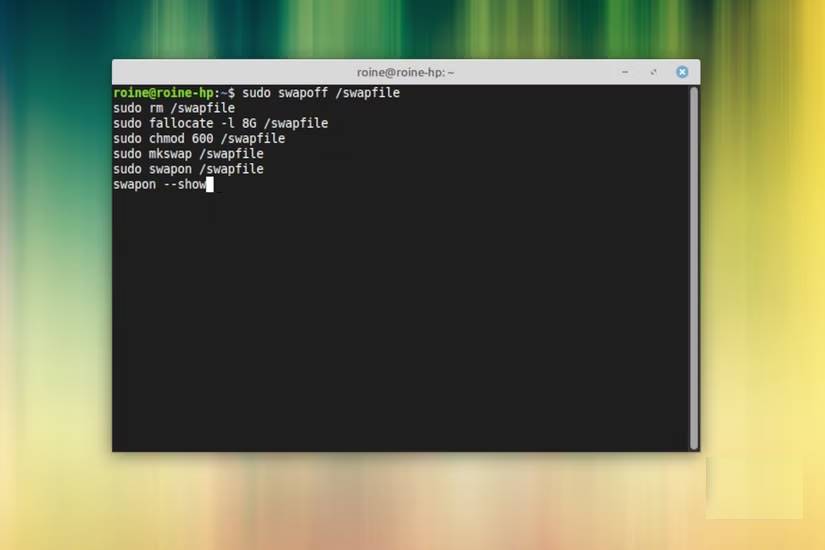
Most guides skip the model setup step. That's why people wonder why their once-perfect laptop suddenly runs as slow as if it were wading through mud.
If you're using 8GB of RAM with a small swapfile, local LLM models will push your system into memory overload faster than you might expect. On the Mint laptop, the swapfile already showed signs of instability during normal desktop use. Loading a model only made that more apparent, so two small adjustments made a very significant difference.
First, increase the swapfile size. Increasing it from around 2GB to around 8GB will give the system more space to operate when models suddenly increase their memory usage.
Secondly, consider enabling zram. This creates a compressed swapfile in RAM and helps smooth out short-term overloads. On Ubuntu-based systems like Mint, installing zram-tools is usually sufficient to get started.
All of this doesn't turn your laptop into a workstation. What it does is prevent those moments when things suddenly become unstable.
Use Ollama as Your Local Model Runner
This Is the Simplest Way to Get Started

There are many ways to run a local model on Linux. Some are powerful. Some are educational. Some are great ways to spend an evening troubleshooting dependency errors. If your goal is to set up a clean, local ChatGPT system on Mint without unnecessary hassle, Ollama is currently a very good option.
The installation is quite simple:
curl -fsSL https://ollama.com/install.sh | shOnce complete, test it with a small model:
ollama run llama3.2:3bIf everything is properly connected, you'll join a local chat session right in the terminal. This is a crucial first test. If responses are transmitted at a reasonable speed, your hardware is within the right range. What makes Ollama particularly user-friendly is that it handles downloading, formatting, and distributing the model without turning the process into a weekend project.
Add Open WebUI for a Full ChatGPT Experience
This Is When Things Start to Get More Complete

Terminal chat is great for experimenting. It's not really great for everyday use unless you really like living within that black rectangle.
Open WebUI is built on the Ollama platform and gives you what most people really want: a clean browser interface, conversation history, and easy model switching. In other words, the familiar ChatGPT experience, but running on your own computer.
If Docker is already installed on your Mint system, launching it is very quick:
docker run -d -p 3000:8080 --name open-webui --restart always --add-host=host.docker.internal:host-gateway -e OLLAMA_BASE_URL=http://host.docker.internal:11434 -v open-webui:/app/backend/data ghcr.io/open-webui/open-webui:mainThen open:
http://localhost:3000Create your account, choose a model, and suddenly your ordinary Linux Mint laptop is running its own AI assistant. This is where the whole setup no longer feels theoretical but starts to feel genuinely useful.
Choose a Model That Is Truly Compatible with Your Hardware

Choosing the right model is more important than almost anything else on an 8GB system. Choosing too large a size will quickly degrade the experience. Make a wise choice, and you'll find it surprisingly smooth.
For Ryzen laptops with 8 GB of RAM, the following models usually perform well:
- Llama 3.2 3B instruct
- Qwen 2.5 3B instruct
- Phi 3 Mini
In everyday use, 3B models achieve the best balance between responsiveness and quality. You'll get a short pause, followed by a stable output that's perfectly usable for general editing and support. You can experiment with 7B models in Q4 quantization mode if you're curious. Just set realistic expectations. They're heavy, slow, but easier to use virtual memory for. Also, keep the context window at a reasonable level. Around 2k to 4k tokens is usually a comfortable range on machines in this segment. Another good thing to remember is that many of these models have much shorter training times than GPT, Gemini, or Copilot.
The Quiet Allure of Running Local AI on Mint
What surprised many people most wasn't the raw speed, but the overall ease of use of the setup after the minor issues were resolved. Linux Mint remains a great platform for this type of experiment. Hardware support is well-developed, the Ubuntu platform maintains high compatibility, and Cinnamon retains its smoothness. With a little tweaking and sensible model selection, even a mid-range laptop can run a powerful local AI assistant.
Local language management systems (LLMs) are no longer just for high-end workstations. With the right expectations and careful setup, they've finally reached the reach of the average Linux user. And there's something incredibly satisfying about watching your own computer handle the problem.
FAQ
Why Is It Easier to Use Linux for Local LLMs Than Windows?
Get a clear answer to why is it easier to use Linux for local LLMs than Windows, including the key facts, causes, options, and practical takeaways.
Why does this topic matter?
Key takeaway: Get a clear answer to why is it easier to use Linux for local LLMs than Windows, including the key facts, causes, options, and practical takeaways.
What are the most important takeaways?
For a long time, running large local language models seemed only for those with desktop GPUs as big as toaster ovens.
Related Articles
 9 Best Local/offline Llms You Can Try Right Now: Local LLM6 minutes read
 5 Ways to Make Your Switch from Windows to Linux Easier: Practical Guide7 minutes read
 7 Best Tools for Running LLM Models Locally: Practical Guide7 minutes read
 How to Set up a Local Web Server (Local Web Server) on7 minutes read
 3 Local Llms That Can Run on a Phone8 minutes read
 No Need to Give up Windows: Dual Booting Linux Is Easier Than You Think!10 minutes read
Reader Comments 0
Sign in with email or Google to join the discussion.