Table of Contents
Notion serves as a popular app for storing structured notes. However, its biggest limitation is that it doesn't have an offline mode.
Notion is the go-to app for structured note-taking. However, its biggest drawback is that it doesn't have an offline mode. Thankfully, that's finally changing with Notion's introduction of offline mode. But sadly, things aren't as they should be.
Notion has a unique approach to offline
The best note-taking apps offer full offline access in offline mode. In practice, you can access and edit existing notes and create new ones without an internet connection, and all your changes will sync when you're back online. You don't need to download notes first to access or work on them offline.
Notion, however, takes a different approach to offline mode. Instead of automatically downloading your entire workspace, which would make all your pages available offline, the app requires you to manually enable offline access for each page.
To do this, open the note you want to access offline, click the three-dot menu in the top-right corner, and turn on the Available offline Toggle.
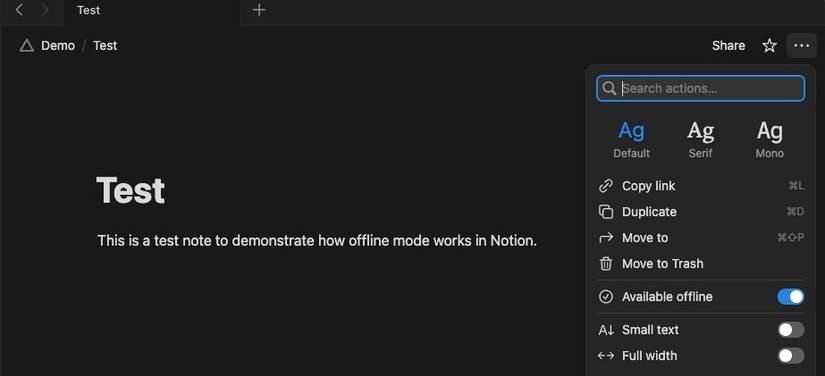
Notion will start downloading the note. Once it's done, you'll see a confirmation message. You can now access and edit this note on your device, even when you're offline. Any changes you make will sync when you reconnect.
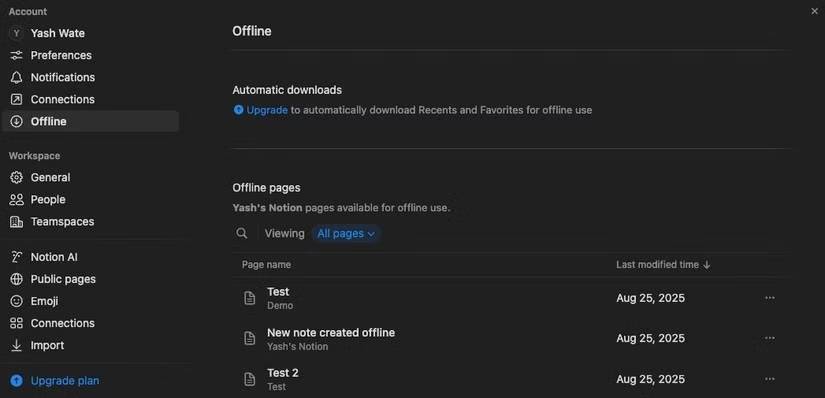
You can see all your offline pages from your workspace settings. Click on your workspace and select Settings . Here, go to the Offline Section and you will see all your downloaded pages under Offline pages . You can also delete unnecessary pages from here.
Offline mode is functional but not ideal
Notion's semi-offline approach has a few benefits. One notable benefit is storage efficiency, which is important for workspaces with large numbers of pages, as taking them all offline would take up many storage space on your device.
Similarly, since many users primarily use Notion for collaboration purposes, this approach helps minimize complex sync conflicts in collaborative workspaces that can arise when two parties—one online and one offline—make changes to a page at the same time.
That said, Notion's offline selling method has some drawbacks and isn't really ideal for most users.
Download the manual page
Requiring manual downloads of pages for offline access is a major drawback of Notion's semi-offline approach. But what makes matters worse is its implementation.
Notion doesn't provide a single toggle to take all pages in your workspace offline. Instead, You should manually download each note you want to access offline. This also means that if a note has multiple subpages, downloading just the main note won't download the other pages.
If you forget to download pages while online, they won't be available when you're offline. Notion, in a way, solves this situation for paid users by automatically downloading the 20 most recently visited or most popular pages.
Also, if you find yourself needing a note in a workspace that you didn't initially take offline, you won't be able to access it. It's important to note that if you use a Notion database for project management—and download a site with a large database—Notion will show you the first 50 rows.
Limited feature set
While you're offline, many Notion features won't be available. For example, you won't be able to upload files to your notes, and you won't be able to access some Notion embedded files in your notes, especially those that require an internet connection.
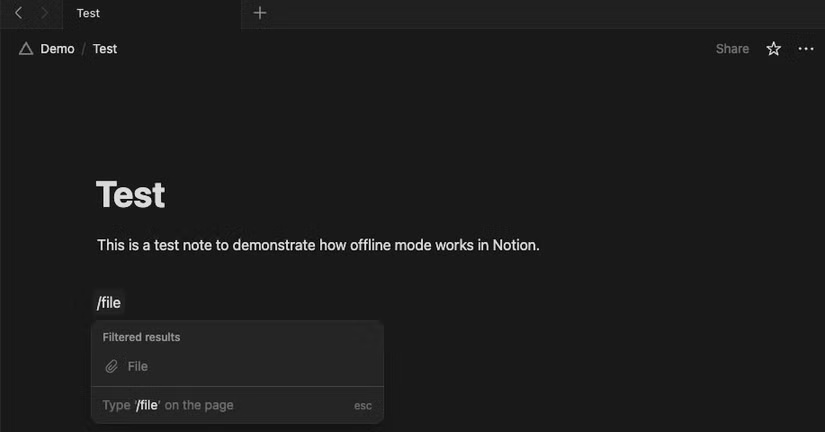
Similarly, some blocks, like charts and forms, aren't available offline. Notion's AI features, like summarizing or researching, aren't available either. You also lose the ability to share and export files offline.
No offline search function
Notion Search requires an internet connection to query the workspace index and return results for your searches, so it makes sense that it doesn't allow you to search workspaces offline.
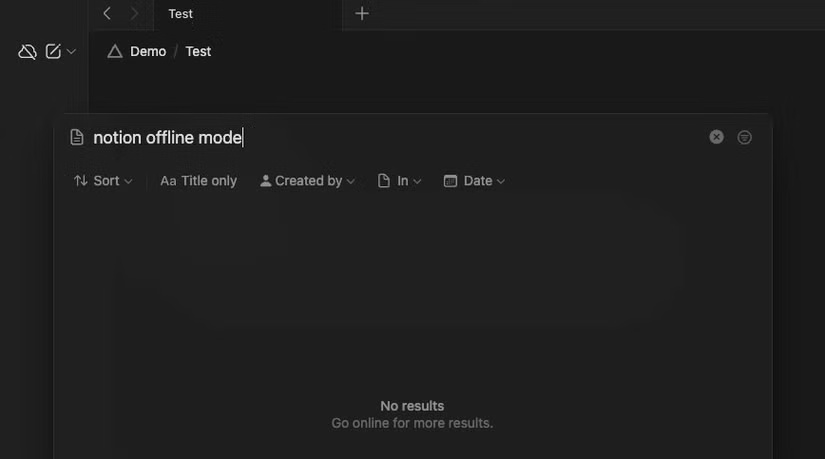
What's disappointing is that it doesn't even let you search for downloaded pages, so you have to manually navigate your workspace and locate pages you've bookmarked for offline use. This also means you can't find your notes with their contents when you're offline, which is again a big drawback.
Offline capabilities per device
Any notes you download in Notion for offline access are device-specific. In practice, if you download a note in the Notion app on, say, an Android phone, you'll only be able to access that note on that phone.
You can't switch to the Notion desktop app and continue reading or editing notes. If you want to maintain offline access to multiple pages on multiple devices, you'll need to download them to all of them.
Many of Notion's offline limitations stem from its cloud-first architecture, which is exactly why it took them so long to get offline working. However, certain features, like page downloads, offline searches, and displaying database entries, could be handled better. Hopefully, Notion will take steps in the future to make working offline more pleasant.
FAQ
Why Does Notion's Offline Mode Frustrate Users: Explained?
In practical terms, Notion is a popular app for storing structured notes. However, its biggest limitation is that it doesn't have an offline mode.
What factors are most important?
The article highlights that offline mode is functional but not ideal Notion's semi-offline approach has a few benefits.
What is the main takeaway?
The main takeaway is that similarly, since many users primarily use Notion for collaboration purposes, this approach helps minimize complex sync conflicts in collaborative workspaces that can arise when two parties—one online and one.
Related Articles
 5 Best Offline Streaming Services for Travel6 minutes read
 How to Enable Offline Browsing Mode on Firefox Browser?5 minutes read
 How to Giving Offline Presentations on Canva4 minutes read
 Back up Gmail Data Using Offline Mode: Instructions4 minutes read
 Google Adds the Ability to Work Offline with Drive via Chrome3 minutes read
 Best 10 Good Offline Games for PC and Download Link7 minutes read
Reader Comments 0
Sign in with email or Google to join the discussion.