Table of Contents
This guide provides a clear, practical overview of users who install Windows 11 on incompatible devices may not, with useful context, important details, and straightforward takeaways for everyday readers.
But of course things can't go so smoothly. Windows developers have just issued a warning that Windows 11 users on unsupported systems may not be entitled to periodic, or otherwise unsupported, security updates from Microsoft.
Since officially announcing Windows 11, Microsoft has emphasized the necessary requirements that a system must strictly adhere to To install a new operating system. However, the main problem lies in the requirements for TPM 2.0 processors and new generation CPUs. This leaves a large number of Windows 10 users on hardware systems that are not too old, but still stuck, unable to upgrade to Windows 11, unless they accept to spend quite a bit more money to upgrade hardware (related to Windows 10). related to CPU and mainboard).
As a simple example, this list of hardware incompatible with Windows includes devices using Intel 7th Gen CPUs and AMD Zen 1. The only exception is the 7th Gen Intel Core 7820HQ CPU, which is the processor used on Microsoft Surface Studio 2 devices. These are obviously hardware components that are not too old, and are still in common use.
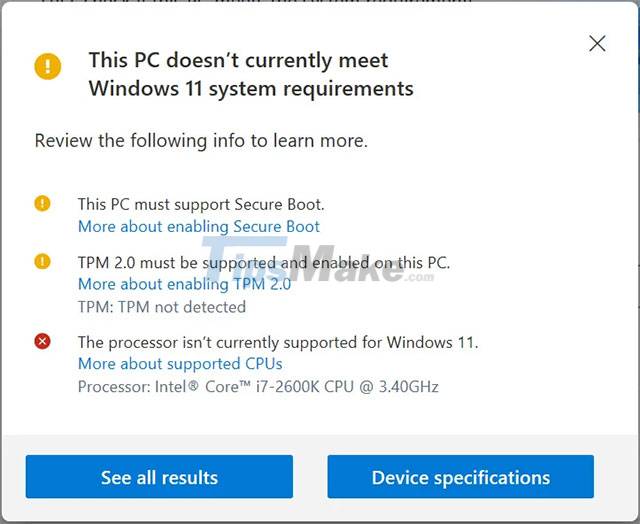
In response to a rather harsh response from the user community, Microsoft recently announced that users of older hardware systems can completely bypass the TPM 2.0 requirement by performing a clean install of Windows 11 using the Media Creation Tool. or ISO file.
However, users will still need to have at least a TPM 1.2 security processor, and using this method will leave the PC in an unsupported state as outlined above.
Microsoft hasn't said why it's making such a policy, but it's most likely to allow a trial to install and experience Windows 11 on test devices.
Loopholes come with risks
Microsoft has stated that Windows 11 devices in an unsupported state will not receive new updates through Windows Update. This may include driver and security related updates. This will obviously lead to a huge security risk, especially as zero-day vulnerabilities exploited by cybercriminals are increasingly common.
In other words, Microsoft allows users to install and use 'underground' Windows 11 on hardware systems that do not meet the minimum requirements, but at the same time will leave them alone by not providing updates. , patch required.
It is not clear if users can manually install updates through the Microsoft Update Catalog. And if possible, Microsoft's controversial policy above will no longer be such a big deal.
On the other hand, if Microsoft also blocked manual updates, there would be nothing more to say!
Key Takeaways
Use the information above as a practical reference for users who install Windows 11 on incompatible devices may not. Review each step carefully, confirm any requirements, and choose the option that best fits your situation.
FAQ
What does this guide explain about Users Who Install Windows 11 on Incompatible Devices May Not?
It explains the main concepts, practical considerations, and useful steps related to users who install Windows 11 on incompatible devices may not without requiring advanced knowledge.
Who can benefit from learning about Users Who Install Windows 11 on Incompatible Devices May Not?
This information is useful for readers who want a clear overview, practical guidance, and reliable steps related to users who install Windows 11 on incompatible devices may not.
What should I check before applying this information?
Review the requirements, confirm that your device, software, or situation matches the instructions, and back up important data before making major changes.
Related Articles
 Microsoft Updates Windows 11 Supported CPU List and… Makes Things More Confusing5 minutes read
 Microsoft Will Change Incompatible Driver Handling on Windows 103 minutes read
 Microsoft Allows Users to Install Windows Store Applications on up to 2000 Devices3 minutes read
 Ways to Install Microsoft Excel on Linux: Install Excel on Linux7 minutes read
 How to Install Windows XP: Step-by-Step Guide14 minutes read
 How to Move on After Windows 7 End of Support8 minutes read
Reader Comments 0
Sign in with email or Google to join the discussion.