Table of Contents
Screen Unknown Senders on iOS 26 helps filter messages from strangers, renamed from Filter Unknown Senders, easier to use and still optional, not enabled by default.
At WWDC 2025, Apple announced that iOS 26 would give users more control over messages from unknown senders, which immediately drew backlash from politicians who said the new feature could cost them millions of dollars in campaign donations.
That said, the fact is that this feature has existed since 2019, starting with iOS 13. It is now called 'Filter Unknown Senders', and has always been opt-in. Its core function has not changed: filtering messages regardless of their content.
In practice, users will not receive messages such as toll notifications, doctor appointment confirmations, package delivery messages, service provider notifications, or even notifications from relatives who have just changed their number. That is also the reason why this feature is only optional, because it is not perfect.
In fact, the upcoming update could both benefit unknown senders and reduce user frustration. Fast Company spoke directly with Apple to clarify what the actual changes in iOS 26 are.
Mainly interface changes
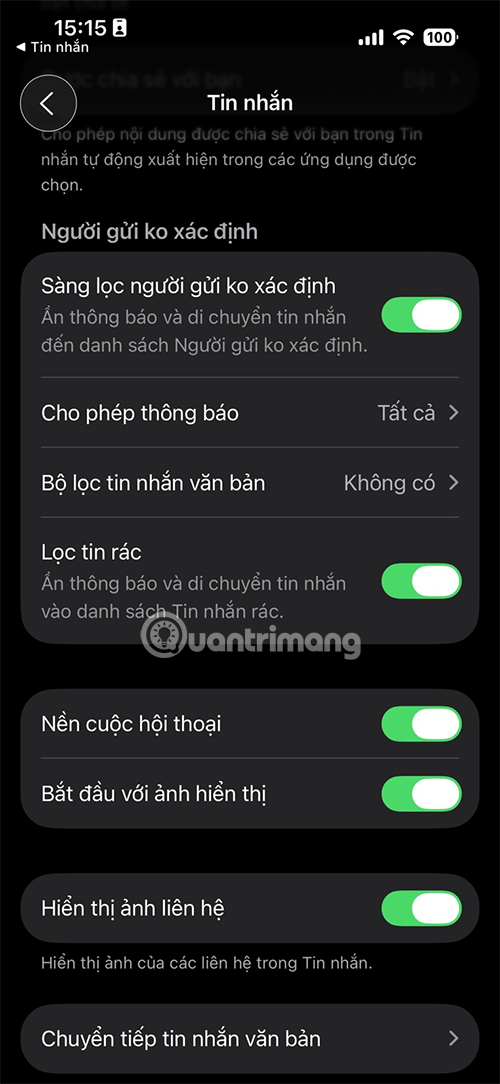
In iOS 13 to iOS 18, this feature was called 'Filter Unknown Senders'. On iOS 26, it was renamed to 'Screen Unknown Senders' to more accurately reflect its use.
Currently, a sender is considered 'unknown' if two conditions are met:
- Not in the directory.
- The user has never responded to messages from that number.
- This rule hasn't changed. What's new is how filtered messages are displayed and managed.
Apple says the 'Unknown Senders' inbox will be made easier to find. In the top right corner of the Messages app, a new Filter button will always be visible, allowing users to quickly switch between their main inbox and their unknown senders inbox.
Additionally, when a message comes in from a stranger, the Filter button will display a notification badge with the number of messages that have been forwarded to this inbox.
Most importantly, the feature still won't be enabled by default. As Fast Company notes, 'Just because someone has iOS 26 installed on their iPhone doesn't mean messages from political fundraising groups will automatically be filtered.'
Again, this is an example of politicians overreaching when it comes to big tech. Apple could have been clearer, but the controversy could have been avoided if political organizations had done their homework before making public statements.
FAQ
How do you use the screen messages from strangers feature on iOS 26: how-to guide?
In practical terms, screen Unknown Senders on iOS 26 helps filter messages from strangers, renamed from Filter Unknown Senders, easier to use and still optional, not enabled by default.
What should you check before getting started?
Review the requirements, compatible device or software version, and any warnings described in the guide before making changes.
What should you do if the steps do not work?
Repeat the steps in order, confirm that your app or system is up to date, and review the troubleshooting details provided above.
Related Articles
 Instructions on How to Not Receive Messages from Strangers on Zalo3 minutes read
 How to Stop Receiving Messages from Strangers on Messenger7 minutes read
 How to View Messages from Strangers on Zalo3 minutes read
 How to Share a Mac Screen with Messages5 minutes read
 Forget About Stalking Your Crush on Facebook with This New Feature!3 minutes read
 How to Disable the Upload to Listen Feature on iOS 104 minutes read
Reader Comments 0
Sign in with email or Google to join the discussion.