Table of Contents
Are you accidentally shortening the life of your smartphone? Discover 6 common mistakes when using your phone such as charging incorrectly, skipping updates, leaving your phone in harsh environments… and effective solutions.
Most of us want our phones to last for years. But sometimes, it's the little everyday habits that can slow down performance and shorten the life of your device. From charging the wrong battery to skipping software updates to leaving your phone in harsh environments, here are six common mistakes to avoid.
1. Don't use rice to dry a wet smartphone
One of the most popular tips on the internet for when your phone falls into water is to put it in a bag of rice. But this is a terrible way to do it. Rice will absorb some of the surface moisture, but it will not dry the inside of the phone at all. Rice dust can even get into the connection port, causing permanent damage.
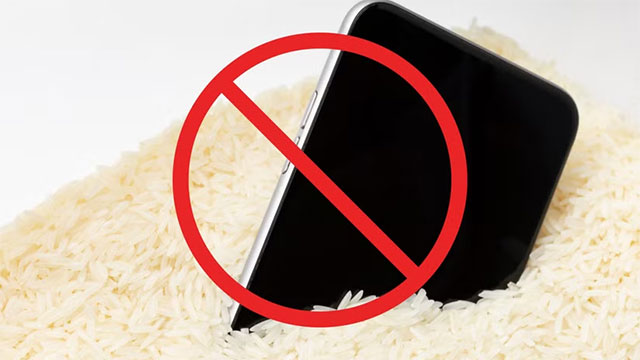
Instead, turn the phone off immediately, remove the SIM and memory card. Then, use silica gel desiccant packets (usually included in the product packaging or easily purchased online). Place the phone in a sealed container with the silica gel for 24–48 hours before turning it back on.
2. Don't skip software updates
Many people often press 'Later' when their phone prompts them to update. However, delaying it regularly is a big mistake. Updates not only add new features, but also patch security holes and fix performance issues.
If left unchecked, your phone could become sluggish, vulnerable to bugs, or vulnerable to hackers who can steal your data. Turn on automatic updates, or if you update manually, check regularly to keep your device secure and running smoothly.
3. Don't charge your phone in hot environments or with cheap chargers
During charging, the battery always generates heat. If you charge in an already hot environment, the heat will increase even more, easily reducing the life of the battery and components. Therefore, charge in a cool place, away from direct sunlight.
Also, using cheap, poor quality chargers can do more harm than good. These chargers often provide unstable power, heat up quickly, lack safety features, and even cause fires and explosions. The best solution is to use genuine chargers, or if you have to buy from a third party, choose a reputable, certified safe one. At the same time, avoid using public charging ports to protect your device from the risk of 'juice jacking'.
4. Limit connection to unfamiliar devices or public Wi-Fi
Charging a smartphone from a strange computer in a library or coffee shop may seem harmless, but it poses a serious risk. The computer may contain malware that can infect your phone and steal your data. So never connect your smartphone to an untrusted device.

Likewise, public Wi-Fi is also a hot spot for hackers. They can launch man-in-the-middle attacks to intercept your data. If you must use public Wi-Fi, turn on a VPN to encrypt your traffic and reduce the risk of information theft.
5. Do not expose the phone to excessively high or low temperatures.
Phones work best within a stable temperature range. Excessively high temperatures can cause the device to overheat, reduce performance, and even damage components. Therefore, do not leave the device in the sun, in a hot car, or near heat-generating devices.
On the other hand, too low a temperature can be harmful. Batteries work less efficiently in cold environments, screens and touch screens can freeze, and even when brought from a cold outside into a warm house, condensation inside can cause a short circuit. It is best to let the device return to normal temperature before use.
6. Don't put your phone in your back pocket or breast pocket
Back pockets are convenient, but they can easily bend your phone, crack the screen, or cause it to fall out. Thieves can even pick your pocket without you knowing. Breast pockets are less risky, but if you bend over or move quickly, your phone can still fall out.
If the front pocket is too tight, the pressure can also damage the screen. The safest solution is to use a special pouch or leather case, which both protects the device and is easy to take out when needed.
Phones today are designed to be quite durable, but small habits that we often ignore are the 'silent enemies' that cause the device to quickly deteriorate. Avoiding the above 6 mistakes will help your smartphone last longer, save on repair costs and bring a smooth experience for many years.
FAQ
What should you know about the options in this guide?
In practical terms, are you accidentally shortening the life of your smartphone? Discover 6 common mistakes when using your phone such as charging incorrectly, skipping updates, leaving your phone in harsh environments… and effective solutions.
Which option is the best choice?
The best choice depends on your priorities, compatibility, budget, and the specific features discussed in the comparison.
What should you compare before deciding?
Compare core features, limitations, ease of use, compatibility, and long-term value before making a decision.
Related Articles
 11 Common Mistakes When Building a PC and How to Avoid Them: What You Need to Know12 minutes read
 Common Mistakes When Sowing Seeds9 minutes read
 12 Common Mistakes When Cooking That You Should Avoid7 minutes read
 Common Mistakes When Buying Shoes That Harm Your Feet5 minutes read
 Top Common Mistakes Students Make When Studying9 minutes read
 7 Mistakes on Social Networks to Avoid If You Want8 minutes read
Reader Comments 0
Sign in with email or Google to join the discussion.