Table of Contents
Phishing, pirated software, outdated apps, and malicious ads are four of the top reasons Windows computers get hacked.
Cyber threats are getting more sophisticated, but the problem is that most Windows users are still vulnerable to the same old tricks. A misplaced click, a hastily downloaded 'free' software, or a long-delayed system update — all can open the door to hackers.
According to recent data from Microsoft, their customers face 600 million attacks every day. This number shows that personal computers are not only targets but also 'gateways' for hackers to infiltrate. Understanding how they work is the first step to identifying and stopping them before it's too late.
1. Phishing – an old trick but still effective
Phishing is one of the oldest forms of attack, but it still traps countless users. Instead of trying to 'break into' a system, scammers try to trick users into opening the door themselves. They send emails that look real—like notifications from 'Microsoft,' shipping updates, or urgent password changes—to get victims to click on a malicious link.
Sometimes, scammers will even call pretending to be technical support staff, saying the computer is 'infected' and asking users to provide information or grant access.
The best way to avoid this is to stay vigilant and skeptical:
- Do not click on links or open attachments in unfamiliar emails.
- If you receive an urgent request, Open your browser and go directly To the official page instead of clicking on the link in the email.
- Enable Two-factor authentication (2FA) For important accounts.
- Keep Windows Defender And your system up to date.
- When you get a strange call from your bank or credit card company, Hang up and call back through the official hotline number .
Most attacks will fail if the user just Stops for a few seconds to check .
2. Pirated and 'free' software – the price to pay is not cheap
Cracked software or free downloads from untrusted sources are common vectors for malware. These applications often come with spyware, adware, or backdoors that allow hackers to access your system silently.
Before installing anything that doesn't come from the developer's official site, ask yourself if it's worth sacrificing your safety for a few bucks. File-sharing sites often contain malicious ads and fake 'download' buttons.
To reduce the risk:
- Only download software from Official sources or the Microsoft Store .
- Always turn on Windows Defender And scan files before installing.
- If possible, check The digital signature or hash Of the installer.
A little caution can save hours of troubleshooting — or worse, losing your personal data.
3. Outdated software – a wide open door for hackers
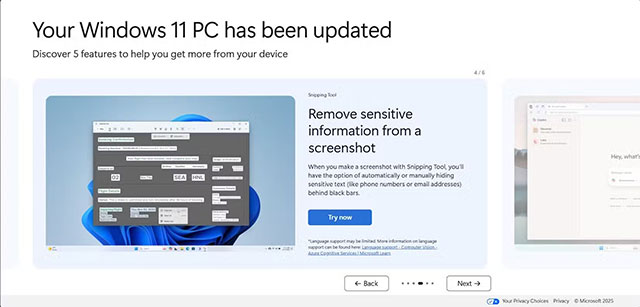
Running old software is like leaving a door unlocked. No matter how careful a user is, an out-of-date application or operating system is fertile ground for hackers.
Microsoft has warned that Windows 10's end of support means millions of computers will no longer receive security patches, meaning any new vulnerabilities discovered will become a 'permanent crack' in the defenses.
Not only the operating system, but also Outdated browser extensions or add-ons Are potential risks. The best way is to:
- Enable Automatic updates For system and applications.
- Remove unused software .
- Regularly Check the list of installed applications Like how to clean up extensions on the browser.
Keeping your software up to date is not only a basic security measure, but also a necessary habit for maintaining long-term system stability.
4. Malware – one-click malware infection
Users don't need to download anything to get infected — sometimes just by visiting the wrong website. Malvertising is often hidden in legitimate-looking banners, especially on sites that pirate movies or download content. When a user clicks on it, their browser can be redirected and download malware in the background.
The simple way to protect is:
- Use an ad blocker Or enable your browser's built-in tracking protection.
- Stay away from websites that infringe copyrights Or offer free content of unknown origin.
- Always keep your browser and extensions Updated to patch security holes.
Good habits are the strongest armor
Keeping your Windows PC safe doesn't require you to be a cybersecurity expert. The key is to practice sensible usage habits: only install trusted software, be cautious when visiting unfamiliar sites, update regularly, and be alert to unusual notifications.
Technology will continue to change, and so will hackers. But with a little attention and discipline, You can protect themselves from most online risks, keeping their systems safe and secure.
FAQ
What should you know about the options in this guide?
In practical terms, phishing, pirated software, outdated apps, and malicious ads are four of the top reasons Windows computers get hacked.
Which option is the best choice?
The best choice depends on your priorities, compatibility, budget, and the specific features discussed in the comparison.
What should you compare before deciding?
Compare core features, limitations, ease of use, compatibility, and long-term value before making a decision.
Related Articles
 Fix Computer Error That Cannot Connect to Wifi16 minutes read
 8 Ways to Remember Everything You Want: Learning Methods7 minutes read
 5 Common Methods Hackers Use to Hack Bank Accounts7 minutes read
 How to Hack Gmail: Step-by-Step Guide9 minutes read
 Guard Against Computer Hacking: Computer Hacking Methods and9 minutes read
 Ways to Handle Errors in Rust9 minutes read
Reader Comments 0
Sign in with email or Google to join the discussion.