Table of Contents
If your computer is experiencing microstutter even though your FPS is stable, the culprit could be your RGB control software.
It's no secret that background apps can reduce FPS while gaming. But since they typically only take up a small portion of RAM and CPU, we assume the impact is negligible… right? Well, that's true, except for one unlikely 'exception': RGB lighting control software.
How can RGB software cause stuttering?
If you have ever opened Task Manager, you will see that most background apps only use about 1-5% of CPU capacity and less than 1GB of RAM. Therefore, for low-configuration machines, turning off all background apps is the simplest way to improve performance when playing games without spending a penny.
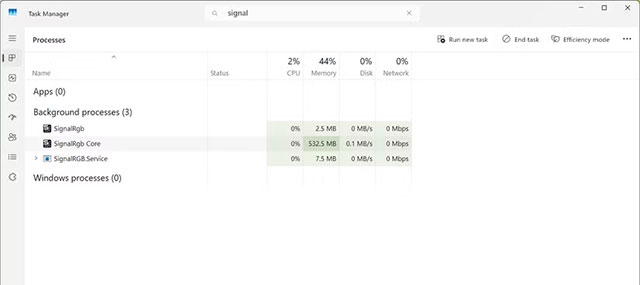
The same goes for RGB software. Everyone loves to see their PCs glow while gaming – it's a gamer ritual. Keeping software like ASUS Armoury Crate, Corsair iCUE, or SignalRGB running in the background might seem harmless, but it's not.
To synchronize the lighting between the motherboard, graphics card, RAM, and peripherals, the RGB software has to Constantly communicate with the hardware , creating a series of background processes. The more RGB devices, the heavier the system, and sometimes conflicts occur that we don't even know about unless we look closely at the log.
Here's the thing: these programs create Short, irregular bursts of CPU power That only last a few milliseconds, so your average FPS doesn't change much. But those little 'jitters' cause Microstutter —a slight drop in frame rate that's enough to make your gameplay feel less smooth.
I used SignalRGB Myself. The average FPS didn't drop significantly, but the slight stuttering was still there, both on my old and new machines. At first, I thought it was due to poor optimization, since my system configuration was by no means weak — Ryzen 7 7700 With 32GB RAM ! But when I tried closing all background apps and re-entering Marvel Rivals , the stuttering was almost gone. That's when I started to suspect the 'real culprit'.
In-game reality check
(I tested with SignalRGB, but the mechanism of other RGB apps is similar, so the results should be generally applicable.)
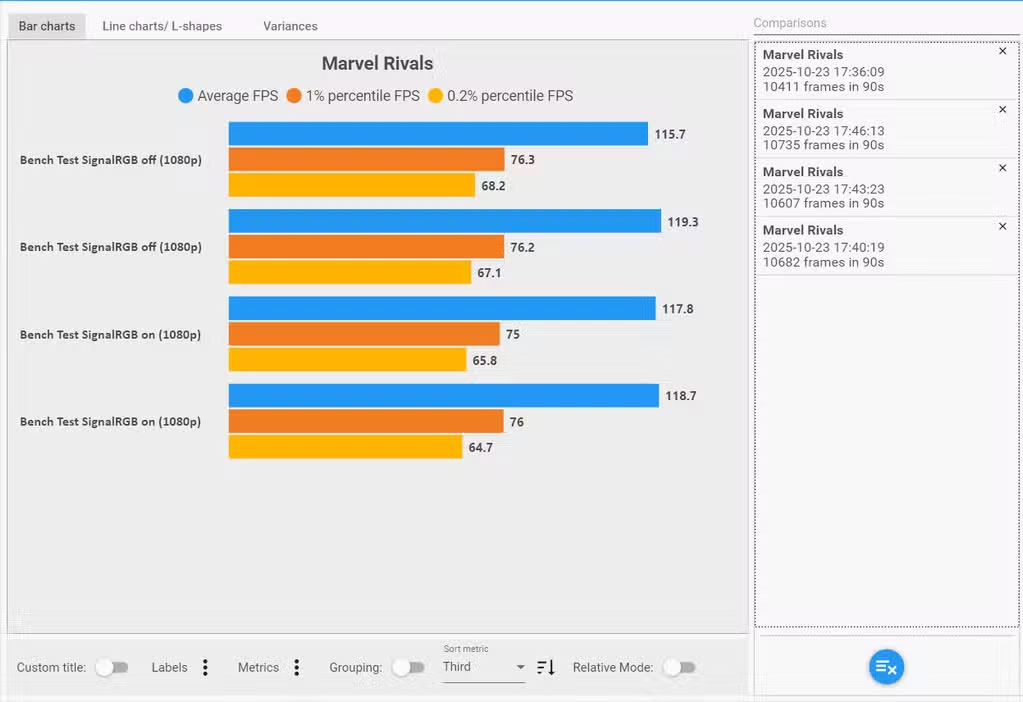
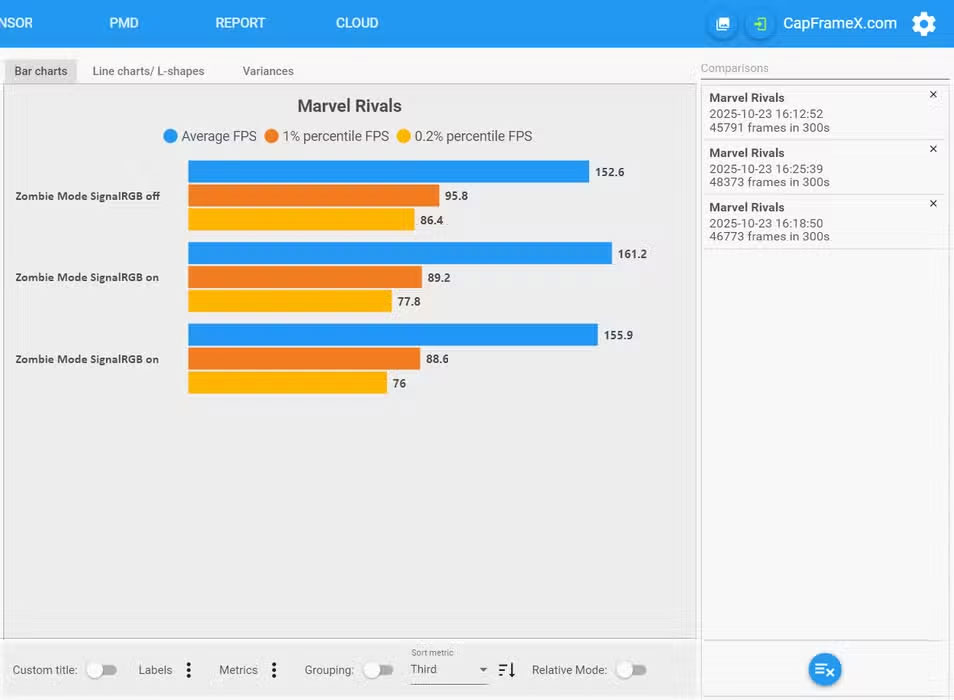
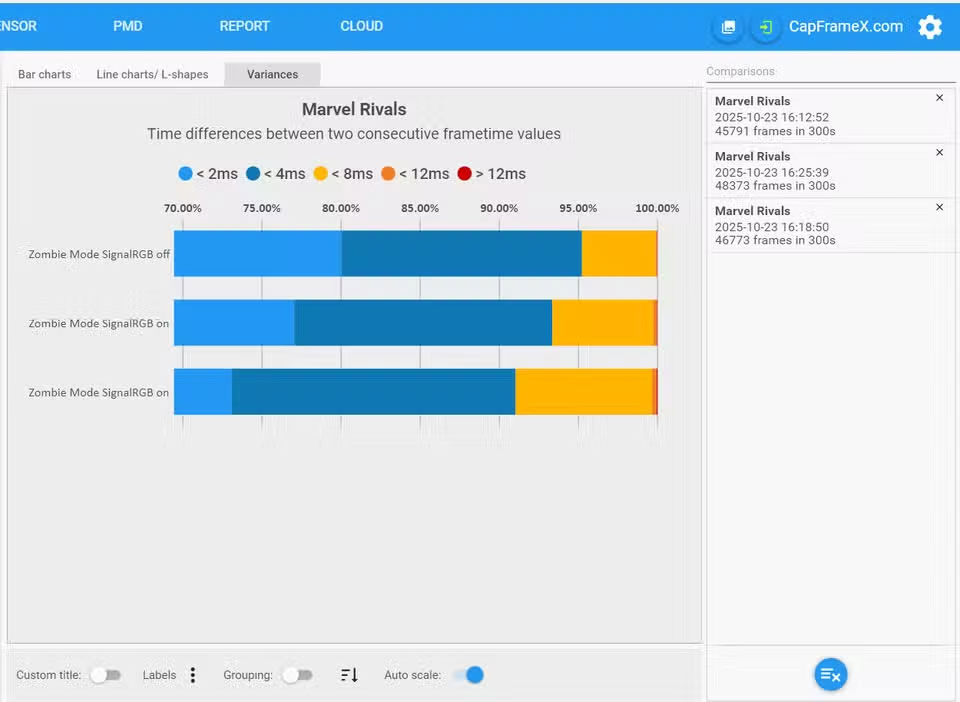
Detecting microstutter isn't easy, because it's not something you see in average FPS, but rather in 1% and 0.1% lows — the slowest frames in the game. I use CapFrameX For more precise measurements, focusing on the 0.2% lows , which should catch even the smallest stutters.
- Marvel Rivals (1080p): With SignalRGB enabled, 0.2% lows dropped noticeably and framerates were inconsistent. While average FPS was only slightly different, stability was noticeably lower.

- Halloween Zombies Mode (1440p, FSR on): The 5-minute test gives the clearest results – both 1% and 0.2% lows improve dramatically with SignalRGB off.
- Red Dead Redemption 2: Older game so the difference is almost negligible (53.4 vs 53.2).
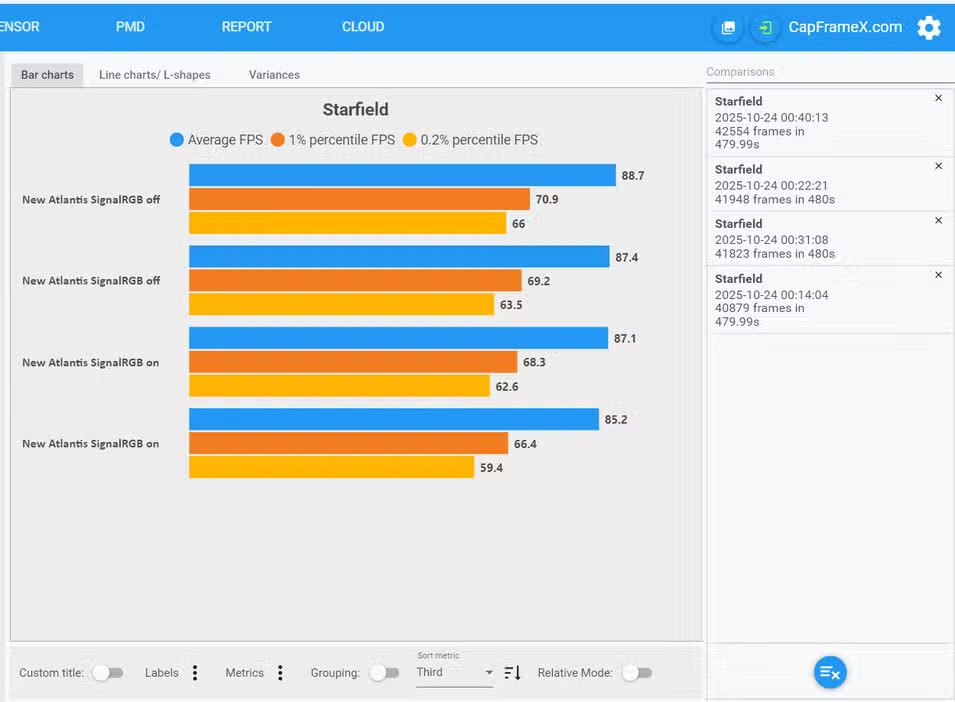

- Starfield: This is a real 'CPU killer' game. After four 8-minute runs, the microstutter was more noticeable with SignalRGB enabled, with significantly lower framerates and lags.
Should I turn off RGB software when playing games?
After reviewing the data myself, it was possible to confirm: RGB synchronization software does cause microstutter . The question is: is it worth disabling it completely?
If performance is your top priority, especially in competitive or heavy AAA games, It's best to turn it off . Personally, in casual or light indie games, a little stuttering doesn't matter much, and the synchronized RGB lighting is still more pleasing to the eye.
But now that you know the impact, you should consider turning Off all RGB software whenever playing online or heavy games , where even a little microstutter can be the difference between winning and losing.
FAQ
What should you know about game lag?
In practical terms, if your computer is experiencing microstutter even though your FPS is stable, the culprit could be your RGB control software.
Why does game lag matter?
The article highlights that to synchronize the lighting between the motherboard, graphics card, RAM, and peripherals, the RGB software has to Constantly communicate with the hardware , creating a series of background processes.
What is the main takeaway?
The main takeaway is that should I turn off RGB software when playing games.
Related Articles
 How to Enable Dynamic Lighting on Windows 115 minutes read
 Managing Devices with RGB Leds on Windows 11 Is About to Get Simpler3 minutes read
 How to Use Smartphone Filters to Fix Bad Lighting in Photos6 minutes read
 Top 8 Free Game Development Software Tools22 minutes read
 Top 5 Free Game Development Software Tools16 minutes read
 Top 5 Software to Increase Game FPS for Windows 10, 115 minutes read
Reader Comments 0
Sign in with email or Google to join the discussion.