Table of Contents
Want to ditch Google Photos but still have the convenience of backing up and managing your photos? Try these three DIY photo server solutions: Plex, Synology Photos, and Immich — private, powerful, and easy to use.
Are you ready to ditch Google Photos and build your own photo storage system? Self-hosting not only gives you full control over your data, but also keeps your photos and videos safe without giving Google access. Here are three options worth considering if you want to run your own 'Google Photos'.
1. Plex – When your entertainment server doubles as a photo storage location

Many people are familiar with Plex as a media center, but few know that Plex can also function as a personal photo server. Plex Photos is built into the Plex server, and a mobile app lets you automatically back up photos from your phone whenever you are away.
The only downside is that Plex Photos doesn't have the AI or smart image recognition capabilities of Google Photos. That means you can't type 'dog' and see pictures of your dog pop up. On the other hand, Plex offers a simple, intuitive experience, and it's completely free if you already have a Plex server or are thinking about installing one.
One big plus: Plex Photos still works remotely without a paid Plex Pass plan, even after a recent change that limited Plex's remote access features.
2. Synology Photos – All-in-one NAS solution
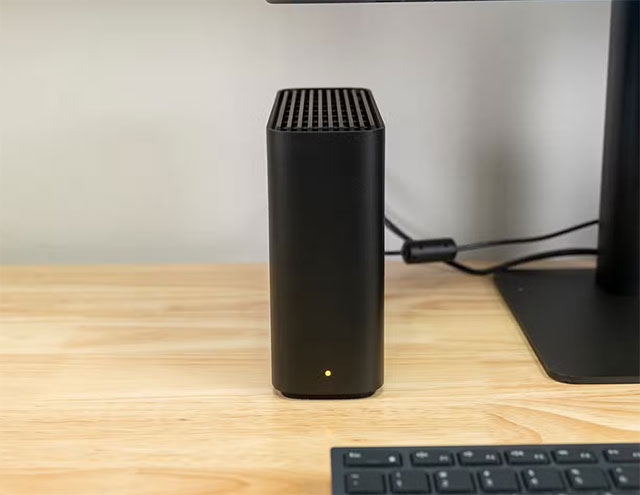
If you own a Synology NAS, the good news is that Synology Photos is already installed and ready to use. This service automatically backs up and organizes photos and videos from multiple devices, all stored locally on the NAS – not in the cloud.
If you don't own a NAS yet, it's still pretty easy to get started. For example, the Synology Beestation comes with a 4TB hard drive pre-installed and costs just $220. It's a great option for anyone looking to build a personal photo and file server at home without being too tech-savvy.
The catch is that Synology Photos can replace both Google Photos and Google Drive, allowing you to manage photos, videos, and documents simultaneously—all in a single device.
3. Immich – Perfect alternative to Google Photos, with AI
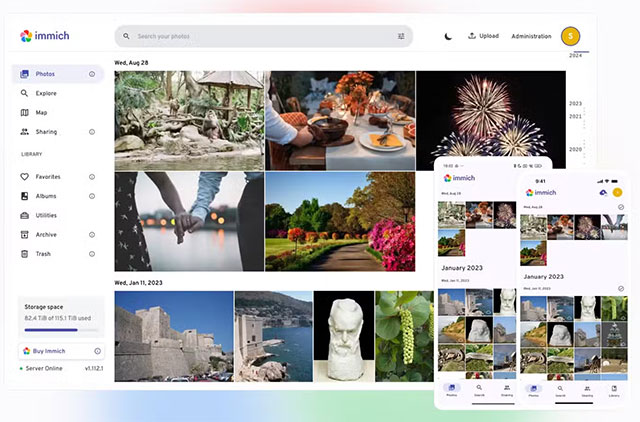
If you're looking for the closest experience to Google Photos, Immich is a strong contender.
This open-source software runs on self-built servers, using local AI and Machine Learning to classify photos, recognize faces, smart tag, and even search for photo content just like Google Photos.
Immich's mobile app is also very smooth, has a modern interface, and is fully featured with sharing and syncing features. However, the only downside is that it requires quite powerful hardware. Since Immich runs AI/ML models directly on the machine, you need a system with a discrete GPU or a modern CPU. For example, the original author used a GTX 1660 Ti and got very good performance. The more powerful it is, the faster the tagging and image processing will be.
In short, Immich is the most comprehensive Google Photos alternative available: multiple user accounts, shared albums, smart tagging, and flexible search. As long as you have the 'infrastructure' to run it, you're good to go.
Don't forget the 3-2-1 rule when backing up
Whatever solution you choose, you should never store all your photos on a single device. The '3-2-1' rule of data backup is:
- 3 copies of data,
- 2 different types of storage devices,
- And at least 1 copy in another location (off-site).
For example, if you store all your photos on a Beestation NAS drive and it fails, you will lose all your data. A safer solution is to add an external backup service like Backblaze B2, Synology C2, or even encrypt your data and store it on Google Drive/Dropbox.
Some people even back up their data to a separate hard drive and give it to a friend or family member to keep for them—simple yet effective. Building your own photo server is a great option, but without a proper backup plan, all your hard work can be lost if a single drive fails.
FAQ
What should you know about the options in this guide?
In practical terms, want to ditch Google Photos but still have the convenience of backing up and managing your photos? Try these three DIY photo server solutions: Plex, Synology Photos, and Immich — private, powerful, and easy to use.
Which option is the best choice?
The best choice depends on your priorities, compatibility, budget, and the specific features discussed in the comparison.
What should you compare before deciding?
Compare core features, limitations, ease of use, compatibility, and long-term value before making a decision.
Related Articles
 4 Privacy-focused Google Photos Alternatives7 minutes read
 22 Tips to Help You Master Google Photos23 minutes read
 10 Google Photos Tips and Tricks You Shouldn't Miss9 minutes read
 Five Apps Will Replace Google Photos When Things Start to6 minutes read
 6 Tips to Free up Storage Space on Google Photos7 minutes read
 How to Use TripUp to Store Photos on iPhone High Quality3 minutes read
Reader Comments 0
Sign in with email or Google to join the discussion.