Table of Contents
Adobe is testing an AI assistant that lets Photoshop users request edits in natural language. The beta is available in supported web and mobile versions, while Adobe Firefly is also gaining additional generative editing controls.
Instead of locating every tool manually, a user can describe an intended change, such as removing an object, replacing a background, changing colors, cropping to a format, or adjusting light and shadow. The assistant interprets the request and applies an available Photoshop operation.
Plan eligibility, generation credits, promotional limits, and beta availability can change. Check the account's current usage panel before assuming that AI generation is unlimited or free.
Natural-language edits in Photoshop
The assistant was previewed at Adobe MAX and is designed to translate an editing goal into Photoshop actions. This may make common tasks easier for beginners and speed up repetitive edits for experienced users.
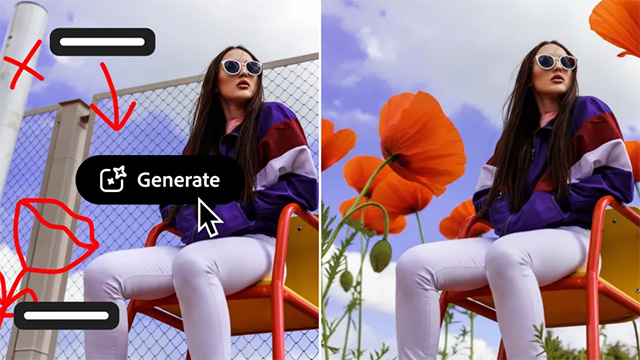
A prompt should describe the visible result rather than rely on vague wording. For example, “Remove the person on the far left and reconstruct the wall texture” gives the system a clearer target than “clean up the image.”
Generated edits still need inspection. Look closely at edges, hands, repeated textures, reflections, shadows, signs, and small text. AI may create plausible pixels that do not accurately represent the original scene.
AI Markup adds visual instructions
Adobe is also publicly testing AI Markup, which combines a written request with marks drawn over the image. A user can circle an object to remove, indicate where a new element should appear, or sketch the approximate shape of an addition.
This reduces ambiguity when a prompt refers to one of several similar objects. It also gives the editor more control over placement without requiring a precise text description of the location.
Generative editing tools in Firefly
Firefly includes several tools that overlap with or support Photoshop workflows:
- Generative Fill adds or replaces content inside a selected area.
- Generative Remove removes an object and reconstructs the surrounding scene.
- Generative Expand extends the canvas and creates content outside the original frame.
- Generative Upscale increases image dimensions while attempting to preserve or reconstruct detail.
- Background removal separates a foreground subject from its background.
Firefly may also offer third-party models from multiple providers. Model choice can affect style, output quality, usage rights, credit cost, and how submitted content is processed.
When the assistant is useful
Prompt-based editing is well suited to creating rough concepts, cleaning distractions, trying background variations, and making common adjustments without searching through menus. It is less appropriate when the pixels must remain documentary evidence or when a precise product, medical, scientific, or legal image cannot tolerate invented detail.
Keep the original file, work non-destructively when possible, and disclose material generative edits when authenticity matters. The assistant can shorten the route to an edit, but it does not remove the need for visual judgment or factual responsibility.
Related Articles
 Instructions for Using Photoshop CS5 to Edit Photos in Full Set5 minutes read
 How to Blur Photos Using Adobe Photoshop Fix Android6 minutes read
 Do You Want to Learn Adobe Photoshop Tips Within 1 Minute? Take a2 minutes read
 Link Download Adobe Photoshop CC9 minutes read
 Photoshop CS2 Download and Installation Guide4 minutes read
 Link Download Adobe Photoshop Express for Windows 109 minutes read
Reader Comments 0
Sign in with email or Google to join the discussion.