Table of Contents
Out of curiosity, some people decided to step out of Apple's closed garden and try something different: Google Photos.
When I first got my iPhone in 2019, I was already using Apple's Photos app for backups. After all, it was the company's default backup solution for photos and videos. Like many other iPhone features, it worked really well. That said, that doesn't mean Apple's cloud storage solution was perfect. I didn't think much of it at the time—every photo I took went straight to iCloud, and I trusted that everything was safe.
For years, it was a habit and they never questioned it. Out of curiosity, some people decided to step out of Apple's closed garden and try something different: Google Photos. Surprisingly, Google Photos was better in many aspects. Since then, they have used Google Photos on their iPhone for backup and have never looked back.
5. Add free storage to back up photos and videos
15GB free storage for beginners
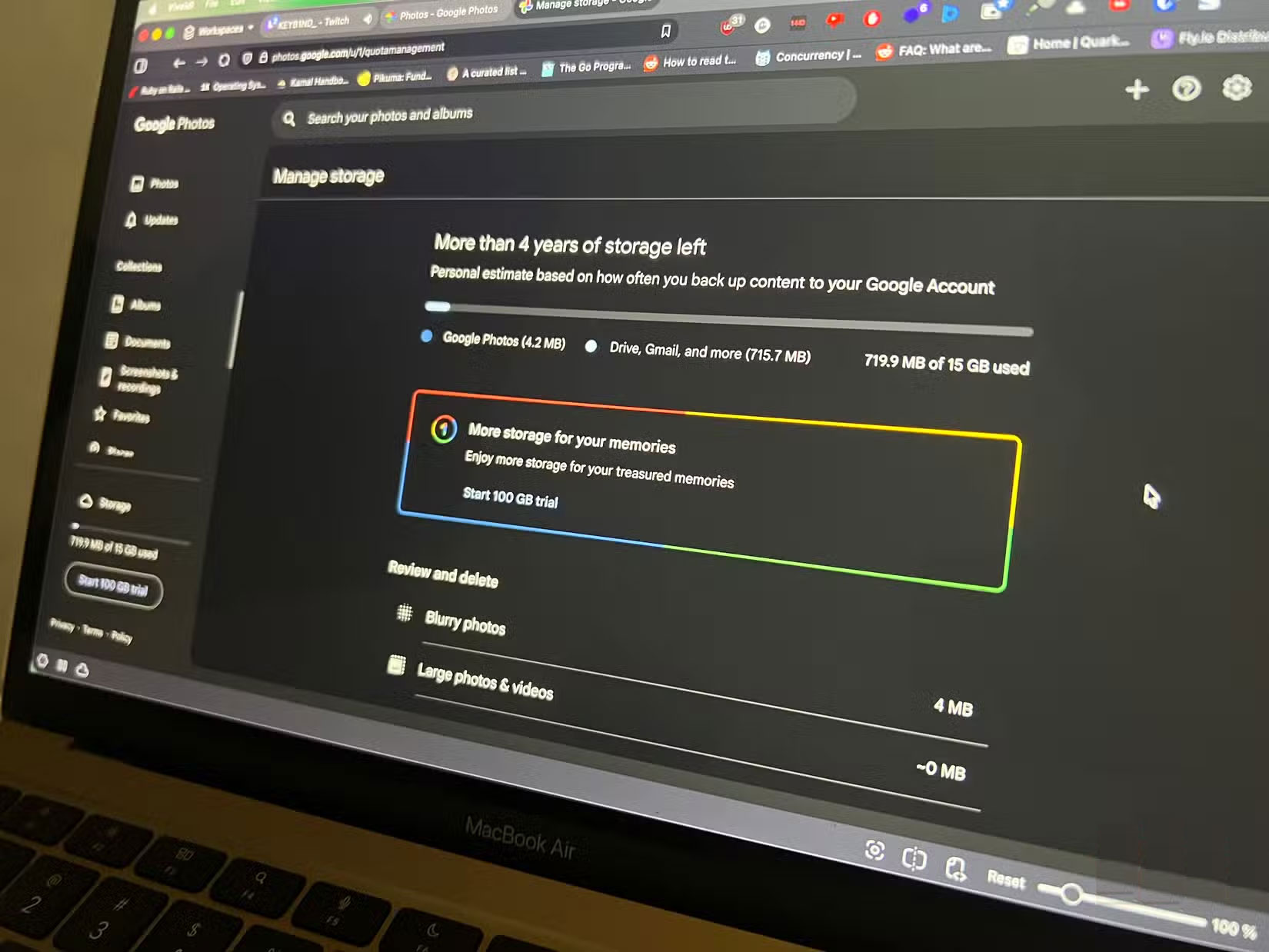
The first thing you'll notice after moving your backups to Google Photos is that your storage suddenly increases dramatically. With iCloud, Apple only gives you 5GB of free storage, which may be enough for a while if you don't take too many photos a day, but make no mistake, that 5GB isn't just for backing up photos and videos.
Your iPhone backs up everything to that little cloud storage, from documents to messages, so you quickly run out of free storage and have to upgrade. You run into that problem pretty soon, so you have to start paying for storage to free up space for your media library. But with Google Photos, you don't have to pay right away, as you get 15GB of free storage.
4. Flexible backup settings and controls
Complete control over backups
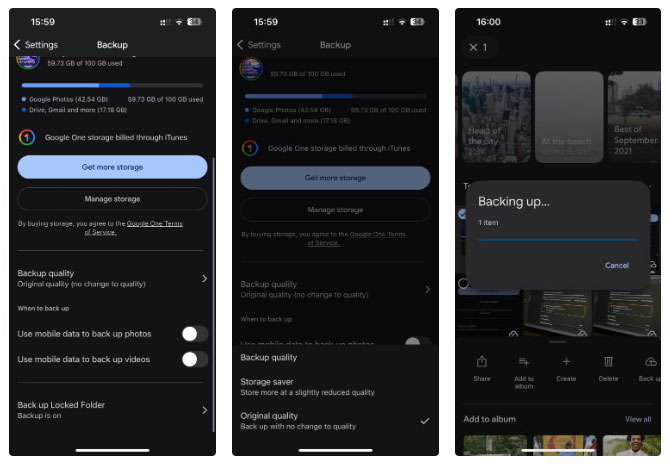
Unlike iCloud Photos, Google Photos gives you more control over your backups. First, it lets you choose the quality of your backups (original or reduced quality). So, if you want your photos stored at full resolution, just choose the Original quality Option. But if You should save on cloud storage, you can choose Reduced quality . And if you have multiple items to back up, you can manually select the items to back up and hit the dedicated Backup Button to start the process right away.
While Google Photos automatically backs up photos and videos when you're connected to Wi-Fi, it gives you the option to back up photos, videos, or both when you're using cellular data. You can also opt out of backing up by turning off the respective settings in the app's Backup settings.
3. Google Photos has many built-in editing tools
Quickly edit photos without additional apps
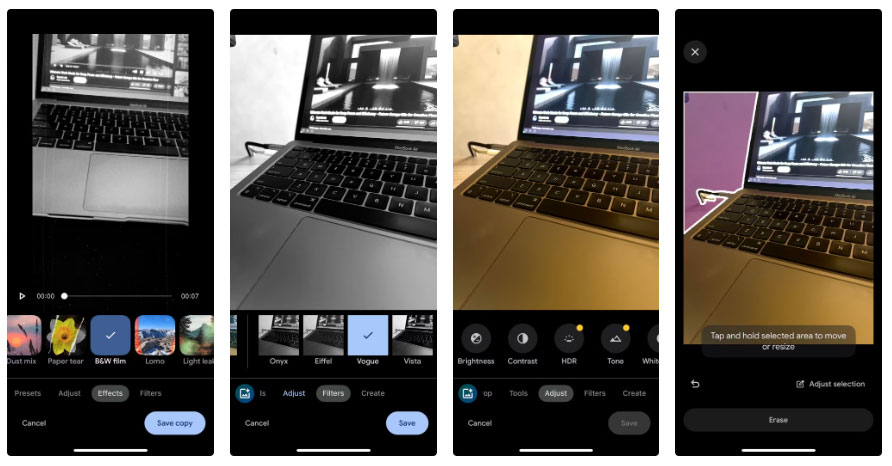
Google Photos is more than just a photo storage service. With so many built-in editing tools, you don't always need to open a separate app to adjust one or two aspects of your photo. If you haven't used the Google Photos photo editor, it covers many the basics.
In addition to photo editing tools, Google Photos also has basic video editing features built in. You can trim, speed up, and even apply some effects to videos on your iPhone. That's right, Google Photos has many hidden features you may not have heard of.
2. Can free up space without losing photos
Peace of mind with free iPhone storage
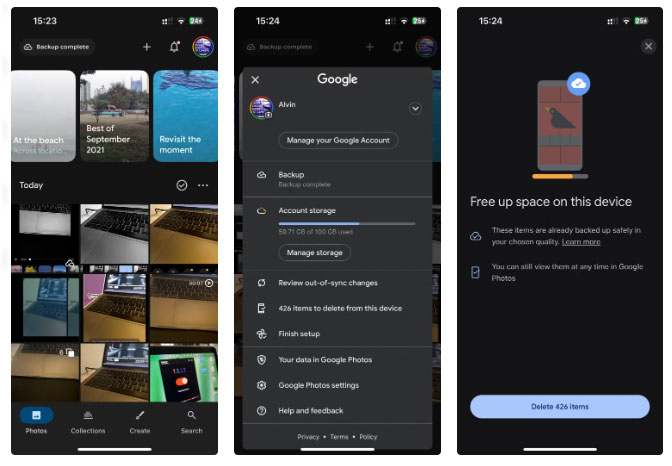
One of the most underrated features of Google Photos is how it handles freeing up space. Google Photos makes it easier to see what's been backed up to the cloud and what hasn't—the app adds a suitable icon to the bottom right corner of any photos that haven't been backed up. Even better, you don't have to dig through your photo library to delete backed-up media to free up space on your iPhone.
Google Photos gives you the option to delete a local copy of all your backed up photos and videos from your iPhone. You can do this by tapping your profile picture in the upper right corner, then selecting the X items to delete from this device Option from the interface. This is a big difference from iCloud. iCloud Photos automatically syncs across devices, which sounds great until you realize that deleting a photo on your iPhone also deletes it from your library and any other Apple devices linked to your account.
1. You can access your photos from anywhere
Google Photos has great cross-platform support
Another significant advantage of using Google Photos instead of iCloud Photos on your iPhone is the convenience of accessing your library from virtually any device. iCloud Photos is great, but the problem is that it's tied to Apple hardware. Sure, you can log in to iCloud.com on a browser and access your photos and videos, but the experience is a lot less convenient than using the Photos app on your iPhone, iPad, or Mac.
What makes Google Photos stand out, however, is that it has a Progressive Web App (PWA) that you can install through Chromium browsers like Chrome and Microsoft Edge. This creates a standalone Google Photos window that runs as an app independent of the browser, providing an app-like experience on Mac and Windows.
FAQ
Why Is Google Photos Better Than iCloud on iPhone: Explained?
In practical terms, out of curiosity, some people decided to step out of Apple's closed garden and try something different: Google Photos.
What factors are most important?
The article highlights that since then, they have used Google Photos on their iPhone for backup and have never looked back.
What is the main takeaway?
The main takeaway is that you can access your photos from anywhere Google Photos has great cross-platform support Another significant advantage of using Google Photos instead of iCloud Photos on your iPhone is the convenience of accessing your.
Related Articles
 How to Use iCloud Photos on iPhone, iPad, and Mac4 minutes read
 5 Reasons to Use Google Photos to Replace Icloud Photo8 minutes read
 How to Download Photos from ICloud7 minutes read
 6 Best Icloud Drive Alternatives for iPhone/iPad8 minutes read
 How to Sync iPhone Photos to Windows With OneDrive8 minutes read
 How to Share Photos with Temporary Icloud Links on iPhone and iPad6 minutes read
Reader Comments 0
Sign in with email or Google to join the discussion.