Table of Contents
This updated guide explores users will never have to create a Microsoft account password again with practical details, clear explanations, and useful takeaways. The next time you create a Microsoft account, you'll notice there's no option to set a password. that is right! Microsoft is ditching traditional passwords and defaulting to passkeys, especially for new accounts. it is a bold move, but one that many people are totally in favor of!
- Why should you stop using local Windows accounts?
Microsoft Will No Longer Use Passwords by Default
Microsoft has finally decided to ditch passwords in favor of passkeys. The tech giant made the announcement via a blog post—appropriately enough on World Password Day (which is celebrated on May 1). So what does this mean for you?
When you create a new account with Microsoft (including Xbox or any other company brand), you will not have to come up with a complicated alphanumeric password. Instead, you can just set up a passkey on your Microsoft account. it is much more secure, because the passkey cannot be stolen or intercepted, and you do not have to worry about remembering it.
Note : When you try to create a Microsoft account at the time of writing, you are still asked to set up a password. So while this passwordless experience isn't the default yet, it is likely to become the standard in the near future.
If you're a current Microsoft user, you do not necessarily need to delete your passwords right away. Still, this is a good time to switch to Passkey, and you can take the first step toward a password-free future by deleting your passwords.
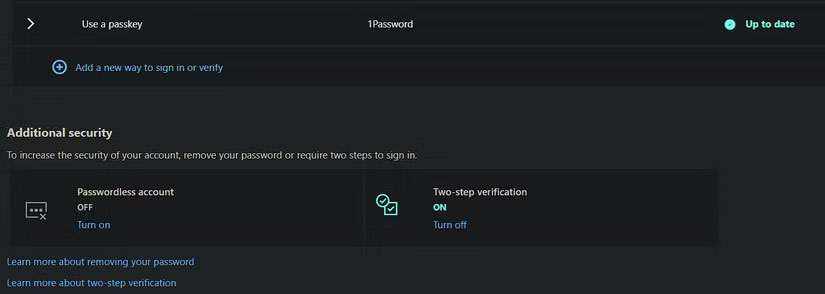
Do this by navigating to your Microsoft account settings, clicking Security on the left, then selecting Manage how I sign in . Scroll down below the list of sign-in options and select Turn on under Passwordless account .
Microsoft Has Optimized Sign - in
As part of this change, Microsoft is simplifying its sign-in process. In its blog, Microsoft explains:
Instead of showing you all the possible ways to sign in, we automatically detect the best available method on your account and set that as the default. for instance, if you have a password and 'one-time codes' set up on your account, we will prompt you to sign in with a one-time code instead of a password. After you sign in, you will be prompted to register a passkey.
So while Microsoft hasn't pressured existing users to switch to passkey yet, this is certainly a move in that direction.
Many people are eager to make this switch. Not only is the added security appealing, but the sheer convenience of not having to deal with complex passwords that look like a cat running across a keyboard.
On top of that, Microsoft reported a 98% success rate for passkey logins compared to a 32% success rate for traditional password logins, which makes the point even more clear. If passkeys can save time and reduce frustration during the login process, people will be happy to switch from passwords.
FAQ
What is the main takeaway about Users Will Never Have to Create a Microsoft Account Password Again?
The key is to understand the core idea, compare the available options, and apply the practical guidance that matches your situation.
What should beginners know about Users Will Never Have to Create a Microsoft Account Password Again?
Start with the essential steps and terminology. Avoid changing advanced settings until you understand how they affect performance, privacy, cost, or compatibility.
How can I use this information in practice?
Follow the relevant section in order, test one change at a time, and confirm the result before moving to the next step or recommendation.
Related Articles
 How to Create a Microsoft Account for Windows Phone4 minutes read
 Microsoft Allows Removing Microsoft Account Passwords3 minutes read
 Instructions for Creating the Fastest Microsoft Account3 minutes read
 Steps to Recover Microsoft Teams Password3 minutes read
 How to Change Your Microsoft Account Password3 minutes read
 Error on macOS Allows Creating Root Account Without Password4 minutes read
Reader Comments 0
Sign in with email or Google to join the discussion.