Table of Contents
This guide provides a clear, practical overview of "This Is the Data Windows Collects from Users". It organizes the most useful details, explains important considerations, and highlights the steps or choices that matter most.
Many of us are at a crossroads, and it might be time to revisit an important topic: the system data (telemetry) that Windows collects from users.
The good news is that if you are wondering between Windows 10 and Windows 11 about which operating system collects more personal data from users, you can rest assured because both Windows 10 version 1903 and later and Windows 11 apply the same system data policy.
Microsoft categorizes personal data collection into two aspects: Required and Optional. We'll start with required data, which the Redmond tech giant says is necessary to keep its services and products secure and up to date, and to provide seamless connectivity to cloud services when needed.
Required data
There are some cases where mandatory data is only collected when a customer uses a related service and is known as Required Service Data . One such example in Windows is the 'Find My Device' feature, which when enabled requires the use of real-time user location data. The full list of cloud-based connected experiences in Windows includes:
- Activity History
- Cloud Clipboard
- Custom Dictionary
- Date and time (for Windows Time service)
- Delivery Optimization (for Windows update distribution)
- Device Encryption
- Emoji
- Eye Control
- Family Safety
- Find My Device
- Get Started
- Location services
- Microsoft Defender SmartScreen
- Phone Link
- Smart App Control
- Troubleshooting service
- Voice typing
- Windows backup
- Windows Insider Program
- Windows Security
- Windows Search
- Windows Spotlight
- Widgets
If you use any of these services, Microsoft will collect additional data about your device, which it classifies as a Required Essential Service . This information can include authentication details, certificates, configuration details, device settings, licensing data, and network system data. The idea is that if a customer uses one of these services, they will have to consent to this data collection, which Microsoft says is 'critical' to providing the required services. It's also important to note that while enterprise customers have granular control over what data is sent to Microsoft when using certain essential services, consumers do not.
Additionally, Windows also collects some data that is classified as Required diagnostic data . Microsoft claims that this is the minimum information needed to keep the operating system and its associated services stable. It is broadly divided into three categories as follows:
- Device configuration and connectivity data: Details about the device, its configuration, and connectivity capabilities. Examples include information about the OEM, processor type, memory configuration, along with network and peripheral data.
- Product and service performance data: Details about the operational status of a device or service. Examples include basic error reporting and reliability data about the operating system and associated services.
- Software setup and inventory data: Details about software installations and updates. Examples include operating system version, installed updates, configuration, and a list of installed applications and drivers.
Optional data
Windows 10 and 11 customers have the option to send more data to Microsoft if they want. Microsoft believes it's good for customers to send them this additional data because it can be helpful in troubleshooting and creating better experiences, but it's not required. Microsoft has a separate guide to optional diagnostic data that's broken down by service and connected experience, but it can be broadly divided into six categories:
- Browsing history data: Browser activity, search history, and browser configuration changes in Microsoft browsers.
- Device configuration and connection data: More specific details beyond those mentioned in the Required section.
- Handwriting, input, and speech data: Dictation, input, and handwriting samples, along with details on converting the input to text.
- Product and service performance data: More specific details beyond those mentioned in the Required section.
- Product and service usage data: Application activity, including application launches and usage statistics for the operating system and related services.
- Software Setup and Inventory Data: More specific details beyond those mentioned in the Required section.
Clear perception
As mentioned earlier, enterprise customers and IT administrators have more control over the data they send to Microsoft; individual users do not. While tech-savvy users can come up with sophisticated workarounds using network tricks, the average user really doesn't have the knowledge or motivation to do the same.
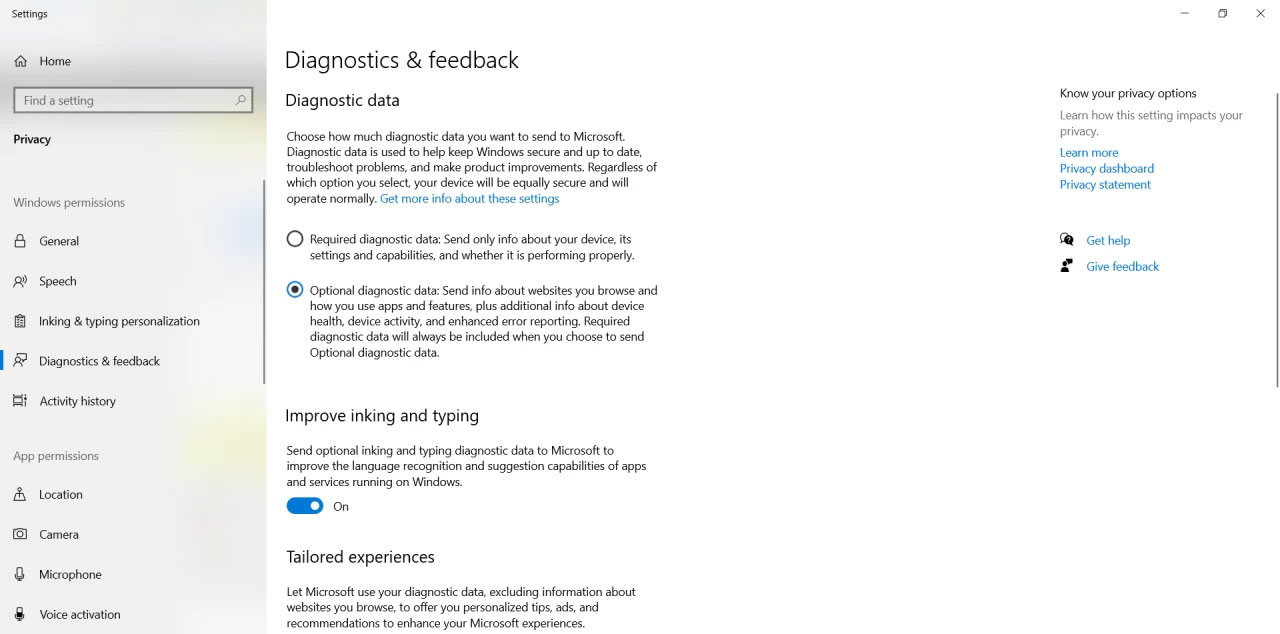
So it's important to understand what your options are. In both Windows 10 and Windows 11, you can navigate to Settings > Privacy > Diagnostics & feedback to choose how much data you want to send to Microsoft. There are two main options for diagnostic data: mandatory and optional, as detailed above. If you're concerned about privacy, you're probably better off choosing the first option (mandatory). There's no way to completely block the transfer of system data.
If you scroll down a bit, you'll also see options for handwriting, typing, and personalized experiences (ads, customizations, etc.). You can turn them on or off depending on your preferences.
Finally, you have a very important tool called the Diagnostic Data Viewer. On the same settings page, you will come across a section called View diagnostic data. If you enable it, any mandatory or optional system data sent to Microsoft will be displayed in the Diagnostic Data Viewer. This can take up to 1GB of space on your hard drive if you enable it, but it will definitely allow you to make more informed choices about your privacy, if you are tech-savvy enough of course.
Ultimately, it all depends on how concerned you are about privacy and how much you trust Microsoft. The average user may not know or care about the data their computer sends to Microsoft.
FAQ
What should you know about required data?
There are some cases where mandatory data is only collected when a customer uses a related service and is known as Required Service Data. One such example in Windows is the 'Find My Device' feature, which when enabled requires the use of real-time user location data. The full list of cloud-based connected experiences in Windows.
What should you know about optional data?
Windows 10 and 11 customers have the option to send more data to Microsoft if they want. Microsoft believes it's good for customers to send them this additional data because it can be helpful in troubleshooting and creating better experiences, but it's not required. Microsoft has a separate guide to optional diagnostic data.
What should you know about clear perception?
As mentioned earlier, enterprise customers and IT administrators have more control over the data they send to Microsoft; individual users do not. While tech-savvy users can come up with sophisticated workarounds using network tricks, the average user really doesn't have the knowledge or motivation to do the same.
Related Articles
 Windows 10 Collects and Sends Your Activity History to Microsoft3 minutes read
 Google's Location Data Inadvertently Turns Innocent People into4 minutes read
 Google Holds 10 Times the Amount of Data That Facebook Has on You4 minutes read
 Google Collects Android Location Data Even When Location Services Are Turned Off3 minutes read
 How to Turn Off Windows Telemetry to Protect Privacy: Step-by-Step Guide5 minutes read
 Facebook Collects Data from Everyone, Even If You Are Not Logged in or Not Using Facebook5 minutes read
Reader Comments 0
Sign in with email or Google to join the discussion.