Table of Contents
Gemini can help turn a comparison table into a visual concept, but an AI image generator is not a reliable charting engine. It may alter numbers, labels, proportions, or sources. For an exact chart, use Google Sheets or another data-visualization tool and use Gemini only to suggest the layout, wording, or chart type.
1. Prepare and verify the data
Organize the data into a table with one row per category and one column per series. Include units, time period, geography, and source. Do not combine unlike measures—such as active users and website visits—in one scale without explaining the difference.
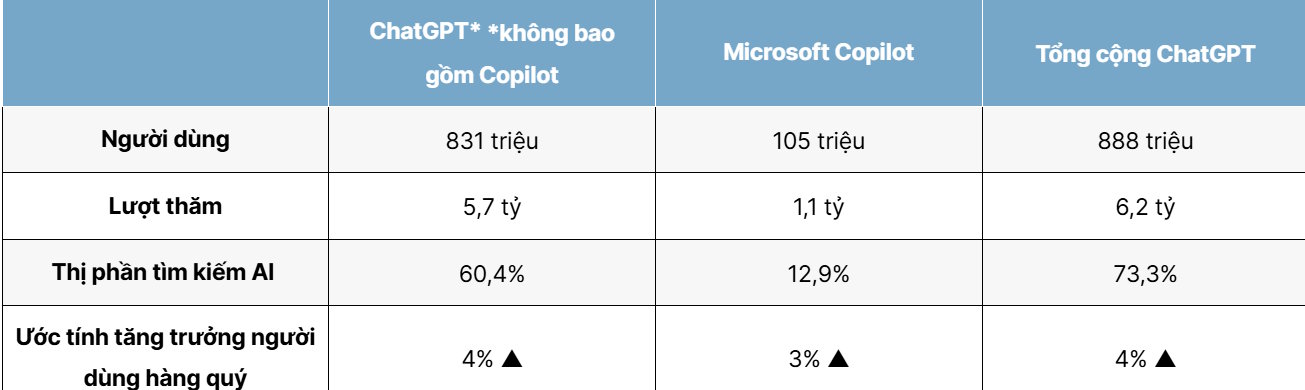
If the figures relate to a changing product or market, confirm them from current, authoritative sources before creating the graphic. The example should not be reused merely because it appears in a screenshot.
2. Ask Gemini for a visualization plan
Paste the verified, non-sensitive table and request a recommendation:
Recommend the clearest chart type for this table. Explain what should be on each axis, the unit, sort order, title, subtitle, legend, and source note. Do not change or estimate any value. Return the chart specification and a machine-readable table.A bar chart is usually suitable for comparing categories, while a line chart is better for change over time. A decorative infographic may be appropriate for a presentation, but it should not sacrifice proportional accuracy.
3. Create the exact chart from data
Build the chart in Google Sheets, Excel, or another tool that maps the verified values directly to marks on the chart. Keep the source table with the final graphic so another person can reproduce it.
If you still want Gemini to create a decorative illustration, open the available image-generation tool and give it a prompt that clearly separates design from data.

Create a 16:9 visual template for a comparison chart. Leave the data bars, numbers, labels, title, and source area blank so I can add verified values later. Use a clean, high-contrast classroom design with ample space for two series.This approach avoids asking the image model to render precise data or text.
4. Review the finished graphic
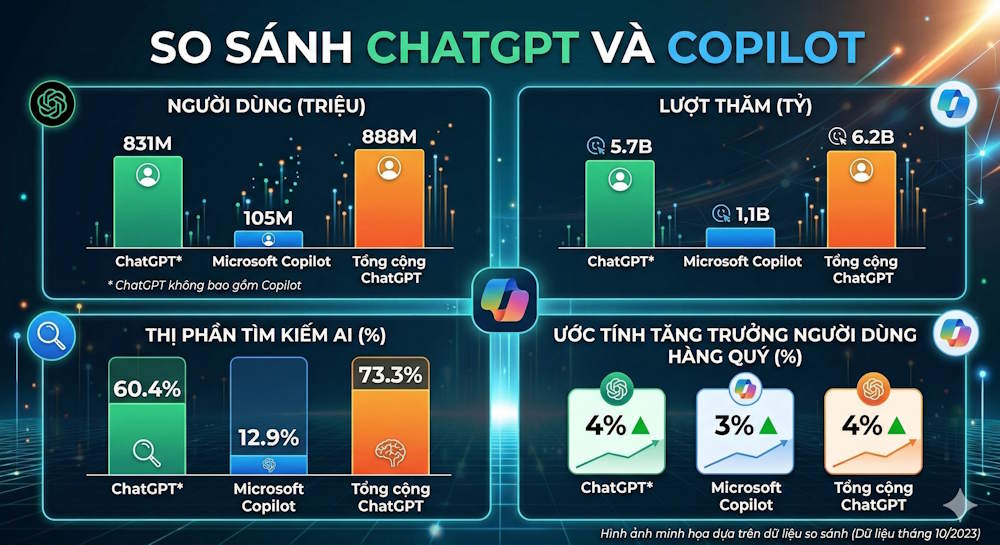
Before using any chart, check:
- every value against the source table;
- axis scale, baseline, interval, and units;
- category and series labels;
- the date and scope of the data;
- color contrast and readability;
- whether the visual area is proportional to the values; and
- the source note and any necessary limitations.
Regenerating an AI image does not guarantee a more accurate chart. The dependable workflow is to generate the design concept with AI and render the data with a real charting tool.




Reader Comments 0
Sign in with email or Google to join the discussion.