Article on the subject of "network connection"
-
Connect two computers to share files
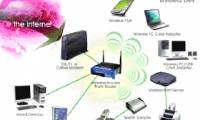
in this article we will introduce the basic methods to connect two computers.
-
Troubleshoot network connectivity problems (Part 1)
this series will introduce you to various troubleshooting techniques that you can use when the computers in the windows network experience communication problems.
-
Restrict wireless access
in this article we have introduced some ways to prevent, or in other words, restrict wireless access, to secure some wi-fi networks.
-
11 solutions to troubleshooting DNS Resolution
when dns resolution does not work, you will fail to use the computer to access the internet. dns is not a great feature on the network, but it is a must-have feature.
-
Connect your Windows XP computer from Windows Vista
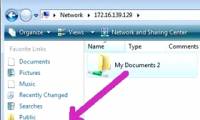
this tutorial will show you the steps needed to access the shared files, folders, or printers that you have set up on windows xp from your windows vista computer.
-
Network connection with Windows 7 HomeGroup
microsoft has made a lot of efforts to make home networks easier to use with automatic connections and access to shared files or folders. can tell the homegroup feature in windows 7, they succeeded.
-
6 ways to network for routers (routers)
even if the problem is a jittery network, you can't access the internet ... just a few simple steps will help you solve the problem of the router. here are a few ways you can follow to fix your internet glitches
-
5 tips to troubleshoot network connectivity issues in Windows Vista
in this article, i will show you five tips that you can take to fix some network problems in windows vista.
-
How to connect to a VPN server from Windows XP
in this tutorial we will show you the steps needed to set up everything in windows xp to allow you to connect to a vpn server.
-
How to connect the network with a bug
bed bugs are used to connect two telephone lines, network wires, data signal cables and other types of electrical wires.
-
Choose to buy a PC board (part 2)
choosing a motherboard should follow certain guidelines, and if you choose the right one, you won't have to worry about future upgrades.
-
Choose to buy a motherboard (end part)
to build a pc system that is right for you, it is necessary to specify the purpose of use.
-
Battery saving tips for laptops running Windows
have you ever been tired of the poor battery life of your windows laptop? if so, the following article may help you improve this situation.
-
Invest in reasonable hardware for virtualization
mastering the optimal specifications for cpu, memory, storage, redundancy, and networking will help you get the best results in virtualization.
-
Top 10 smartphone secret features you will want to use immediately
let's tipsmake.com point through the top 10 smartphone secret features you will want to use immediately in the article below!
-
8 super hidden features on the phone or you may not know
if you are a tech fan, please pocket 8 hidden features on the phone or you may not know below to make your life easier and more convenient!
-
Telstra supports eSIM for Windows users in Australia before both iOS and iPhone
australia's telstra operator has officially announced esim support features for windows 10 laptops and tablets.
-
Mr. Trump wants the 6G network to be deployed as soon as possible
president donald trump thinks that 6g is what humanity must aim for right now.
-
Tests on computer networks with answers - Part 5
in the following article, readers will continue to answer multiple choice questions on computer network topics.
-
Officially released TLS 1.3, promising a faster, safer Internet world
ieft said transport layer security 1.3 will bring 'major improvements in security, speed and privacy'. it's been 10 years since the last release and the development of the new protocol has lasted for 5 years.
-
How to arrange network connection on Windows 10
windows 10 automatically arranges network connections based on parameters. however, we can also change the priority of network connection according to user needs.
-
Common network connection errors and solutions
if your network connection is misconfigured or technical error, you will see some error messages displayed on the screen. these messages tell the user basic information about the problem. the following list of common connection-related errors will be useful in troubleshooting network problems.
-
8 simple ways to fix network connection problems
if you're struggling with network connection issues, such as no network connection or having a network icon but being unable to access the internet, ... , please continue reading this article from tipsmake to learn 8 simple ways to fix network connection problems.
-
Speed up network and Internet access
the speed of network connection depends not only on the speed of the hardware. depending on the type of network connection you have, you can adjust the connection to speed up internet access as well as in your local area network (lan). the sections in this article will introduce you to steps d
-
Speed up Internet connection by using CMD command on WindowsXP / 7/8 / 8.1
internet connection speed is one of the top concerns. besides installing and using 3rd party applications to speed up, you can set the parameters you need to achieve the highest network performance.
-
Install laptop to prioritize wired network connection
have you ever been in a situation where, even though you connected your laptop to a wired network, the device still sees the previous wireless network as the default connection? the article will show you how to fix this problem quickly and easily.
-
Does a VPN slow down your Internet connection?
a vpn is a virtual private network, virtual private network, which is a networking technology that helps to create a secure network connection when participating in a public network such as the internet or a private network owned by a service provider.
-
Fix the problem of 'dead' Internet connection
a beautiful afternoon, you came to the office and suddenly realized that a series of problems occurred with the internet system or the corporate lan intranet. as a person in the network management system, it is your first job to find the cause.
-
5 things to do when ... lose the Internet
if you read this article, of course you are connected to the internet and do not need to pay too much attention to disconnection. however, in recent times, many internet users have lost their connection, network errors and slow connection like ... turtle. so how do we do when there is no network
-
Tips to speed up the Internet, connect to the network faster
there are many factors that affect the speed of internet connection on your computer, one of the most important factors is the speed of the line being used. however, you can change the connection speed by changing the settings on windows to partially improve the speed of internet connection.
-
How to fix an empty Network Connections interface
network connections is a network management interface on a windows computer, allowing you to change networks or fix network connection errors.
-
Turn Windows 8 laptop into Wifi hotspot
windows 7 has an internet connection sharing function via ad-hoc protocol. however, on windows 8 this function has been disabled, or more accurately hidden. microsoft does not 'lock' this feature completely. to enable network connection sharing via wireless waves, follow the steps below.
-
How to fix No Network Connection error on TikTok
error 'no network connection. no internet connection. connect to the internet and try again 'is one of the common tiktok errors that many users are facing.
-
How do Private Network and Public Network on Windows differ?
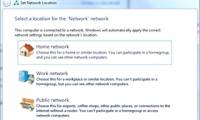
windows allows users to set up each network to connect to, either private or public. when accessing a new network connection, windows will ask if you want your computer to be found by other devices that have the same wi-fi connection as you based on setting up public network and private network.
-
Firewire: Network connection 1394
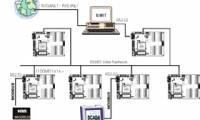
fireware / 1394 is a high-speed serial connection used to connect external storage devices and multimedia devices. but you can also run tcp / ip via fireware to network the two systems together.
-
How to share Internet Ethernet connection for mobile devices
after all, the wired ethernet network is still more popular, and you can convert that wired ethernet connection to a wi-fi connection that all your mobile devices, from smartphones, phones. photos, laptops, until game consoles ... can be used.
-
Speed up 802.11n connection for Windows XP
although your network connection and network bandwidth will limit download speeds, with 802.11n networks, we can adjust to increase the speed of the network.
-
Mobile data connection too slow? Try the following 7 network acceleration techniques
nothing is more annoying than a slow mobile data connection. whether searching on google or checking facebook on your phone, you paid and hoped for a stable speed, but when the service doesn't meet that speed, it's easy to get frustrated.
-
Some troubleshooting tips for Windows network
in the process of network connection there are indeed many problems that arise, but how to overcome them?
-
How to connect the network with a bug
bed bugs are used to connect two telephone lines, network wires, data signal cables and other types of electrical wires.