Table of Contents
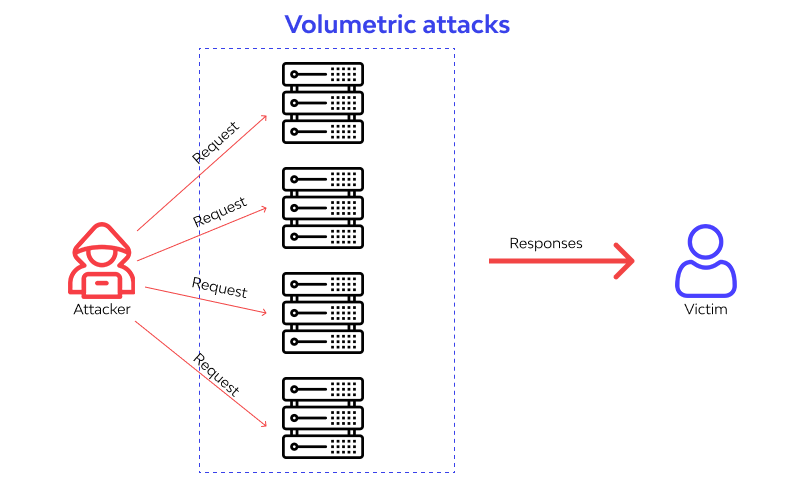
A volumetric distributed denial-of-service (DDoS) attack floods a network with enough traffic to consume the bandwidth a service needs. When an internet link is saturated, customers can lose access even when the application and its servers are still healthy. Filtering typically has to happen upstream, before the traffic reaches the congested link.

How to identify a bandwidth flood
- Check traffic against your normal peaks. Compare inbound bits per second, packets per second, packet loss, and interface utilization with recent baselines. Ask your provider for upstream metrics if your own counters stop climbing at the link limit.
- Compare network and application health. If multiple services on the same connection time out while internal application checks pass, investigate the shared network path. If bandwidth looks normal but web requests and application latency surge, an HTTP flood or application bottleneck is another possibility.
- Verify from outside your network. Compare probes from different networks and check provider status. A routing fault or a legitimate traffic surge can cause similar symptoms.
What traffic might you see?
UDP and ICMP floods can show up as traffic mixes that differ sharply from your baseline. In reflected floods, the traffic can appear to come from many legitimate servers. Track the affected destinations and time range and share representative flow data with your provider. An unexpected protocol by itself is insufficient evidence to block it.
What to do during an incident
- Contact your ISP, hosting provider, or DDoS mitigation service through its emergency channel. Provide affected IPs, start time and time zone, traffic measurements, and the customer impact.
- Ask for upstream filtering or traffic scrubbing. A web application firewall can help filter HTTP traffic after that traffic reaches it. It cannot restore capacity on a saturated link ahead of it.
- Verify recovery using external checks as well as internal monitoring. If the provider proposes discarding all traffic to a destination, confirm the outage that will cause and agree on when to reverse the route.
Before the next incident, record escalation contacts, identify which addresses your protection covers, and check whether users can reach your origin directly. Consult the TipsMake DDoS response overview and the CISA DDoS response guide when building your response plan.
Related Articles
 What is Volumetric DDoS Attack?
 What are Protocol Attacks? How to Detect and Prevent Attacks
 What is Wannacry? How to detect and prevent it effectively
 The new algorithm can prevent cyber-attacks on GPS devices
 How to detect SSH brute force attacks and protection solutions
 What is IPS? The network security benefits that IPS brings
Reader Comments 0
Sign in with email or Google to join the discussion.