Table of Contents
People have always known that Google has a lot of information about them, but 'a lot' is a bit vague. What exactly that information includes. That's when they stumbled upon a tool hiding right in plain sight: Google Takeout. It lets users download data directly from Google's servers, packaged neatly for inspection.
What is Google Takeout?
Google Takeout is an official service launched in 2011 by an internal Google group called the Data Liberation Front. Their mission is to make it easy for users to move data out of Google products — whether for backups, switching platforms, or just out of curiosity.
Essentially, it's a data export tool. You choose the Google services you're interested in, and Takeout compiles an archive of your personal data from those services. This data can include emails, documents, photos, browsing history, YouTube watch history, location logs, Google Fit activity, payment records, and more.
These are the services you can export your data to
One of the first things you'll notice about Google Takeout is the sheer number of services it supports. At the time of writing, you can export data from:
- Gmail (including every message, attachment, and draft you've ever received).
- Google Drive files and folders.
- Saved contacts and addresses.
- Google Calendar Events.
- Map data, including pinned locations, place reviews, saved places, and map edits.
- YouTube and YouTube Music, including watch and search history, playlists, subscriptions, and comments.
- Google Photos albums and metadata.
- Google Fit health and activity profiles.
- Google Pay transaction history.
- Gemini Chat Log (formerly Google Bard).
- Google Play Store app download history and reviews.
- Save notes.
- Tasks, Groups, Voice, News and more.
The list is long, and for many people, it goes beyond the apps they currently use. Many people are even surprised to see that it includes data from Google Podcasts, which they thought was buried.
Step by step export process
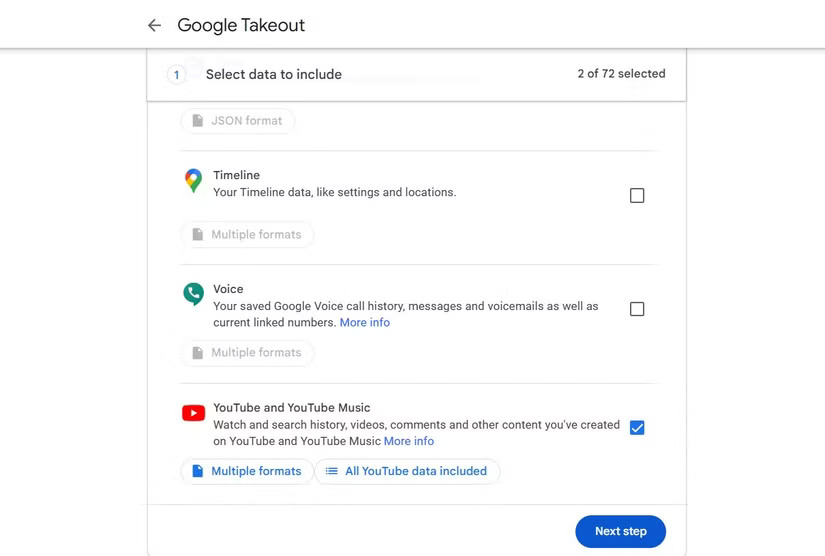
Exporting your data from Google Takeout is easy. Go to Google Takeout and sign in to your Google account. By default, every Google service you've ever used is selected. You can leave them all as they are, or select them individually. For example, if you only want Gmail and YouTube data, you can uncheck everything else. Then, click Next step , and you'll be taken to Choose file type, frequency & destination .
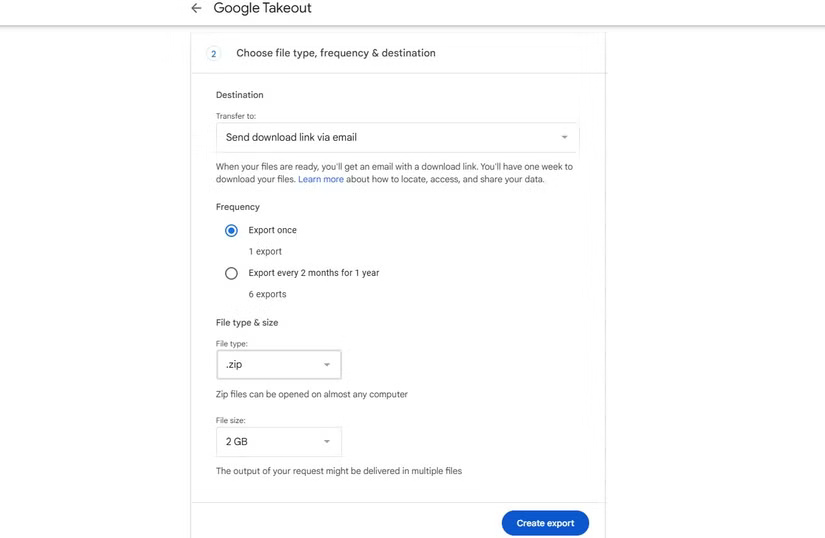
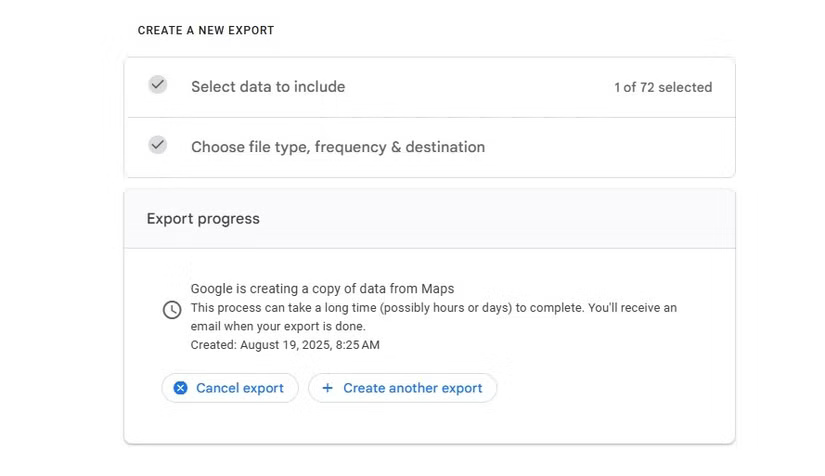
Here, you'll be asked how you want your data sent in the Transfer to drop-down box — via an email download link or directly to a cloud storage service like Google Drive, Dropbox, OneDrive, or Box. You'll also choose how often you want your data exported ( Export once or Export every 2 months for 1 year ), the file type ( .zip or .tgz ), and set a maximum storage size ( 1 GB, 2 GB , or 4 GB ). If your data exceeds that size, Google will split it into multiple files. Once you're done sorting, click Create export and wait. Depending on how much data you have, this can take anywhere from a few minutes to a few days. I had years of Gmail and Photos data, so the export took nearly 24 hours to prepare.
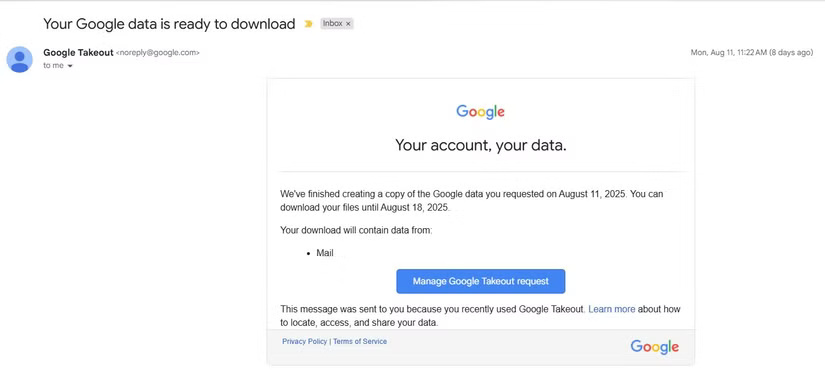
When ready, Google will send you a link. The archive will contain folders for each service, containing HTML files that you can open in your browser or JSON files that store structured data. Photos and videos are downloaded in their original format.
A few things to note
While Google Takeout is useful, it's not the whole story. There are a few important things to know:
- Deleted data not included : If you've deleted your emails or search history, that data won't show up in your export. What you see is what's still on Google's servers.
- Here's just what Google shows you : Takeout is essentially Google's "polite" version of your data. It may not include everything Google has collected, especially raw logs or inferences that Google uses for advertising.
- Short download window : Once Google prepares your archive, it will be available for download for about 7 days, and you only have a few downloads before it expires.
- Files can be huge : If you have years of email archives and cloud storage files, your export can easily be tens or hundreds of gigabytes. Be prepared for long download times and large hard drive space.
Final Thoughts
Following the steps in order and checking version-specific settings should make it easier to Find Out What Google Knows About You. If an option looks different, verify the device, app, or operating-system version before changing additional settings.
FAQ
What is the best way to Find Out What Google Knows About You?
Start with the requirements described in the article and follow the steps in order. People have always known that Google has a lot of information about them, but 'a lot' is a bit vague. What exactly that information includes. That's when they stumbled upon a tool hiding right in plain sight: Google Takeout.
What should you know about What is Google Takeout??
Google Takeout is an official service launched in 2011 by an internal Google group called the Data Liberation Front.
What should you do if the instructions do not match your screen?
Check the device, software version, account permissions, and regional settings. Interfaces can change after updates, so use the closest matching option and consult the official support documentation when necessary.
Related Articles
 Google's Find My App Just Got a Lot Better5 minutes read
 How to Find Your Way with Google Maps on Your Phone5 minutes read
 How to Source and Detail Photos with Google5 minutes read
 How to Use the Find Feature on Google Chrome: Practical Guide6 minutes read
 Find the Shortest Path with Google Map — Use Google Map to4 minutes read
 The Google Search Page Is Flooded with Ads5 minutes read
Reader Comments 0
Sign in with email or Google to join the discussion.