Table of Contents
Google AI Studio provides a browser-based environment for testing Gemini models, prompts, files, and supported tools before integrating them into an application. If Gemini 3.1 Pro Preview is available for your account, you can select it from the model menu and compare its results with another model.
Preview models can change, have different limits, or be retired. Do not build a production dependency without checking the current model documentation, availability, pricing, rate limits, and migration guidance.
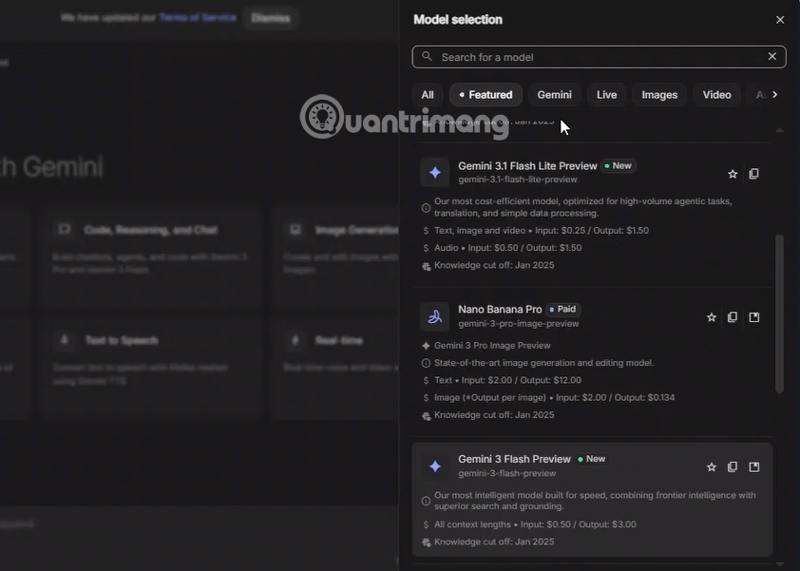
Select Gemini 3.1 Pro Preview
Step 1: Open Google AI Studio and select Playground from the left panel.

Step 2: In Run settings, open the Model selector.

Step 3: Choose Gemini 3.1 Pro Preview. If it is not listed, it may not be enabled for the account, project, or region.
Write and test the prompt
Enter a request in the prompt area. State the task, relevant context, constraints, and required output format.
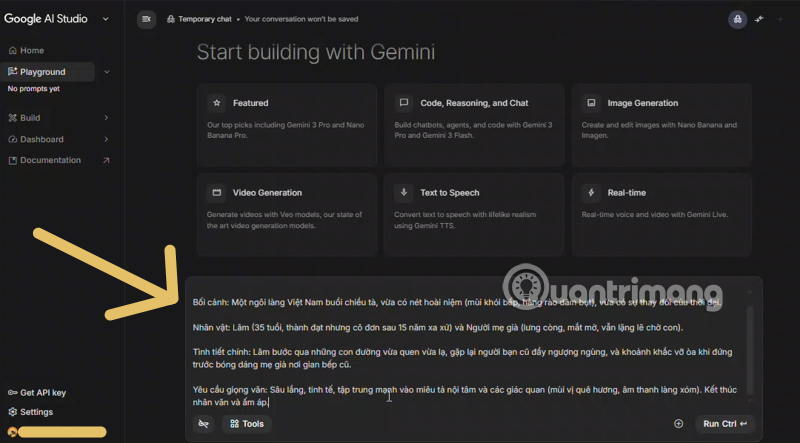
For a repeatable test, include a small set of expected behaviors and failure cases. A polished response to one prompt does not establish reliability.
Enable only the tools you need
Open Tools to enable supported capabilities such as search or code execution when the task requires them.

A tool can send queries, process code, or access additional information. Review what the tool does and do not enable it merely because it is available.
Add files and adjust run settings
Select Add to attach a supported image, video, audio file, or document for analysis.

Do not upload confidential, personal, or regulated data unless the account configuration and organizational policy allow it. A large context window indicates capacity, not guaranteed comprehension of every detail in a long file.
Adjust settings only when you understand their effect. Higher randomness can increase variation, while a lower setting may produce more consistent output. Then select Run.
Evaluate the result
Check the response against a known source or expected answer. For code, run tests and inspect the changes. For document analysis, verify cited passages. For images, audio, or video, confirm that the model did not infer details that are absent from the input.
When comparing models, reuse the same prompt, files, tool settings, and evaluation criteria. Record latency, errors, output quality, and estimated cost rather than relying on labels such as “Pro” or marketing claims.
Before using a preview model in production
- Confirm the exact model identifier and supported API.
- Read current data-use and retention terms.
- Set budget and rate limits.
- Design retries and a fallback model.
- Test prompt-injection and unsafe-input cases when tools are enabled.
- Monitor output quality after model updates.
- Keep a migration plan for preview retirement.
AI Studio is best used as a controlled evaluation workspace. A successful Playground demo should be followed by documented tests before the same model is trusted in a user-facing system.
Related Articles
 10 Ways to Maximize Your Experience with Google AI Studio and Gemini5 minutes read
 How to Use Gemma 4 with the Gemini API and Google AI Studio6 minutes read
 Instructions for Getting Started with Gemini Embedding 211 minutes read
 Gemini 3.1 Pro or Gemini 3 Pro: Better?8 minutes read
 Google Launches Gemini 2.5 Computer Use: AI Models That Superiorly Control3 minutes read
 4 Google Apps That Work Better with Gemini: Explained5 minutes read
Reader Comments 0
Sign in with email or Google to join the discussion.