Table of Contents
Choosing between Gmail or Proton Mail Is Better depends on the features and trade-offs that matter most to you. This comparison reviews usability, performance, compatibility, and practical value so you can make a better-informed decision.
Key Takeaways
- Review ease of use.
- Explore privacy & security.
- Understand storage capacity.
Ease of Use
Gmail and Proton Mail have slightly different user interfaces. Gmail uses a two-page design with the menu on the left and emails on the right. Additional email category tabs are located on top of the main Inbox menu.
Category tabs make it easy to find your latest emails, whether from your colleagues in the Primary tab, from your favorite social networks in the Social section, and more.
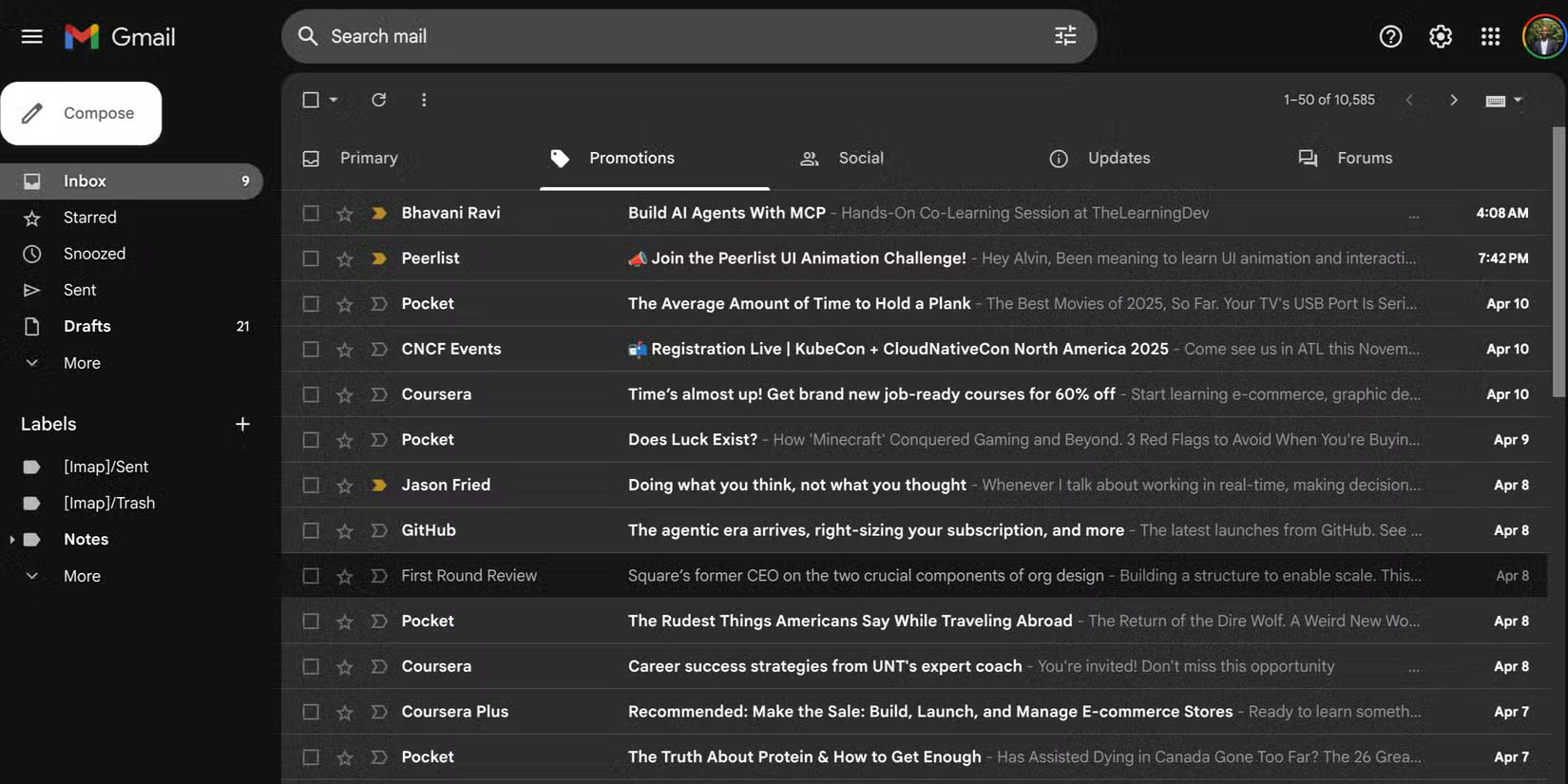
Unlike Gmail, Proton Mail's interface feels modern but less polished. While it has a nice three-pane layout—a step up from Gmail's two—it lacks smart sorting.
The major downside, however, is that you'll miss out on Gmail's sophisticated email categorization features when you want to quickly sift through specific emails.
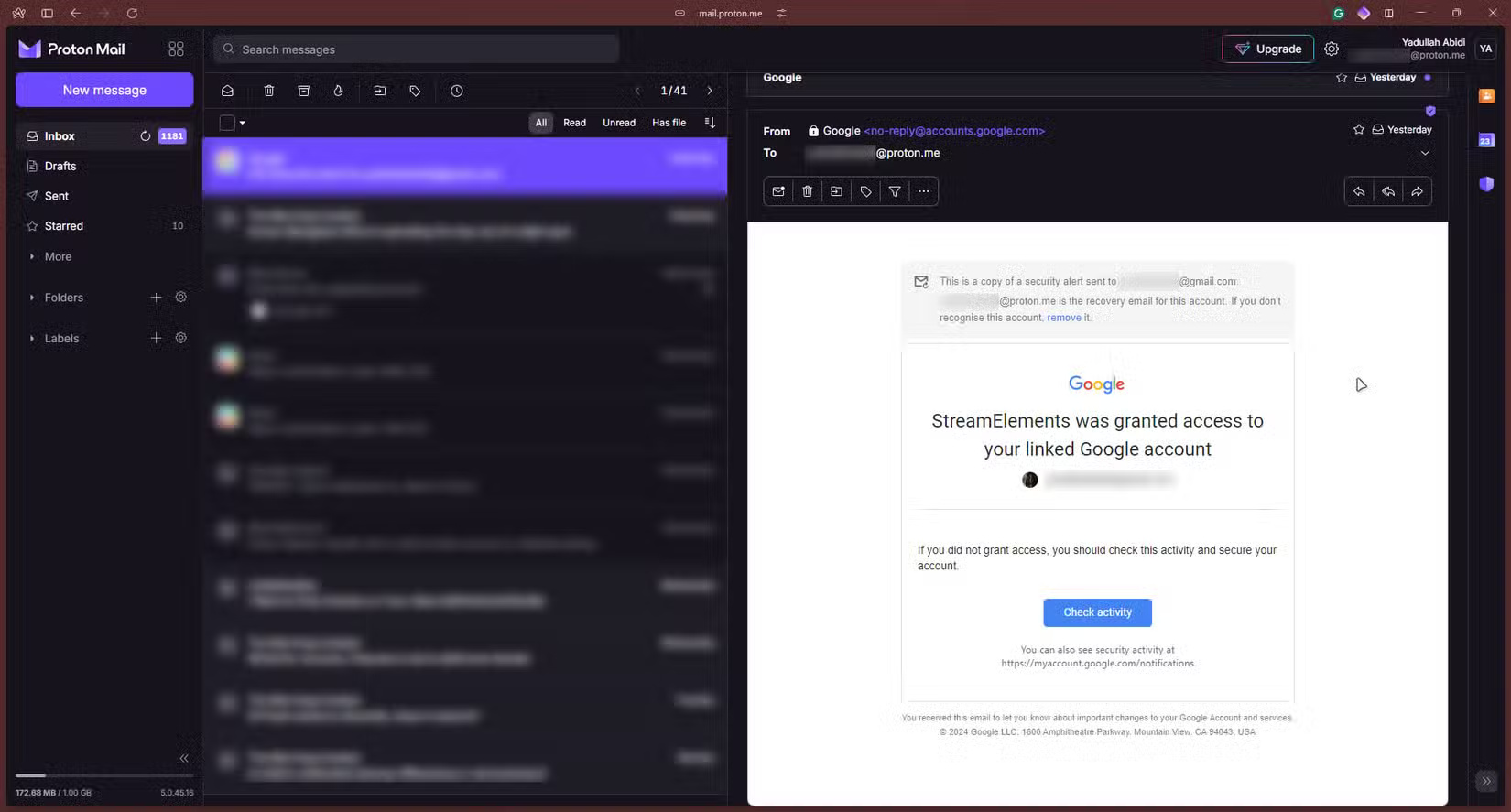
The mobile experience is nearly identical. However, Gmail offers a two-tab interface by default, making it easy to access Google Meet. Of course, you can remove the Google Meet tab from the Gmail mobile app if you want.
On both apps, you can easily compose emails, read incoming emails, and perform actions like deleting, archiving, pausing, marking as important or unread, etc. Both offer labels and folders, which are handy for organizing your email inbox. Overall, Gmail and Proton Mail are both straightforward to use and get started with.
Winning option: Draw
Privacy & Security
One major area where Gmail falls short is privacy. The biggest issue is that because Gmail is based in the United States, it is subject to US law (plus the laws of the Five, Nine, and 14 Eyes surveillance alliance), which could force the company to hand over user data to the government upon request.
In Gmail, your emails are encrypted in transit, but the problem is that Google keeps a copy of your private key and can read your emails. Its business model relies heavily on collecting data across its services while Google claims it no longer scans emails for advertising purposes.
Proton Mail, on the other hand, has better security. First, the company is based in Switzerland, so your data is protected under the country's strict privacy laws. Second, it uses end-to-end encryption and zero-access, meaning no one can read your emails other than you and the recipient — including the company itself.
Additionally, Gmail tracks how you use its services, while Proton doesn't. Another advantage of Proton is that it is open source, doesn't serve ads, automatically blocks third-party trackers, and allows you to create email aliases. In terms of security, both support two-factor authentication (2FA) and hardware security keys. Additionally, Proton offers the option to secure your account with biometric authentication on Android and iPhone.
Proton Mail is the best when it comes to privacy and security. So if you want a solid reason to switch from Gmail to Proton Mail, look no further.
Winning Option: Proton Mail
Storage Capacity
Another significant difference between the two services is storage. Gmail gives you 15GB of free cloud storage. You can sign up for Google One for $2.49/month for 100GB if you need more storage.
Proton Mail only gives you 1GB for free, but the great thing is that it's just for your email. You can expand your storage by paying for a service that starts at $3.99/month, which bumps your storage up to 15GB and gives you access to other perks.
It's shared across services - unlike Proton Mail's dedicated limit while Gmail offers more storage. For instance, if you sign up for Proton Drive, you get 5GB for that particular service.
So if your Proton Drive fills up, you'll be able to continue sending and receiving emails as long as Proton Mail has free storage. For Gmail, if you fill up your quota by uploading large files to Google Drive or large amounts of photos and videos to Google Photos, you won't be able to send or receive emails because storage is shared.
Winning Option: Gmail
Availability
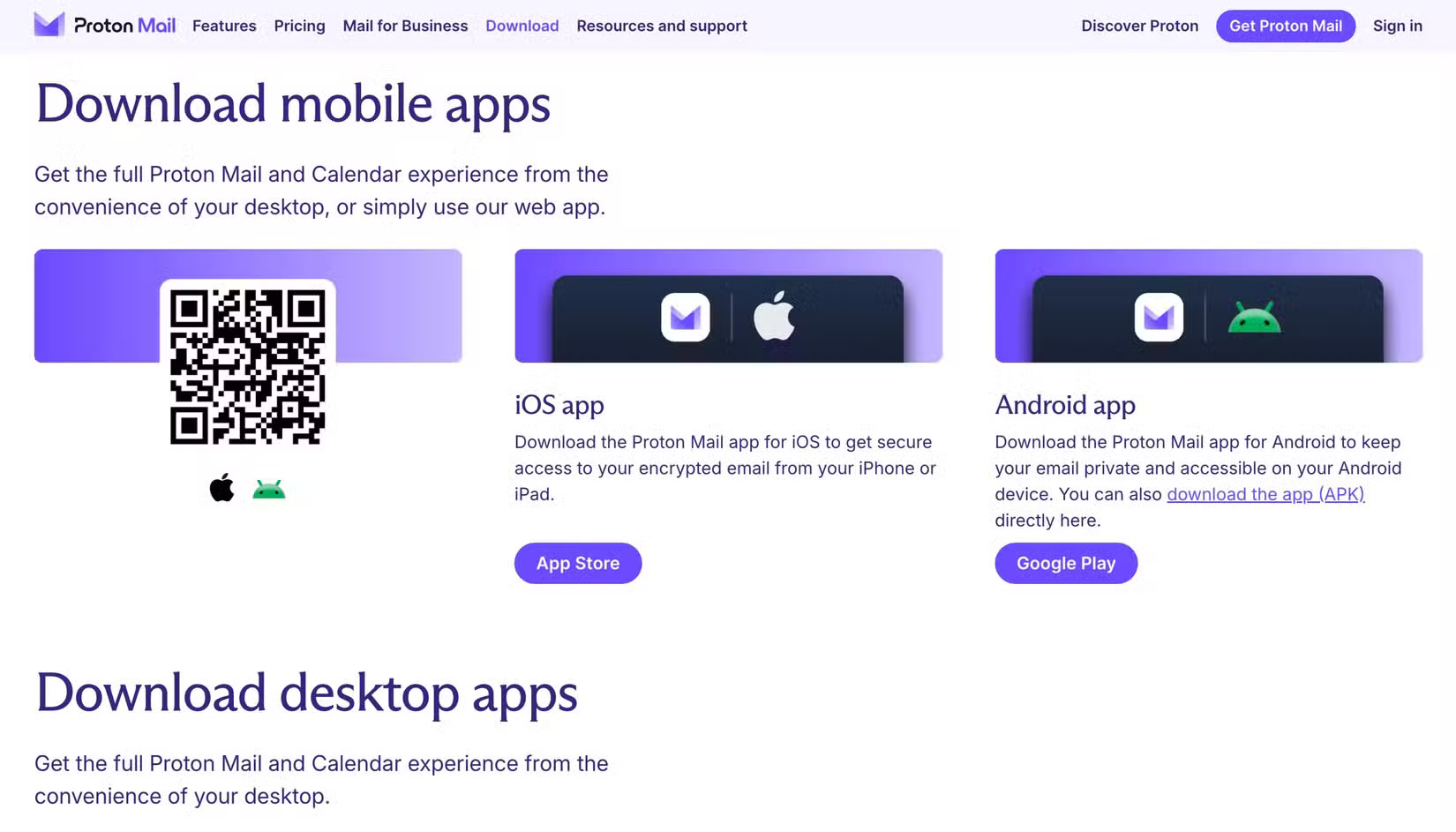
Gmail and Proton Mail have been around for a while, and as such, are available on a number of platforms. You can access both services via the web and mobile devices (Android and iPhone). Proton Mail offers desktop apps for Windows, macOS, and even Linux (on Debian and RPM-based distributions) while Gmail doesn't have a desktop app.
The biggest drawback to Proton Mail is that the desktop apps cost money. Free users only get a limited-time trial. But if you're willing to pay, Proton Mail goes above and beyond by offering desktop apps.
Winning Option: Proton Mail
Price
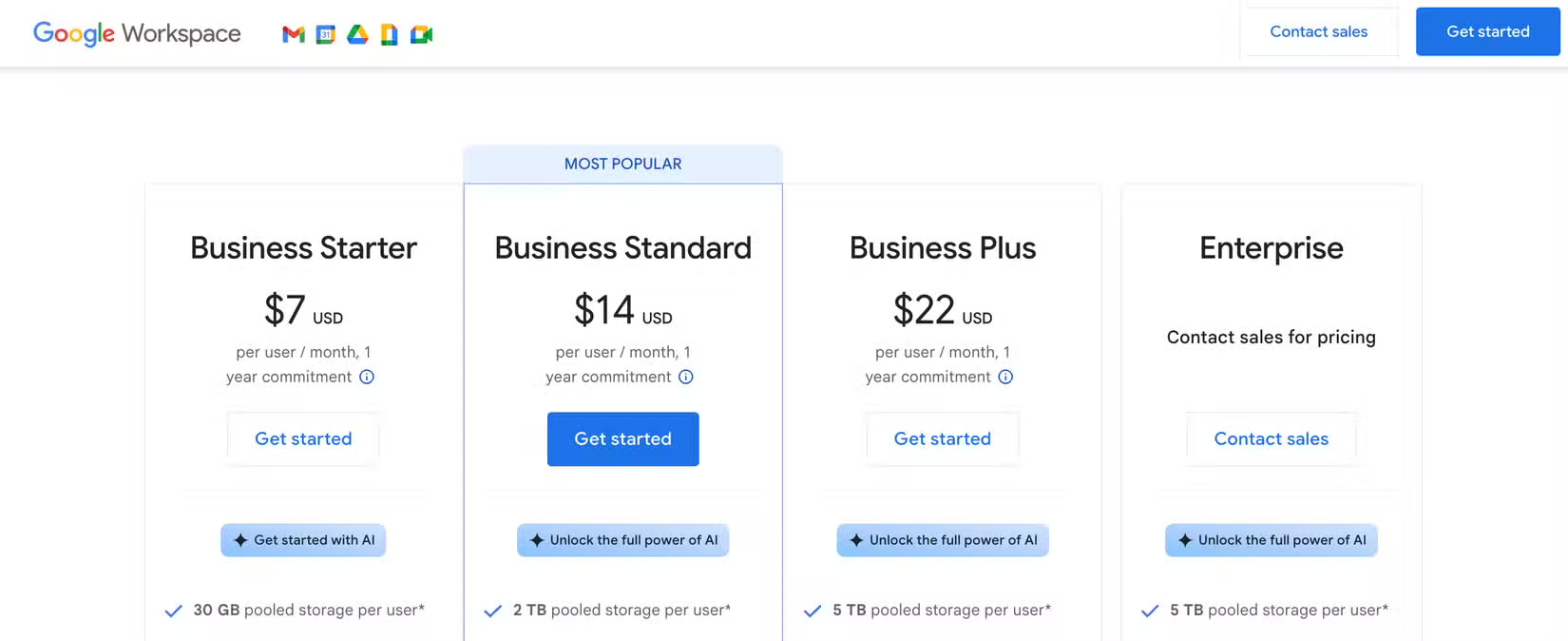
Both services are free, but there are limitations. Second, you only get 15GB of free storage. First, Gmail puts ads in your emails. Depending on your plan, you can pay Google Workspace for anywhere from 30GB to 5TB of storage.
In addition to the extra storage, you won't see ads in Gmail when you sign up for Google Workspace. However, you don't need to pay for Google Workspace if you just need the extra storage. The Business Starter plan starts at $7/month with 30GB of storage, custom professional email, and more. Google One is cheaper (starting at $2.49/month for 100GB), but you'll still see ads in Gmail.
Proton Mail, on the other hand, has a free plan that is ad-free, but you only get 1GB of storage for your emails. You can upgrade to a paid plan for more storage and additional features, starting at just $3.99/month. The lowest plan, Proton Mail Plus, includes 15GB of storage, 10 additional email addresses, a custom email domain, and more. There's also a 500GB plan and another plan for two users with 1TB of storage. Proton also offers family plans.
Winning Option: Gmail
Integration
Gmail's biggest advantage over Proton Mail is its tight integration with other Google services (like Google Keep, Meet, Calendar, and Drive) and third-party options. For instance, if you want to attach a file to an email, you can select one from Google Drive. And if you try to attach a file larger than Gmail's 25MB limit, Gmail will automatically upload it to Google Drive.
Thanks to the public API, many third-party apps, such as Trello, Slack, Zoom, Notion, Zapier, etc., integrate with Gmail.
Proton Mail doesn't integrate as it only works with other Proton services. Since it doesn't provide a public API for third-party apps and services to integrate with the platform, you have to be content with what Proton offers.
Winning Option: Gmail
Additional Features and Perks
Both offer a number of additional features and perks beyond the usual ones. These include custom domains, self-destructing emails, email archiving, calendar companions, email scheduling, AI features to make writing and refining emails easier.
Gmail supports POP3, IMAP, and SMTP protocols, while Proton Mail only supports IMAP and SMTP protocols through the Proton Mail Bridge application. This application lets you integrate their Proton Mail account with various email applications, such as Microsoft Outlook, Mozilla Thunderbird, and Apple Mail.
Winning option: Draw
Is Gmail or Proton Mail a Better Email Provider?
Gmail stands out as the better option when compared head-to-head. It offers generous free storage, is cheaper per GB if you need more storage, and supports integration with other apps and services. The main caveat, however, is privacy.
Proton Mail is better if privacy and security are top priorities for you. Despite its strong focus on privacy, the app is straightforward to use and offers additional features for convenience, most of which are also available on Gmail.
Final Thoughts
The most reliable way to handle gmail or proton mail is better is to follow the process in order, verify each important setting, and test the result before moving on. Use the guidance above as a practical reference, then adjust the details for your device, software version, or specific goal.
FAQ
Which option is better for most users?
The better choice depends on your priorities. Compare performance, compatibility, ease of use, available features, and ongoing cost rather than choosing from one specification alone.
What are the most important differences to compare?
Focus on real-world performance, device support, workflow, privacy or security controls, pricing, and the features you will actually use.
Can I use both options?
In many cases, yes. Using both can be practical when each option handles a different task, although you should check account, storage, and compatibility requirements first.
Related Articles
 Proton Mail Review: A Private Gmail Alternative10 minutes read
 How to Encrypt Email with Proton Mail: Step-by-Step Guide7 minutes read
 How to Add Gmail to the Windows 10 Mail App7 minutes read
 6 Tips Little Known Gmail6 minutes read
 Beloved VPN and Private Email App Proton Is Getting a Big Discount4 minutes read
 Reasons to Use Spark Mail Instead of Gmail5 minutes read
Reader Comments 0
Sign in with email or Google to join the discussion.