Table of Contents
This updated guide explores proton mail review: a private Gmail alternative with practical details, clear explanations, and useful takeaways. While looking to improve their digital security, people have looked at a number of privacy-focused email apps. Proton Mail is a favorite, and it comes very close to Gmail – although sadly it lacks some key features that many people aren't ready to make the switch.
Why People Love Proton Mail
Proton Mail has many handy tools and a powerful infrastructure, making it great for day-to-day email management.
1. Strong Focus on Security
One of the main reasons people are drawn to Proton Mail is its focus on security. The app features self-destructing messages; while you still wouldn't want to share sensitive information through this form of communication, knowing that any information that might fall into this category can be deleted gives you peace of mind. It also has zero-entry encryption; there are plenty of reasons to use an encrypted email service.
Proton Mail also has a number of other features designed to keep users safe. for instance, the PhishGuard tool can help ward off phishing attacks. This, combined with knowing the most common types of phishing attacks, means you're less likely to fall victim to these types of threats.
The Proton Mail app also has features you'll find in other email services, like two-factor authentication (2FA) and end-to-end encryption.
2. Easily Create Folders and Labels
Achieving the goal of zero emails in your inbox on a regular basis requires initiative, and one way to do this is to create folders and labels. Proton Mail makes it incredibly easy to do both.
When using Proton Mail, you can create labels and folders via the left toolbar. There is a + icon for both; you can add folders to parent folders if needed.
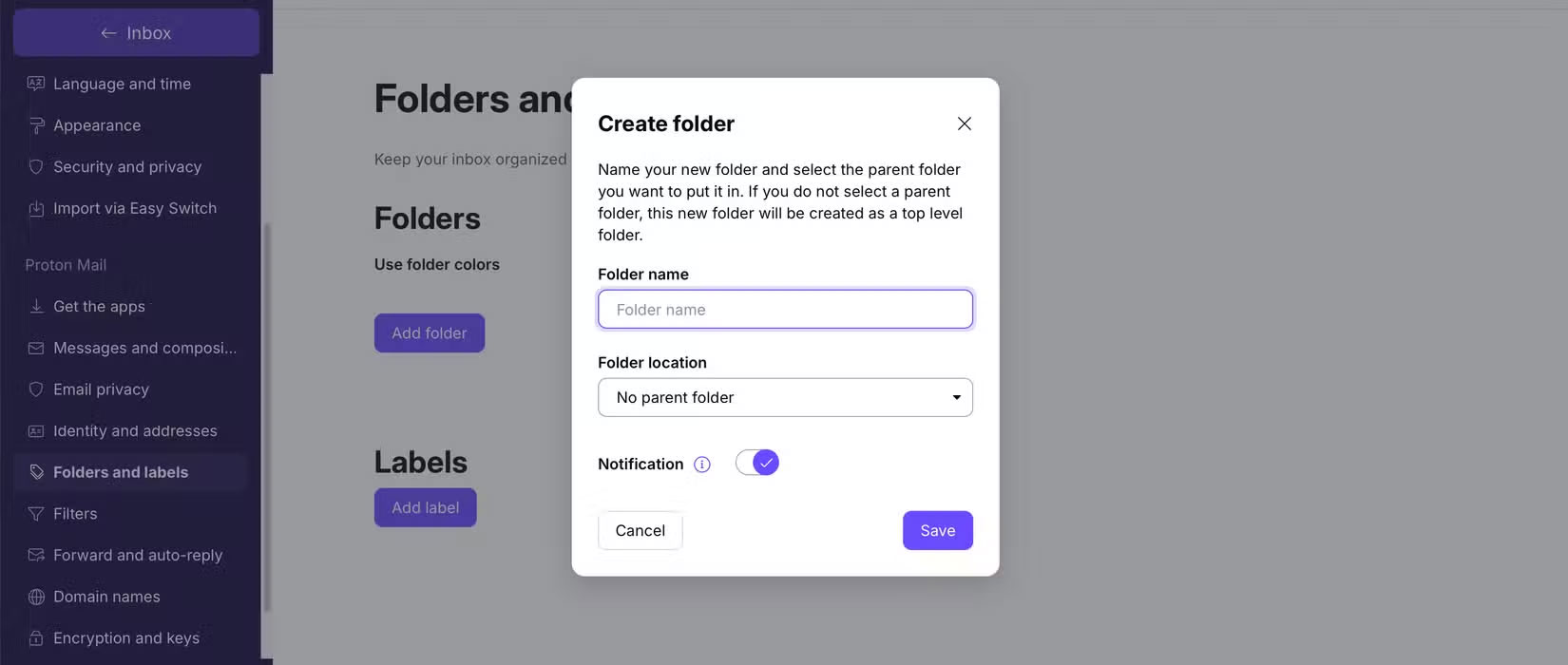
For labels and folders, you can customize quite a bit. for instance, change their colors if needed.
3. Beautiful User Interface
When it comes to using an email app, functionality is only one aspect. Aesthetics play a big role (many people find unsightly apps and services difficult to use). Thankfully, Proton Mail has a beautiful user interface (UI).
The design is instantly eye-catching and the way everything is laid out is great. Plus, the contrast makes navigation easier. Everything feels sleek and modern, especially compared to tools like Outlook (which looks a bit dated).
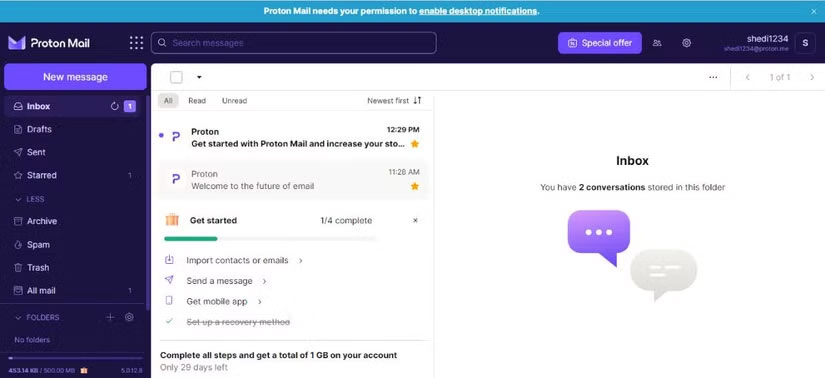
Another thing people like about Proton Mail is that the app design is consistent across both desktop and mobile devices, so you'll have a great experience no matter where you want to browse your email.
4. Lots of Customization Options
While Proton Mail works pretty well with the default settings, it is nice to have access to some customization options when you want to use it. for instance, you can choose from a number of font themes, which gives your inbox and emails a more personalized feel.
Along with changing the font theme, you can use Proton Mail to decide whether you want animations on or off. Also, the app lets you change the font size and choose from a variety of color schemes.

Proton Mail lets you edit your choice of languages, Along with changing the layout and density of your messages. Furthermore, you can decide whether to automatically display embedded messages.
5. Forward Inbox
Using a Gmail address is so ingrained that it can sometimes be difficult to switch to another service. Unfortunately, though, you may miss some emails if you do not check your inbox for a while. Forwarding your inbox is the easiest way to solve this problem in Proton Mail.
This feature lets you set up inbox forwarding to ensure that emails are automatically sent to one of your most frequently used addresses. This helps you stay in sync with what others have sent you. This tool is available under Forward and auto-reply . It requires a paid plan, but it is worth signing up for.
6. Auto Unsubscribe Feature
Another part of achieving 'inbox zero' is being minimalistic with the newsletters you subscribe to. Delete anything you do not find truly valuable, including all marketing emails. But it is equally important to remove yourself from mailing lists you never asked to join.
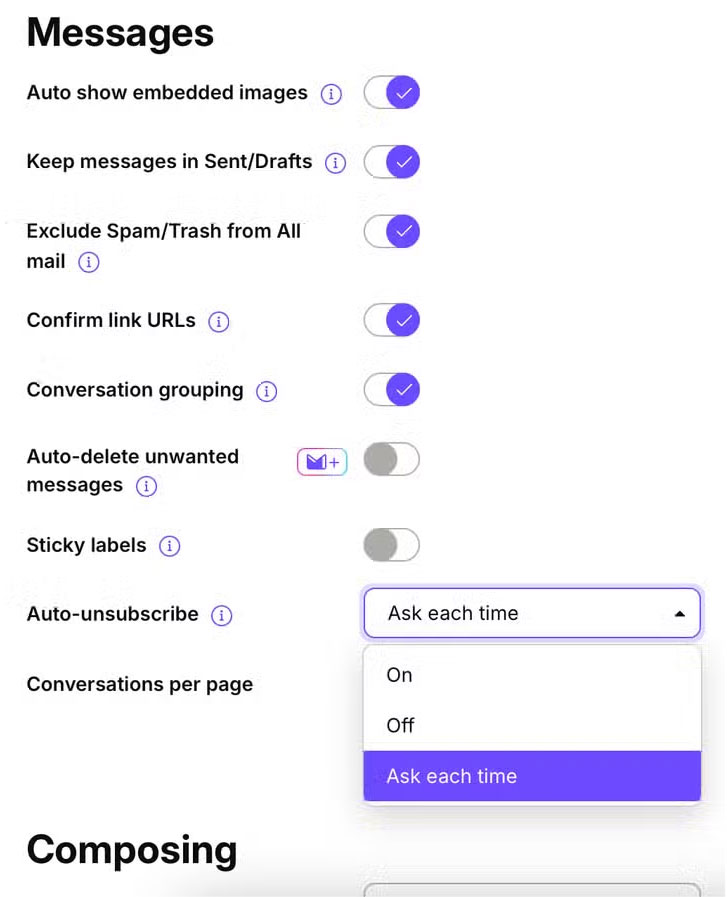
With Proton Mail's Auto Unsubscribe feature, you can automatically unsubscribe from any mailing list when it moves messages to your spam folder. The app lets you choose whether you want to be asked each time or enable the tool to do it automatically.
Note: If you're still receiving emails after unsubscribing, there are a few things you can do to stop the problem. for instance, you can block the sender or change your email settings.
7. Receive Email Notifications Sent to Another Account
Try to check your email at most twice a day. Many people would rather get a summary than manually check their inbox. Proton Mail lets you do just that by setting up notifications. With this tool, you can receive email notifications sent to one of your other accounts.
If you see anything worth replying to, you can easily open your Proton Mail account and reply. This way, you do not have to check your profile for days at a time. Thanks to the better focus that comes from this, you will notice that your productivity is better.
Why Proton Mail Does Not Completely Beat Gmail?
Despite its many advantages, many people still do not think Proton Mail is on the same level as Gmail. Proton Mail lacks some key features that make it the undisputed favorite email app.
1. Less Storage Space
Proton Mail only has 1GB of email storage on its free plan, which is very small. If you get many emails with large attachments, this can be an issue. You can increase this with Proton Unlimited, which includes 500GB of storage (shared across Drive and other Proton services). It costs $12.99/month, down to $9.99/month if you sign up for 12 months ($119.88 total).
Considering that Google offers 15GB of storage without a paid subscription, Proton Mail seems very limited.
2. Gmail Has Better Segmentation Capabilities
Gmail's segmentation capabilities remain a favorite of many email users. it is great at sorting important emails and segmenting everything else into social and other categories. For the most part, Gmail does a pretty good job.
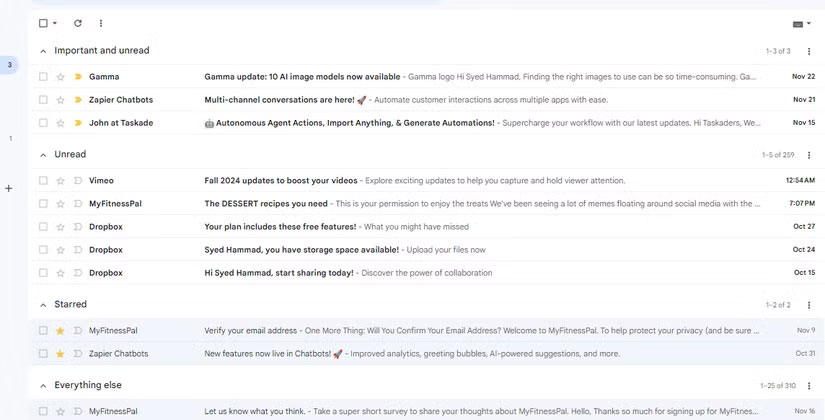
Another advantage of Gmail is that it is very good at identifying spam without having to enter many data. Proton Mail, on the other hand, is not at the same level.
3. Need Better Integration with Third - party Apps
Another big advantage of using Gmail is that it integrates with many third-party apps. for instance, you can use it with Slack, Notion, Asana, and a number of other everyday tools. This makes it easy to stay organized and streamline the way you work across multiple platforms.
Proton Mail, by comparison, does not have many third-party app integrations. Hopefully this will change in the future, as the tool is great, but until then, it is hard to fully justify switching.
Proton Mail has many great features that make it worth using. The customization options are pretty impressive, as is the app's focus on privacy and security. Still, it lacks a few features — like Gmail-level segmentation — which means you might not be convinced to switch completely. Still, you can set up an account to receive Proton Mail notifications in Gmail, allowing you to check whenever you want.
FAQ
What is the main takeaway about Proton Mail Review: A Private Gmail Alternative?
The key is to understand the core idea, compare the available options, and apply the practical guidance that matches your situation.
What should beginners know about Proton Mail Review: A Private Gmail Alternative?
Start with the essential steps and terminology. Avoid changing advanced settings until you understand how they affect performance, privacy, cost, or compatibility.
How can I use this information in practice?
Follow the relevant section in order, test one change at a time, and confirm the result before moving to the next step or recommendation.
Related Articles
 Gmail or Proton Mail Is Better?11 minutes read
 How to Encrypt Email with Proton Mail: Step-by-Step Guide7 minutes read
 4 Privacy - Focused Apps You Should Switch To6 minutes read
 Beloved VPN and Private Email App Proton Is Getting a Big Discount4 minutes read
 4 Privacy-focused Google Photos Alternatives7 minutes read
 Learn About Docs in Proton Drive: a Private, distraction-free6 minutes read
Reader Comments 0
Sign in with email or Google to join the discussion.