Table of Contents
Proton Sheets is a spreadsheet editor built into Proton Drive, with end-to-end encryption enabled by default. It lets users work with formulas, charts, and shared worksheets while limiting access to the owner and authorized collaborators. Proton announced the service in December 2025 as an addition to its document and cloud-storage tools.
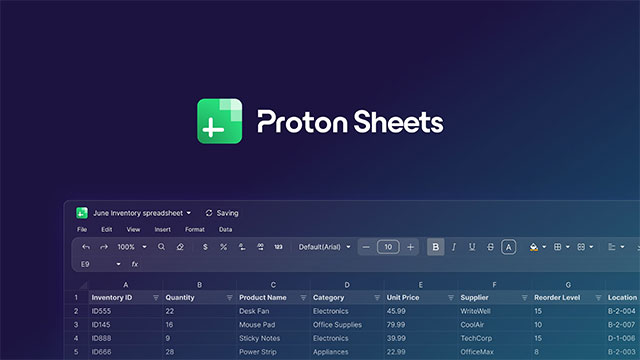
What Proton Sheets offers
Proton’s launch announcement describes a familiar spreadsheet workflow: organize data in cells, calculate with formulas, build charts, and work with other people. Sharing controls let the owner choose who may view or edit a spreadsheet and revoke access later.
The encryption model is the main distinction: according to Proton, the service cannot read the spreadsheet contents. That does not mean a shared file is visible only to its creator—people granted access can also read it. It also does not prevent a collaborator from copying information or an unlocked device from exposing it.
How to create a spreadsheet
- Sign in to Proton Drive.
- Select New → New spreadsheet. The editor opens a blank spreadsheet in a browser tab.
- Click the name at the top to rename it, then enter data and formulas.
- Use the sharing controls to grant only the access each collaborator needs.
Proton provides access through its free account offering, with paid plans available for additional storage and other services. Check current account limits before moving a large collection of files. TipsMake’s comparison of free cloud storage services introduces the wider storage choices.
Importing Excel or Google Sheets data
The current import and export instructions list CSV, TSV, and XLSX as import formats. In an open spreadsheet, choose File → Import, select a file, and decide where to put its contents. Importing as a new sheet avoids replacing the active sheet by mistake.
If a workbook uses the older XLS format, save a copy as a supported format before importing. For Google Sheets, download a supported file first. Keep the original and compare the imported results, including formulas, dates, number formats, charts, and any features your workflow depends on.
Use File → Download to export an XLSX, CSV, or TSV copy. CSV and TSV are useful for transferring plain tabular data, but they do not retain a complete multi-sheet workbook with all formatting.
When it is a useful alternative
Proton Sheets is worth evaluating when encrypted storage and controlled collaboration are priorities. It should be tested with representative files before replacing an established Excel or Google Sheets workflow; a similar interface does not guarantee support for every advanced feature, automation, or integration.
Encryption also needs to be understood separately for each service. For example, TipsMake’s email encryption comparison explains why protection can differ when communicating with external recipients. Choose tools based on both their protection model and the features you actually need.
Related Articles
 5 reasons you should give up Excel and start using Google Sheets
 Google Sheets: Things you need to know before using it
 How to Create a Budget Spreadsheet in Google Sheets
 Google Sheets interface: menus, toolbar, cells, and sheet tabs
 How to Make a Google Spreadsheet
 ChatGPT for Excel: Features, Uses, and Limitations
Reader Comments 0
Sign in with email or Google to join the discussion.