Table of Contents
Google is expanding its Data Migration Service, allowing you to move files, folders, and permissions from Dropbox to Google Drive.
Google has introduced a new feature in Its Data Migration Service That lets you directly transfer files, folders, and even sharing permissions from Dropbox to Google Drive. This is the next step after the company launched a similar tool for OneDrive more than a year ago.
That said, not everyone can do this process themselves. Google requires that data migrations be performed by a Super Administrator in the Google Admin Console. The system only supports up to 100 Dropbox users and team folders at a time, so large businesses will need to break the migration process into multiple batches. Google also notes that this is a productivity tool, not a legal tool, so companies will still need to back up their own data for regulatory retention.
How to perform data migration:
- Access the Google Admin Console , follow the path: Menu → Data → Data Import & Export → Data Migration (New)
- Connect your Dropbox Business account using your Team Administrator Credentials.
- The data migration will be setup Via CSV files :
- A file to specify Which Dropbox folders to copy .
- Another file to Map User accounts between Dropbox and Google Workspace.
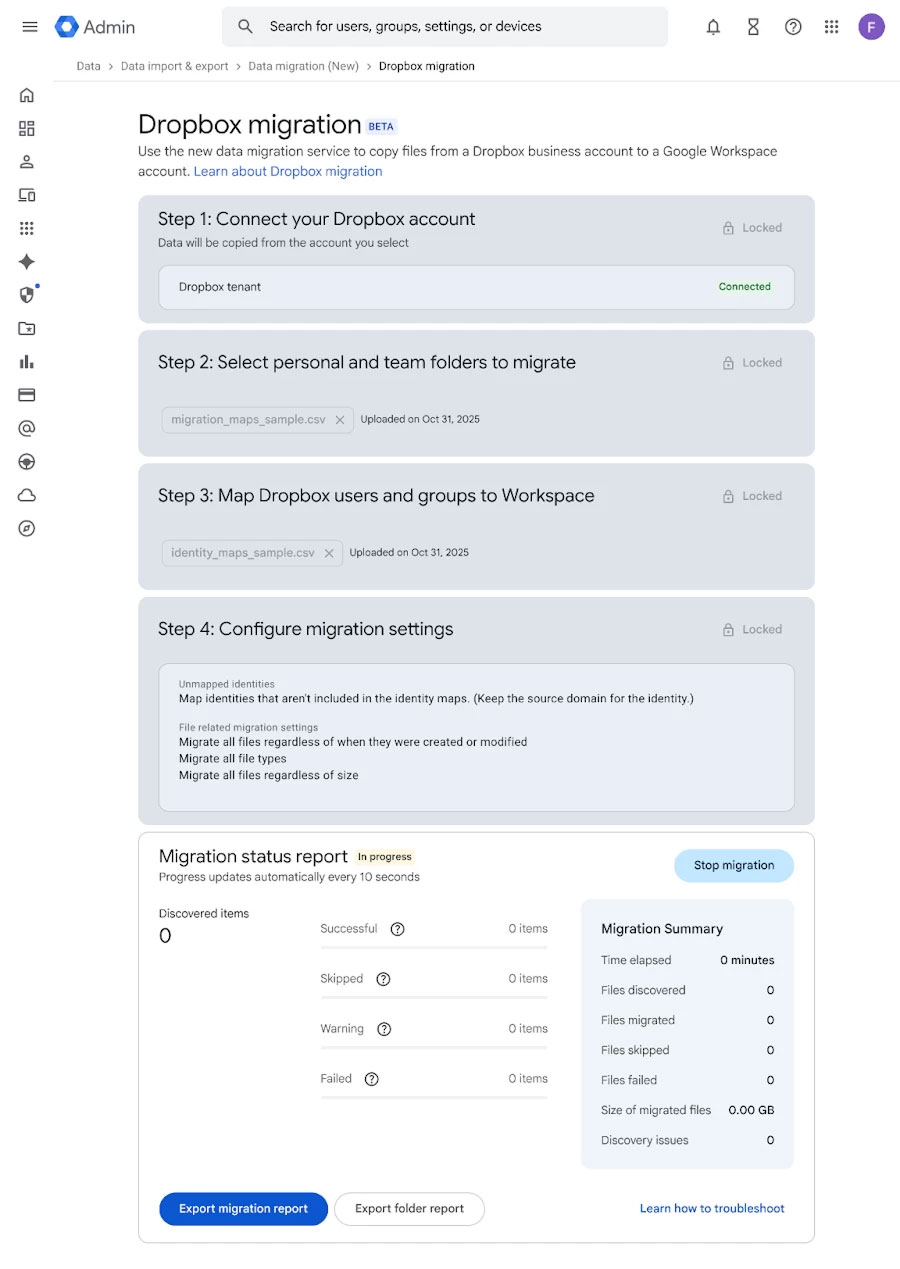
The core of the migration process lies in Setting up CSV files To identify the data to be migrated and user mapping. Specifically, You should create a CSV file that specifies which Dropbox folders will be copied, along with a second file to link user accounts between the two platforms. In the folder mapping file, the column Source DropboxValue Contains the email address of the individual user or group folder path, while Target Drive FolderIDSpecifying the destination Drive folder. The column Target GUserWill be populated with Workspace email addresses to identify who owns the data after migration. The identity mapping CSV file is simpler, simply connecting the Dropbox email to the corresponding Google Workspace email.
The new feature is rolling out now to multiple Google Workspace Plans, including Business Starter, Standard, Plus; Enterprise Starter, Standard, Plus; Essentials Starter, Enterprise Essentials, Enterprise Essentials Plus; Education Fundamentals, Standard, Plus; and Nonprofits. Google says the update may take up to 15 days from announcement to appear in the entire admin console.
With the addition of support for Dropbox, Google is rounding out its data management ecosystem, making it easier for business users to consolidate and operate on Drive without the need for third-party tools.
FAQ
What should you know about Dropbox to Google Drive?
In practical terms, Google is expanding its Data Migration Service, allowing you to move files, folders, and permissions from Dropbox to Google Drive.
Why does Dropbox to Google Drive matter?
The article highlights that how to perform data migration: Access the Google Admin Console , follow the path: Menu → Data → Data Import & Export → Data Migration (New) Connect your Dropbox Business account using your Team Administrator credentials.
What is the main takeaway?
The main takeaway is that with the addition of support for Dropbox, Google is rounding out its data management ecosystem, making it easier for business users to consolidate and operate on Drive without the need for third-party tools.
Related Articles
 How to Delete Files and Folders on Dropbox3 minutes read
 How to Use Dropbox Transfer to Send Files Online5 minutes read
 How to Share Files and Folders in Dropbox: Step-by-Step6 minutes read
 Dropbox Transfer - How to Transfer Large Files Very Quickly Across the3 minutes read
 How to Share Files and Folders on Google Drive2 minutes read
 How to Transfer Files from Computer to iPad: Complete Guide10 minutes read
Reader Comments 0
Sign in with email or Google to join the discussion.