Table of Contents
Evernote's appeal changed as its free-plan limits tightened, subscription pricing increased, and older apps were retired. For someone who used it as a free notebook across several devices, those changes could make the service less convenient or harder to justify.
That does not establish a single cause for changes in its user base, nor does it mean the current product has stopped improving. The useful question is how its documented changes affect the way you take notes.
The free plan became more restrictive
Evernote's current plan comparison lists Free with up to 50 notes, one notebook, and one connected device. That is a different proposition from a general-purpose archive used across a phone, tablet, and computer.
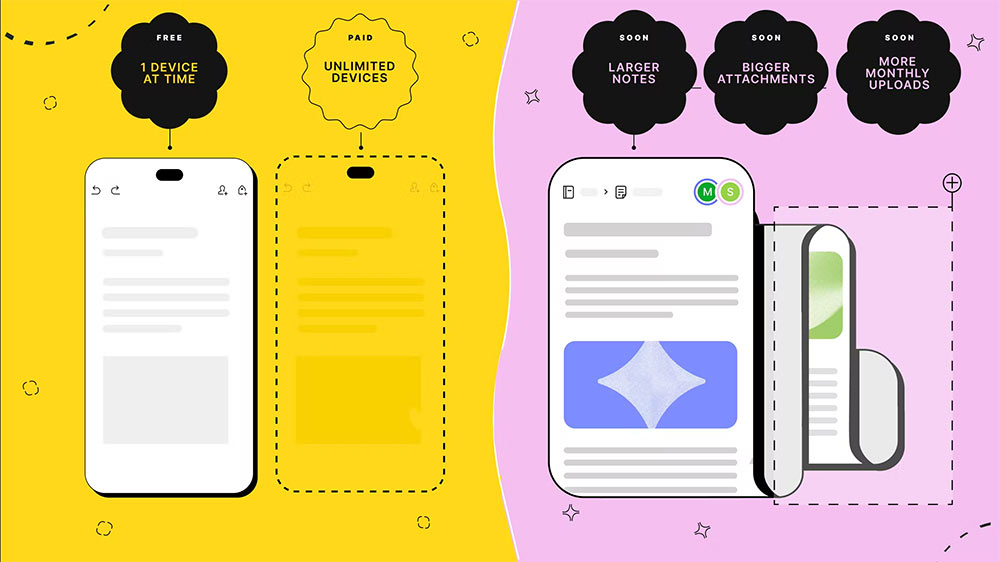
Evernote's August 2024 announcement documented the move to one connected device for Free accounts. If you reach the limit, follow the account's device-management process; the prompt does not by itself mean your notes have disappeared.
Consider the limits together. A small note allowance matters to someone collecting years of research, while a device limit matters to someone who switches between a desktop and phone. Neither restriction proves that every user needs a paid plan, but both can change the value of staying.
The transition away from legacy apps disrupted familiar workflows
The version 10 redesign changed the application experience, and the retirement of legacy clients ended the option of staying indefinitely with an older workflow. Evernote's legacy-client help page gives March 26, 2024 as the decommissioning date.
For a long-time user, a redesign should be evaluated against the features they actually rely on: search, attachments, capture, offline access, and export. Reports about early version 10 problems are not a reliable test of every current release. Try your own representative notes before deciding whether today's app meets your needs.
Privacy communication affected trust
In December 2016, Evernote announced a privacy-policy change and then said it would not implement the announced changes after feedback. The company's updated announcement records that reversal.
It is inaccurate to treat the withdrawn proposal as a description of current access to notes. Read the current privacy policy for the conditions that apply now, especially before storing sensitive material.
Price changes made alternatives worth comparing
Evernote publicly announced subscription increases in 2023. Historical price tables should not be presented as today's renewal quote: billing can vary by plan, market, taxes, and subscription channel.
Compare your actual renewal cost with the functions you use. Another app may be a better fit for simple text, while a user relying on a large searchable archive may value continuity more highly. Our Evernote alternatives overview is a starting point, not a substitute for testing a migration.
Check your notes before switching
- Test search and attachments on the current app and your required devices.
- Review the plan limits and price shown for your own account.
- Export a small notebook and test how the destination handles formatting, tags, links, and attachments.
- Keep an accessible backup until you have checked the migrated notes.
Evernote's history explains why some users reassess it. Your decision should rest on current behavior and your archive, rather than unsupported download statistics or assumptions about the company's internal decisions.
Related Articles
 Learn about Notion - the Evernote alternative note application
 Professional note-taking software for Windows - Evernote
 6 AI Note-Taking Apps for Meetings, Study, and Personal Notes
 How to use Evernote as a learning tool
 9 tricks to use Evernote on iOS and Android mobile devices
 Evernote is about to enter the smart wearable device market
Reader Comments 0
Sign in with email or Google to join the discussion.