Table of Contents
This updated guide explores Apple mail still beats Gmail on iPhone with practical details, clear explanations, and useful takeaways. If you're using an iPhone, Apple Mail is not only the default app, it is the better choice. While Gmail has many features, Apple Mail offers what's really needed.
4. Stronger Focus on Privacy
Apple has made privacy a cornerstone of the iPhone experience, and that commitment is evident in Apple Mail. From blocking invisible tracking pixels to hiding your IP address, the app silently puts up shields that most users do not even realize. Its privacy protections prevent advertisers and marketers from silently tracking your behavior just because you opened an email.
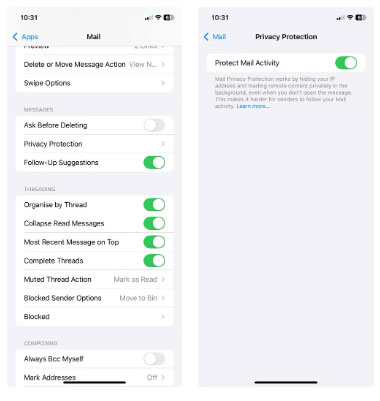
Things work a little differently with Gmail. Google 's business model revolves around data, and while it does not read your emails like it used to, it still collects many information about how you use the service. On iOS, Gmail does not have the same robust privacy controls that Apple Mail offers by default.
This does not mean Gmail isn't secure—but it does mean Apple Mail is more private right out of the box. You do not have to dig through settings or enable extra features. it is already looking for you, and on a personal device like your iPhone, that kind of invisible protection goes a long way.
3. Better Performance and Battery Life
There's something subtle but satisfying about using an app that does not drain your battery or slow down your phone - and Apple Mail strikes that balance. Because it is built directly into iOS, it is optimized to run efficiently in the background. You will not notice it hogging resources or draining your battery percentage while you check for new messages.
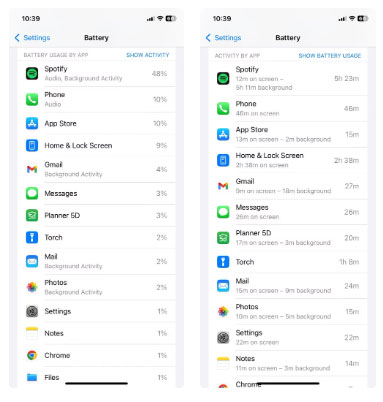
Gmail, on the other hand, has a bit more issues. It runs as a third-party app, which means it has to do many behind-the-scenes work just to update. That can lead to slower performance, especially if you have many email or multiple accounts connected. And while it is not a battery hog, it is certainly not the most efficient option.
Just like how Chrome uses more battery on iOS than Safari, the difference isn't always noticeable. But it adds up over time. If you're someone who checks your email frequently or leaves it open throughout the day, Apple Mail will run smoother, quieter, and be kinder to your battery.
2. VIP Contacts Are Really Useful
Apple Mail's VIP feature is one of those underrated tools that, once you start using it, you'll feel like you cannot do without. It lets you mark certain people (your boss, your most important partners, or your clients) as VIPs. Emails from these contacts will automatically be filtered into a dedicated inbox, and more importantly, they'll trigger special notifications so you never miss a thing.
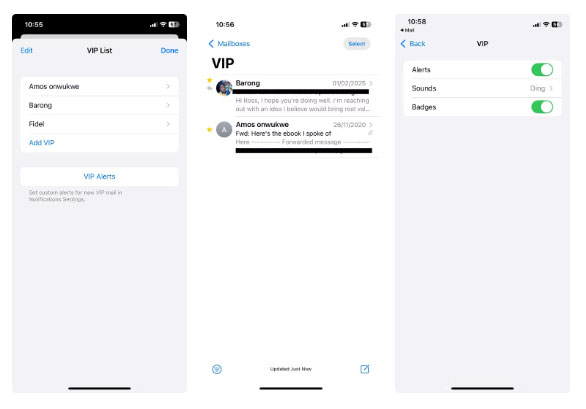
This is especially helpful when your inbox is flooded with newsletters, shipping updates, and random subscriptions. Instead of having to wade through a sea of messages, Apple Mail lets you focus on what really matters. And since it is a native feature, it is built seamlessly into iOS. You can view VIP emails on your lock screen, set custom notification sounds, and even prioritize them in Focus mode.
Sure, you can use some Gmail tricks and hacks to emulate this feature, but it requires more manual setup and lacks the elegance and immediacy of Apple Mail's VIP system. And let's face it: When something is hidden behind many taps and filters, you're less likely to use it.
1. Apple Mail Works Better with iPhone
If you've ever wondered why Apple Mail feels smoother on your iPhone, there's a good reason: it is built for that purpose. Unlike Gmail, which was essentially ported from a more Android-centric experience, Apple Mail is built directly into iOS. That means it is designed to work alongside the operating system, not just exist alongside it.
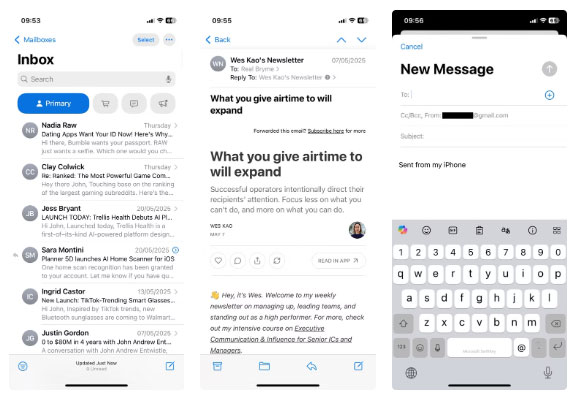
Everything from sharing emails to attaching files from iCloud feels effortless in Apple Mail. You do not encounter the stutters or awkward transitions that plague third-party apps like Gmail. Want to use Siri to send an email or check your inbox? Apple Mail responds instantly. Even simple actions like swiping on a notification to archive a message are smoother.
And then there's the design consistency. Apple Mail follows iOS design guidelines exactly, meaning its interface looks and works the way you expect it to on an iPhone. Gmail, despite its recent design update, still feels like an outsider. Functional, sure, but not quite as familiar.
Gmail tries to blend in with the iPhone. Apple Mail was born there. The difference is in how it handles privacy, contacts, and battery efficiency. it is cleaner, more private, and more streamlined on the iPhone. If you haven't tried it, you're missing out on the email experience your phone was really built for.
FAQ
What is the main takeaway about Apple Mail Still Beats Gmail on iPhone?
The key is to understand the core idea, compare the available options, and apply the practical guidance that matches your situation.
What should beginners know about Apple Mail Still Beats Gmail on iPhone?
Start with the essential steps and terminology. Avoid changing advanced settings until you understand how they affect performance, privacy, cost, or compatibility.
How can I use this information in practice?
Follow the relevant section in order, test one change at a time, and confirm the result before moving to the next step or recommendation.
Related Articles
 The Beats Headsets Are the Best in 201917 minutes read
 The First Ad of the Couple 'Apple & Beats'3 minutes read
 minutes read
 How to Set up Gmail with Outlook, Apple Mail and Other Mail3 minutes read
 How to Change the Apple Mail Font on iPhone3 minutes read
 Apple Will Lay Off 200 Beats Employees3 minutes read
Reader Comments 0
Sign in with email or Google to join the discussion.