Table of Contents
Apple’s AirTag (2nd generation) is a focused upgrade to the original 2021 tracker. It keeps the same dimensions, replaceable CR2032 battery, IP67 rating, Find My network support, and accessory compatibility. The reasons to choose the newer model are easier nearby finding: longer Precision Finding range, expanded Bluetooth range, a louder speaker, and Precision Finding from compatible Apple Watches.
Apple calls the product “AirTag (2nd generation)” rather than AirTag 2, although both names are commonly used. The company introduced it on January 26, 2026 at the same U.S. launch prices as the original: $29 for one and $99 for four. Current prices and availability vary by market and retailer.
AirTag generations compared
| Feature | Original AirTag | AirTag (2nd generation) |
|---|---|---|
| Introduced | 2021 | 2026 |
| Size | 31.9 mm diameter; 8.0 mm high | 31.9 mm diameter; 8.0 mm high |
| Weight | 11 g | 11.8 g |
| Ultra Wideband | Apple U1 chip | Apple-designed second-generation Ultra Wideband chip |
| Precision Finding range | Baseline | Up to 50% farther with supported iPhones, according to Apple |
| Bluetooth | Proximity finding | Updated chip with expanded finding range |
| Apple Watch Precision Finding | Not supported | Series 9 or later and Ultra 2 or later; no Apple Watch SE support |
| Speaker | Built-in speaker | 50% louder; Apple says it can be heard from up to twice as far |
| Battery | User-replaceable CR2032 | User-replaceable CR2032 |
| Water and dust resistance | IP67 under IEC 60529 | IP67 under IEC 60529 |
| Accessories | Original AirTag size | Same form factor; existing AirTag holders remain compatible |
| NFC Lost Mode tap | Supported | Supported |
| U.S. launch price | $29 single; $99 four-pack | $29 single; $99 four-pack |
Apple’s launch announcement provides the range and loudness comparisons. Its second-generation technical specifications confirm the dimensions, weight, battery, resistance rating, and compatibility notes.
Precision Finding reaches farther
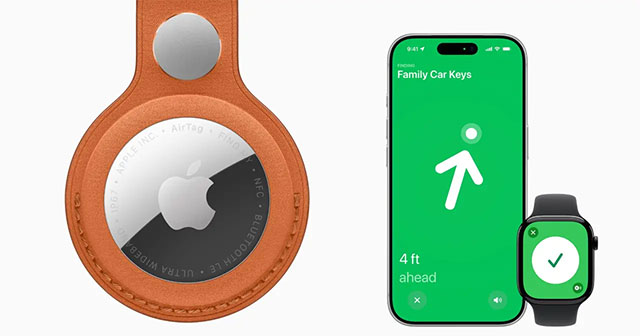
The major hardware change is Apple’s second-generation Ultra Wideband chip. Precision Finding combines on-screen direction, estimated distance, sound, and haptic feedback to guide a user to a nearby AirTag. Apple says the second-generation model can provide that guidance from up to 50% farther away than the original.
The improved Precision Finding range requires AirTag (2nd generation) paired with an iPhone Air or iPhone 15 or later, excluding iPhone 16e, and availability varies where Ultra Wideband is restricted. The updated Bluetooth chip also increases the range at which the item can be located, although Apple does not publish a universal distance for Bluetooth because walls, interference, and other conditions affect it.
You can use Precision Finding on Apple Watch
The new model can be located from Apple Watch Series 9 or later or Apple Watch Ultra 2 or later. The watch must run watchOS 26.2.1 or later. Apple Watch SE models do not support this feature.
This is useful when the paired iPhone is in a bag or another room: open Find Items on the watch, choose the AirTag, and use the direction and distance guidance. Apple’s Apple Watch Precision Finding instructions list the current requirements.
The speaker is easier to hear
Apple redesigned the internals and says the new AirTag is 50% louder, making it audible from up to twice as far as the previous generation in its testing. The new chime and greater output should help with an item buried under cushions or inside luggage, although surrounding material and background noise still affect what you hear.
The original and new models both let you play a sound in Find My. Our guide to playing a sound on an AirTag explains the basic control.
Design, battery, and accessories stay familiar
Both generations measure 31.9 mm across and 8.0 mm high. The newer model is 0.8 g heavier, a difference most users will not notice. Because the external form factor is unchanged, cases, loops, mounts, and key rings made for the original AirTag should fit the second generation.
Both use a user-replaceable CR2032 coin cell. Press the metal cover, turn it counterclockwise, replace the cell with the positive side facing up, and reinstall the cover. Some CR2032 batteries with bitterant coatings may not work reliably with AirTag; check for the confirmation sound after replacement. For the full procedure, see how to set up and replace an AirTag battery.
Both also retain an IP67 laboratory rating: up to 1 metre of fresh water for up to 30 minutes under the test standard. Water resistance is not permanent and can decline with wear, so IP67 should not be treated as permission to submerge the tracker deliberately.
What the teardown changes show
The following teardown video shows differences in the circuit board, speaker assembly, battery contacts, internal markings, and packaging. These observations help explain how Apple increased speaker output while retaining the same exterior, but they are not user-serviceable upgrades.
Opening or modifying an AirTag beyond the normal battery cover can damage it and compromise water resistance. A more securely attached speaker component should also not be treated as proof that unwanted-tracking protections are impossible to defeat; the safety system depends on alerts, changing identifiers, sound, and cross-platform detection.
Software requirements
Apple’s current support page requires an iPhone with iOS 26.2.1 or later to add the second-generation AirTag; supported iPads require iPadOS 26.1 or later. An Apple Account, iCloud sign-in, Bluetooth, Location Services, and Find My are also required. Keep the paired device current because AirTag support arrived through system updates.
The original model works with older Apple hardware and software, making it easier to reuse with an older iPhone. If your phone cannot run the software required by AirTag (2nd generation), confirm compatibility before buying.
Find My network and item sharing are not exclusive upgrades
Both AirTag generations can use Apple’s crowdsourced Find My network when outside direct Bluetooth range. Both support Lost Mode and an NFC tap that can show owner-provided contact information. They also work with Find My item sharing features available in current Apple software.
The newer AirTag integrates with Share Item Location, which lets an owner temporarily share a lost item’s location with a trusted third party such as a participating airline. This is a software and service feature rather than a reason by itself to replace every original AirTag.
Should you upgrade?
- Choose the second generation when buying new, particularly if you have a supported recent iPhone or compatible Apple Watch and want the best nearby-finding experience.
- Upgrade an existing tracker if you regularly struggle to hear it, need longer Precision Finding range, or want wrist-based guidance.
- Keep the original if it remains reliable and the Find My network, sound, and existing Precision Finding already meet your needs. Battery replacement restores power but does not add the new range.
- Do not buy either for tracking a person or pet. Apple designs AirTag for objects and includes unwanted-tracking alerts. Android users can learn about those alerts in our guide to AirTag detection on Android.
The second generation improves the moments when an item is nearby but difficult to pinpoint. It does not replace GPS, add cellular service, or change the basic Find My network model, so original AirTags remain useful for many owners.
Related Articles
 Get the Most Out of the Convenience of Apple Airtag5 minutes read
 How to Locate Airtag Correctly on iPhone 11 and iPhone 123 minutes read
 Instructions on How to Use AirTag: Main Insights8 minutes read
 How to Play Audio on Airtag3 minutes read
 These Are the Features That Will Be Available in Airtag 24 minutes read
 How to Share Airtag with Others on iPhone3 minutes read
Reader Comments 0
Sign in with email or Google to join the discussion.