Table of Contents
6 Threats That Incognito Mode Can't Protect You from brings together practical options worth considering. Below, you'll find clear explanations, useful context, and tips for deciding which choices best match your needs.
Key Takeaways
- Review your internet activity is not completely private to your ISP.
- Explore others can see your downloaded data.
- Understand network administrators can still monitor your browsing activity.
6. Your Internet Activity Is Not Completely Private to Your ISP

Private browsing doesn't hide your activity from your Internet Service Provider (ISP). Your ISP can still track the websites you visit, when you visit, and how long you stay because everything you do online is routed through their servers. So they can track your browsing habits if they want to.
So how do you protect yourself? One simple and effective option is to use a VPN (virtual private network). It encrypts your internet traffic and routes it through a secure server, making it difficult for your ISP to track your activity. However, VPNs have limitations and risks, so you need to be aware of them.
5. Others Can See Your Downloaded Data
It's saved to your device just like any regular download when you download a file during a private browsing session. That means that even after you close your incognito window, the files are still accessible on your computer. Unless you manually delete them, anyone using your device can view, open, or move them, putting your sensitive data at risk.
The good news is that your browser won't record these downloads in your history. However, if you're using a public or shared device, you'll need to manually delete these files when you're done. Consider encrypting or password-protecting it to prevent unauthorized access if you need to keep a large downloaded file on a shared device.
4. Network Administrators Can Still Monitor Your Browsing Activity
Do you use private browsing mode at work, school, or on public Wi-Fi and think your activity is hidden? Unfortunately, that's not the case. Network administrators, including your IT team, can still track what you do online, even in private mode. So how can you stay off their radar? As mentioned earlier, an easy solution is a VPN (virtual private network).
A VPN creates an encrypted tunnel between your device and the Internet, masking your activity. In that case, you can try the Tor Browser, which routes your traffic through several encrypted nodes to help maintain privacy. However, VPNs are often blocked on such networks. Alternatively, you can use the Brave browser's privacy mode with Tor.
3. Browser Extensions May Collect Your Data
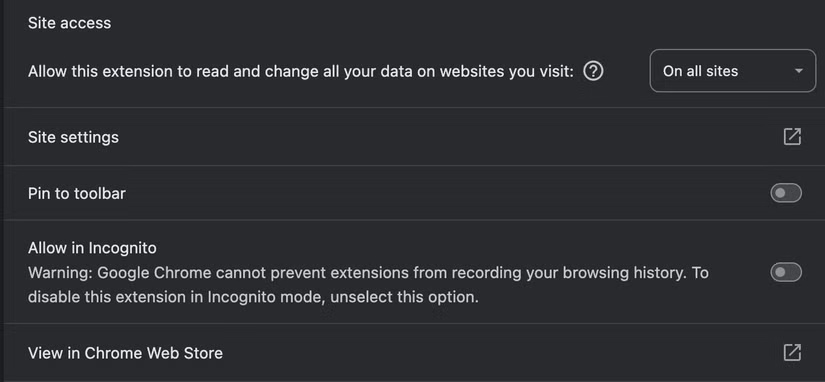
By default, browser extensions are disabled during private browsing sessions — but you can choose to enable them. They can collect data about the websites you visit and your actions if you've allowed certain extensions to run in private mode. So even if you think your activity is private, these extensions can still track you in the background.
In Chrome, you can see which extensions are running in private mode by clicking the Extensions icon near the main menu. Open the Extensions page, click Details for the extension you want to restrict, and turn off the setting that allows extensions to run in Incognito mode. This helps you stop extensions from running. You can easily manage this permission in other browsers.
2. Incognito Mode Doesn't Protect You from Malware
Many people believe that they are completely protected from online threats when you first start using Incognito mode. But if you think that, you are wrong. Incognito mode doesn't protect you from malicious websites, risky downloads, or harmful scripts. Your device will be just as vulnerable as it would be in a regular browsing session if you interact with dangerous content.
That's why you should follow all standard security precautions when browsing privately. Scan suspicious files and links with tools like VirusTotal, keep malware protection on, and don't disable your browser's built-in security and privacy features. Be as cautious when using private mode as you would when browsing normally!
1. Websites Can Still Track and Identify You
Websites can still detect your IP address and collect device-specific information to build a unique profile of you when you browse in private mode. This means you can still be targeted with ads. Your activity can still be associated with your account or profile if you log in to accounts like Google or Facebook while in Incognito mode.
You can minimize it by using privacy-focused browsers like Brave while it's hard to eliminate this type of tracking. Also, don't log in to your main account when browsing in private mode. For instance, if you just want to watch a YouTube video or look at your Facebook or Instagram profile, doing so without logging in won't affect your main account.
There you have it! These are some of the major threats that private browsing mode doesn't protect you from. Now you have a better understanding if you had any misconceptions about being completely protected. Follow the tips we've shared to protect your data, privacy, and security. They do help to greatly reduce them while these precautions don't eliminate all risks.
Final Thoughts
The most reliable way to handle threats that incognito mode can't protect you from is to follow the process in order, verify each important setting, and test the result before moving on. Use the guidance above as a practical reference, then adjust the details for your device, software version, or specific goal.
FAQ
What should I know first about Threats That Incognito Mode Can't Protect You from?
Incognito mode isn't as private as you might think.
How do I get the best results with Threats That Incognito Mode Can't Protect You from?
Use current software or equipment, follow the steps in order, review the recommended settings, and test one change at a time so you can identify what improves the result.
What should I do if Threats That Incognito Mode Can't Protect You from doesn't work as expected?
Check compatibility, permissions, connectivity, and version-specific settings. Restart the relevant device or app, then repeat the process carefully before trying a more advanced fix.
Related Articles
 Simple Tips to Help You Stop Using Incognito Mode on YouTube7 minutes read
 How to Enable Incognito Mode: Step-by-Step Guide9 minutes read
 Incognito Mode in the Browser Is Not as Safe as You Think8 minutes read
 Google Maps Adds Incognito Mode to the Incognito Mode3 minutes read
 Secrets Behind Google Incognito Mode (Incognito)4 minutes read
 Chrome's Incognito Mode Is Not as Discreet as You Think3 minutes read
Reader Comments 0
Sign in with email or Google to join the discussion.