Table of Contents
Explore 5 must-have features when buying a new work monitor, including the key concepts, practical examples, important considerations, and useful guidance.
When shopping for a secondary monitor for my home office, there are a few things I really look for that make a huge difference in comfort, productivity, and usability—and the good news is that they're readily available even on budget models.
Built-in sound when no external speakers are available
If the user's PC does not have separate speakers, and the work does not require high-quality sound, a monitor with built-in speakers will be a stable choice. Especially when the desk is limited in space or the user mainly listens with headphones. Built-in speakers do not take up extra space, convenient when you need to quickly play a video for others to see.
Sure, monitor speakers aren't usually great, and they don't get very loud, but having used a lot of budget models, I've found them to be 'good enough' for simple situations. The important thing is that you don't usually have to pay much extra for this feature, but it's worth checking the spec sheet before you buy.
High refresh rate makes everyday operations smoother
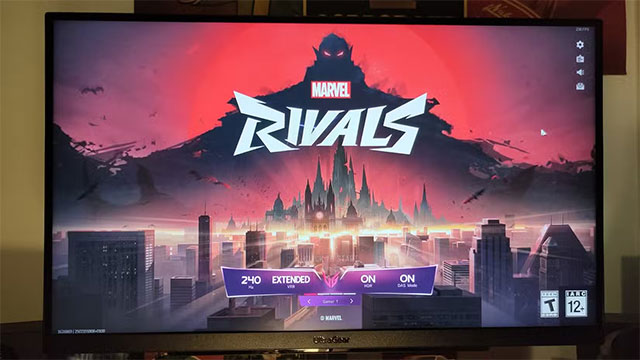
Refresh rate is the number of times the screen refreshes the image in one second. For example, 60Hz means the screen refreshes 60 times per second. The higher the rate, the smoother the motion because more frames are displayed.
Gamers take refresh rates very seriously, but the benefits are also evident in office use like scrolling pages, moving windows, and quick actions. While 60Hz used to be the standard, in recent years even cheap monitors have been offering 90Hz — a 50% improvement.
TÜV Rheinland recommends at least 120Hz to reduce judder and flicker, making it easier on the eyes over extended periods of use. If your budget allows, opting for a higher refresh rate will make for a more pleasant experience, and you can even consider a gaming monitor if you find one at a good price.
Ensure adequate connectivity
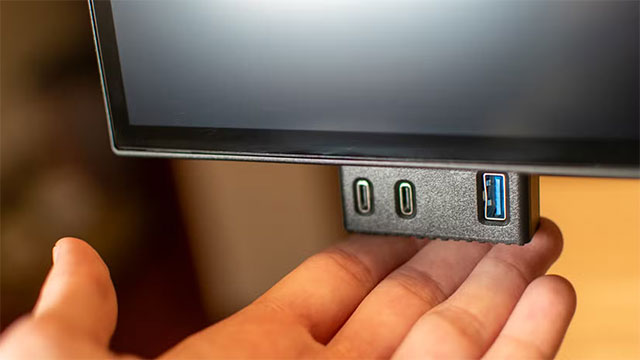
Most monitors today have at least one HDMI port and one DisplayPort, but it's worth checking the specs to be sure. Having both makes it easy to connect multiple devices without constantly unplugging cables. On older machines, having a DVI or VGA port can still be helpful.
If you regularly use one monitor for both your laptop and PC, a monitor with a built-in KVM switch is a must-have. A USB-C port with Power Delivery or Thunderbolt support is also invaluable, allowing you to output video and charge your laptop with just one cable.
Some monitors also feature a passthrough USB-A port that acts as a mini USB hub, making it convenient to quickly plug in a USB drive, mouse, or storage device.
Choose a larger screen, but with the right resolution
A larger screen lets you see more, which increases productivity—but only if the resolution is increased too. If you increase the size without changing the resolution, everything will just get bigger, but you won't be able to see more.
Combining a larger screen size with a higher resolution almost always results in a significant upgrade. If you're using a 24-inch 1080p monitor, you can upgrade to a 27-inch 1440p monitor. If you're already using 1440p, upgrading to a 32-inch 4K monitor will make a noticeable difference. The higher resolution makes text and interfaces sharper thanks to the higher pixel density, making it more comfortable to use for long periods of time.
However, it is also important to consider sitting distance and desk depth, as sitting too close to a large, high-resolution screen can cause eye strain.
VESA support is important
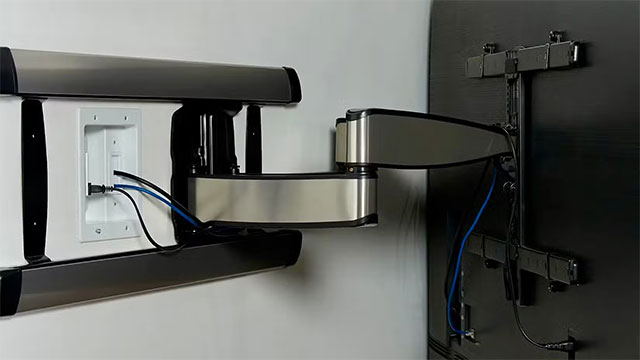
VESA compatibility is often overlooked. VESA is a standard mounting hole size on the back of monitors, the most common being 75×75mm and 100×100mm, but some ultra-wide monitors use even larger sizes.
The most important thing is to check that the monitor supports VESA. Surprisingly, many cheap models or monitors with 'fancy' stands omit this feature.
VESA support allows users to switch to using a monitor arm or wall mount when they want to optimize space. Using an arm not only frees up more desk space, but also makes the work area neater and more beautiful.
Ultimately, a work monitor doesn't have to be expensive or flashy, but it does have to meet some essential criteria. You'll be spending a lot of time in front of it, so make sure it's comfortable and has enough features to support long-term work.
Final Thoughts
Understanding 5 must-have features when buying a new work monitor makes it easier to evaluate the information and apply the most relevant recommendations. Focus on the key points above and verify details that may change over time.
FAQ
What is 5 must-have features when buying a new work monitor?
Explore 5 must-have features when buying a new work monitor, including the key concepts, practical examples, important considerations, and useful guidance.
What key points does this article cover?
The article focuses on Built-in sound when no external speakers are available, High refresh rate makes everyday operations smoother, Ensure adequate connectivity, with practical explanations and examples.
How can you use this information in practice?
Use the explanations to compare options, verify important details, and make a more informed decision. Apply the recommendations that best match your goals and situation.
Related Articles
 Experience Choosing to Buy the Best Computer Monitor23 minutes read
 7 Devices That Work with the Monitor's USB Port8 minutes read
 How to Buy a Computer Monitor That Suits Your Needs7 minutes read
 Screen: 11 Tips for Buying Used Computer Monitors9 minutes read
 Experience Buying Old Computer Monitors12 minutes read
 7 Smart Ways to Use Your Monitor Without a Computer8 minutes read
Reader Comments 0
Sign in with email or Google to join the discussion.