Table of Contents
There's an ecosystem of open-source music streaming apps, all of which are YouTube Music clients, offering ad-free music streaming without the need for registration, login, or cumbersome premium features.
Many people have reached their limits with Spotify. Between the constant price hikes and the annoying AI-generated music, they can't stand the monthly bill anymore. So they've turned to alternatives. Not the familiar Apple Music or YouTube Music, which just swap one subscription for another, but free options.
There's an ecosystem of open-source music streaming apps, all of which are YouTube Music clients, offering ad-free music streaming without the need for registration, logins, or fancy premium features. Each has its own unique style and reason to choose them over Spotify.
OuterTune
A super powerful fork of InnerTune
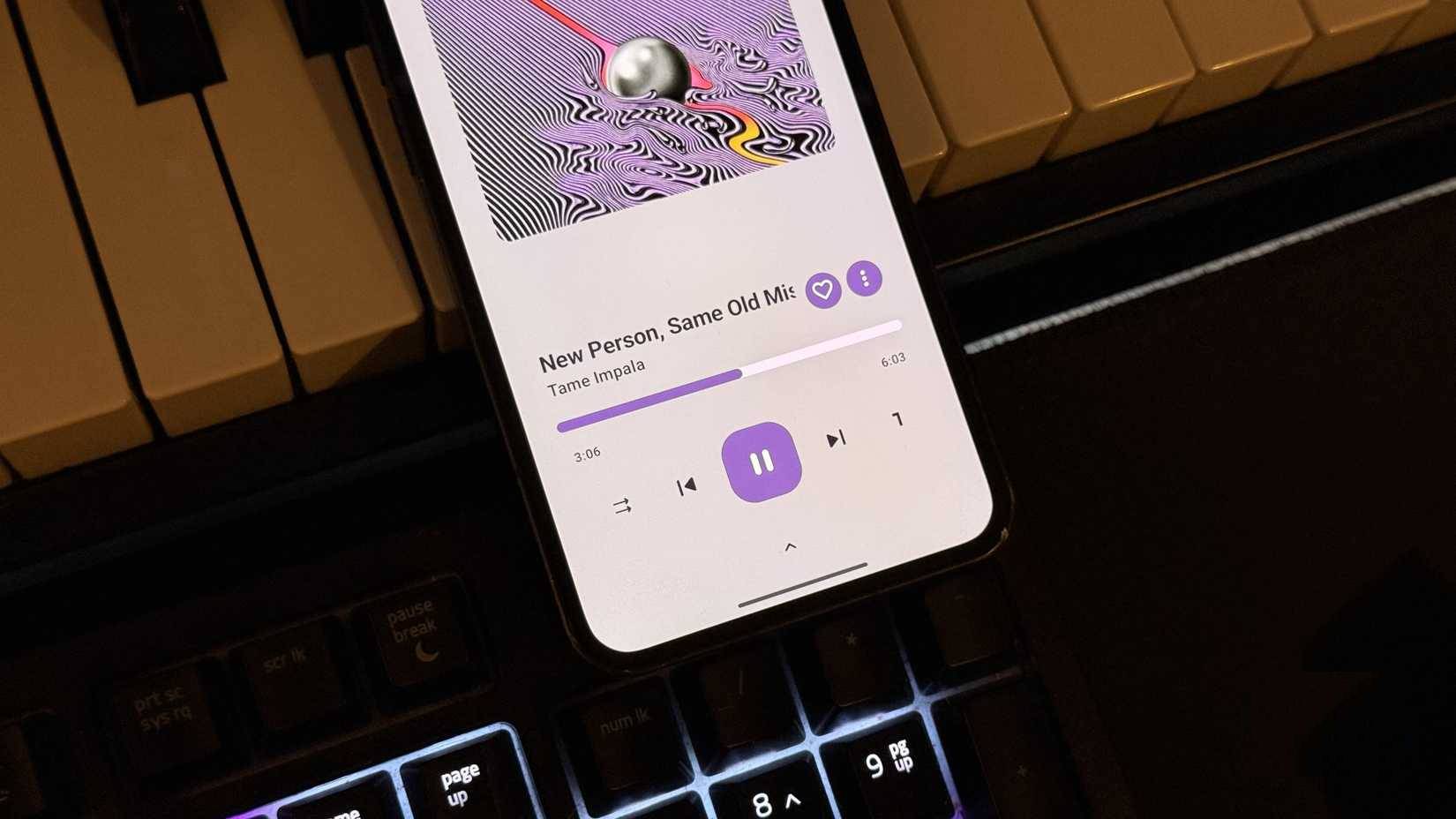
OuterTune is the app that turns many people off YouTube Music subscriptions because it treats local files and streaming tracks the same. You can mix songs on your phone with YouTube Music streams in one seamless, curated library.
Queue management is one of the more convenient features that users like about this app, and if you ever need some useful playlist tips and tricks, you will appreciate its approach. Instead of struggling with a single playlist, it lets you maintain multiple queues that persist even after closing the app. Each queue operates independently, so you can move from one selected playlist to another without losing your place in any of them. If you swipe up on the player screen, you will find detailed tools to rearrange, lock, or merge queues.
ViTune
Easy sidebar navigation
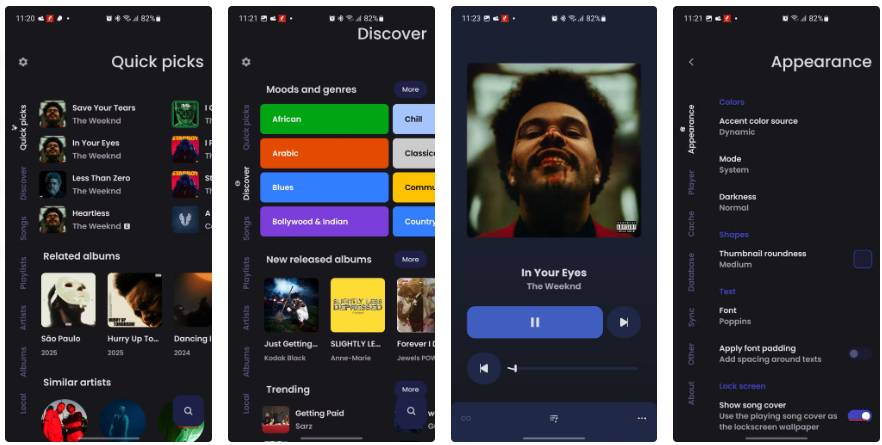
People love ViTune for the way it prioritizes clarity over clutter, organizing everything via a vertical sidebar that makes it easy to access Quick Picks, Discover, Songs, Playlists, Artists, Albums, and Local tabs without getting bogged down in sub-menus. The interface is pretty clean for an app that handles so much content, and you never feel lost navigating between sections.
The main player screen is completely minimalist, simple but focused, with album art in the center and essential playback controls placed below. Interestingly, there isn't even a playback timer displayed next to the progress bar. Three horizontal dots in the bottom right corner show extended options, such as starting a radio station, adjusting speed and pitch, or blacklisting a track.
Kreate
"Brother" of RiMusic
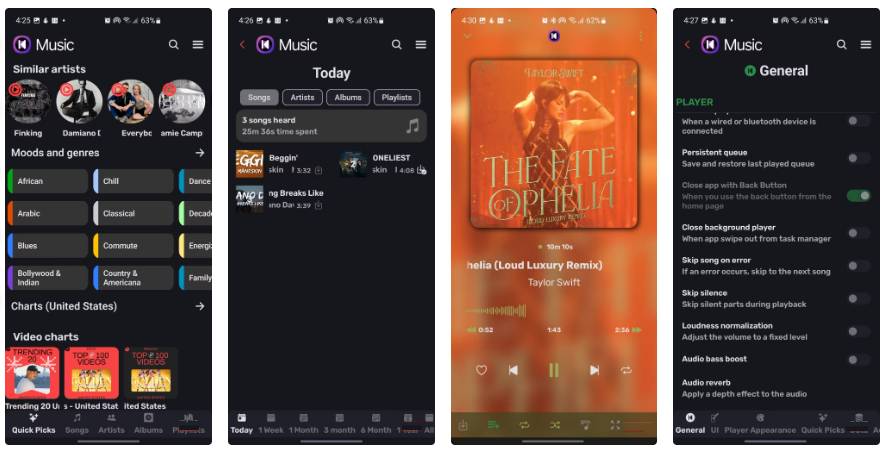
Kreate runs on the RiMusic interface, which means you'll have a bottom navigation bar that contains the standard tabs: Quick Picks, Songs, Artists, Albums, and Playlists. Each of these tabs divides content into filterable sections, making organizing your library feel more like a real chore than a fruitless search.
One interesting feature that caught my eye when I tried this music app was the Statistics page, located in the three-line menu. This page tracks your listening time by day, week, month, and even year, showing you exactly how many minutes you spent on each song. Unlike Spotigraph, which pulls lifetime stats from Spotify, all of Kreate's reports are stored and processed locally.
The music player screen is completely minimalist, with album art taking up the entire screen and controls relegated to a neat strip at the bottom. Tapping the three-dot menu reveals the usual options, like Start radio, Equalizer, and Sleep timer. There's also an Update Button to refresh metadata when YouTube changes content.
Harmony Music
Runs on both mobile and PC
This app isn't significantly different from the ones I've reviewed so far, but it might make you delete Spotify from your phone and PC. Why? Because Harmony Music is the only app that can completely replace Spotify across platforms. The ad-free desktop app alone is enough to make it worthy of this list.
The app offers playlist creation and bookmarking support for both songs and artists/albums, with the ability to import songs, playlists, albums, and artists by sharing YouTube or YouTube Music content. You can control the stream quality, download songs, support languages, and flexibly switch between the bottom and side navigation bars.
Metrolist
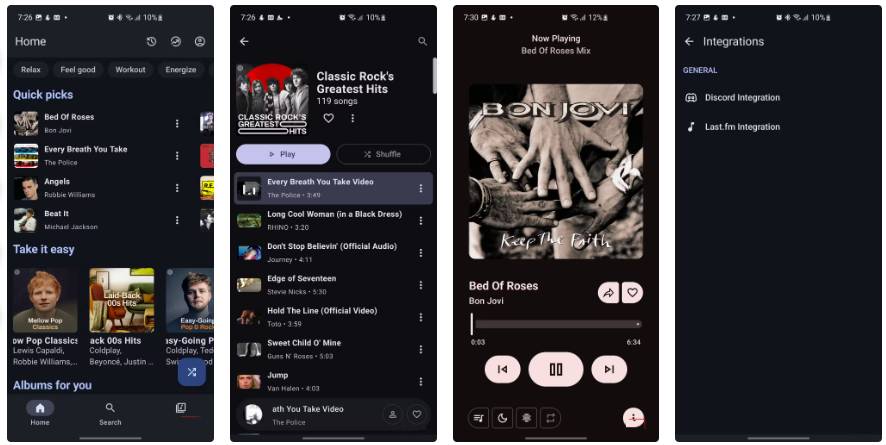
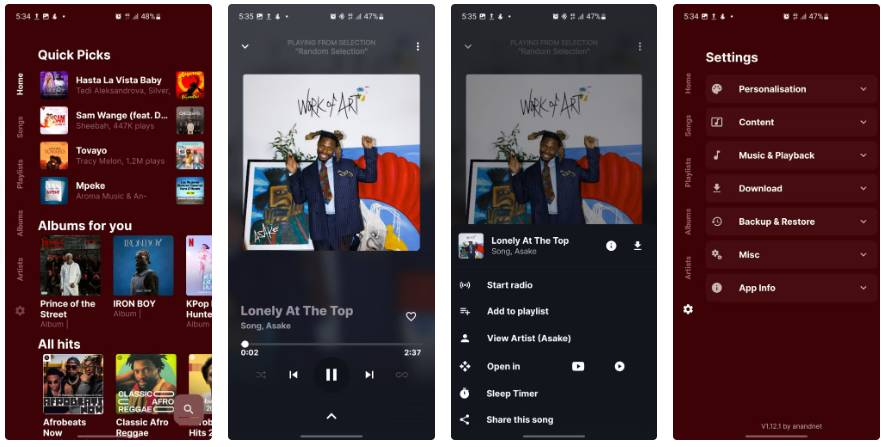
Metrolist takes the top spot in this roundup largely because its interface is so familiar. It mimics the layout of YouTube Music so closely that your muscle memory will immediately kick in. The music player screen emphasizes simplicity, featuring large album art, prominent playback controls that match the album's color scheme, and just enough metadata without visual clutter. Tapping the three vertical dots reveals a bottom panel with essentials like Start radio, Add to playlist, View artist, and Download.
Where Metrolist stands out is its social media integration. Last.fm and Discord connections are available in the Integrations menu, allowing you to review your played tracks or broadcast your listening activity without the need for third-party tools. There's also a Stats page (similar to Kreate) that tracks your listening habits over time, breaking them down over time or at fixed intervals to show you exactly how many songs, artists, and albums you've listened to.
FAQ
What should you know about the options in this guide?
In practical terms, there's an ecosystem of open-source music streaming apps, all of which are YouTube Music clients, offering ad-free music streaming without the need for registration, login, or cumbersome premium features.
Which option is the best choice?
The best choice depends on your priorities, compatibility, budget, and the specific features discussed in the comparison.
What should you compare before deciding?
Compare core features, limitations, ease of use, compatibility, and long-term value before making a decision.
Related Articles
 Why Spotify's AI DJ Feature Can Beat Every Other Music App: Explained7 minutes read
 22 Tips to Improve Your Listening and Streaming Like a Pro on Spotify16 minutes read
 6 Pages to Discover New Music and Find Playlists for Spotify8 minutes read
 5 Reasons Why It's Hard for Many People to Give up Spotify Despite Having6 minutes read
 How to Choose the Right Music Streaming Service for You9 minutes read
 Downloading Spotify in Vietnam, You Can Use Free, Premium Package for VND 59,000/month3 minutes read
Reader Comments 0
Sign in with email or Google to join the discussion.