Table of Contents
Learn how to connect ChatGPT to Apple music with clear steps, practical tips, and troubleshooting guidance for a reliable result.
How to use ChatGPT with Apple Music
Step 1
First, access ChatGPT on your phone, then tap on the Apps section within ChatGPT .
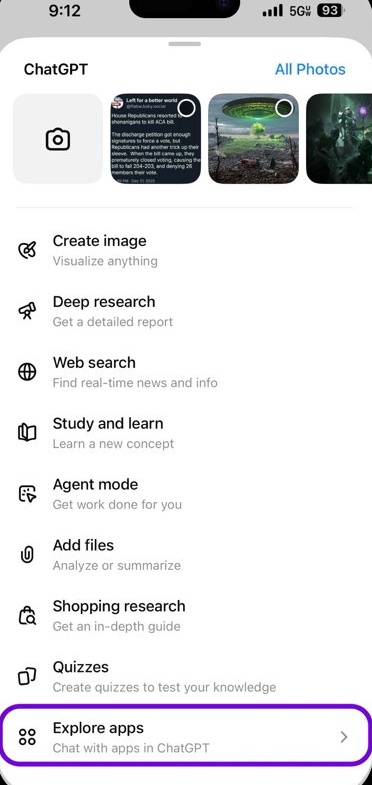
Step 2
Now, select the Apple Music app from the list of available apps, and then sign in to your Apple Music account.
Agree to the access requests that ChatGPT asks .
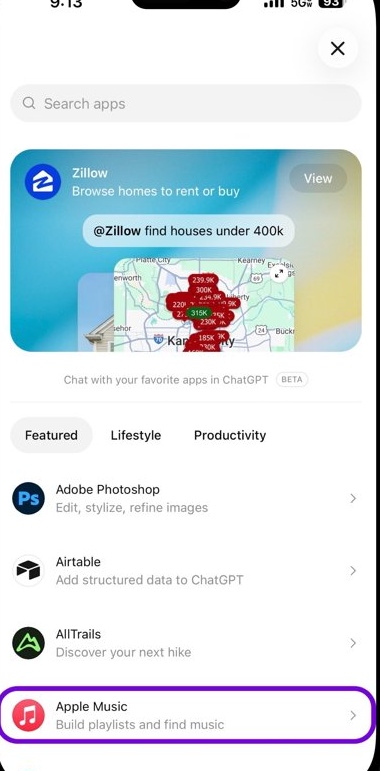
Step 3
Once you've successfully connected Apple Music to ChatGPT, you can go back to searching on Apple Music as usual.
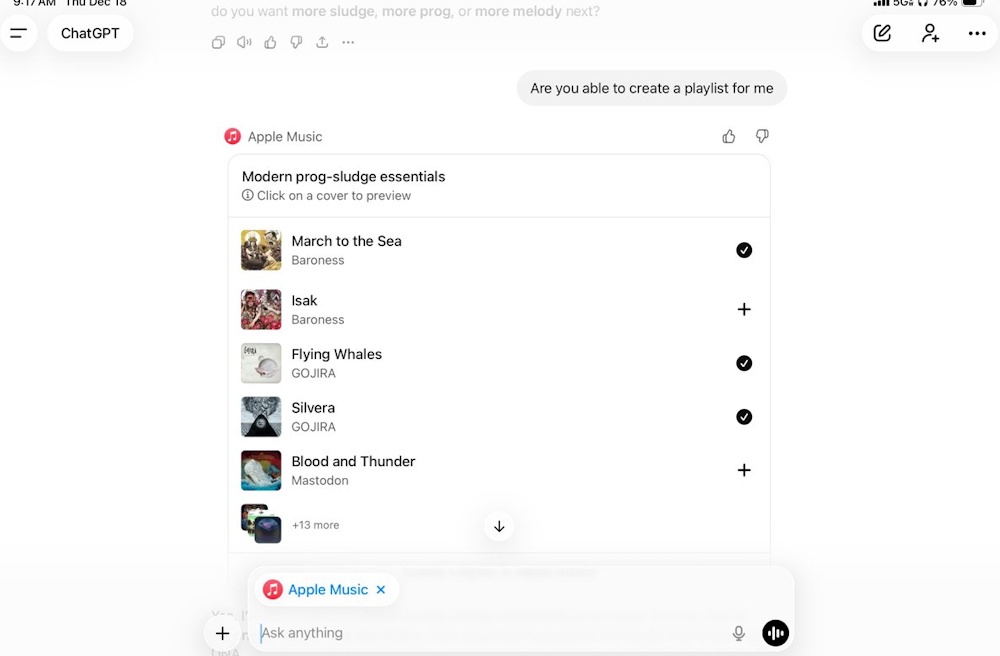
ChatGPT can locate music and save it to your library, while Apple Music continues to handle playback, downloads, and listening history.
You can refine the results by adding context, changing the tone, or narrowing the time period without having to start the search again. ChatGPT cannot view your Apple Music library, playlists, or listening history, as its access is limited to the public Apple Music catalog.
Final Thoughts
Use this guide as a practical checklist for how to connect chatgpt to apple music. Work through the steps in order, verify each result, and adjust the options to match your needs.
FAQ
What do you need before following this How to Connect ChatGPT to Apple Music guide?
Review the required tools, accounts, settings, or materials mentioned in the article. Learn how to connect ChatGPT to Apple music with clear steps, practical tips, and troubleshooting guidance for a reliable result.
What are the main steps for how to connect chatgpt to apple music?
Follow the sections in order, especially How to use ChatGPT with Apple Music, Step 1, Step 2. Complete each step before continuing and verify the result as you go.
What should you do if the process does not work as expected?
Recheck the prerequisites, update the relevant app or service, review the settings, and repeat the step that caused the issue. Use any troubleshooting notes included in the guide.
Related Articles
 How to Create Apple Music Playlists Using ChatGPT4 minutes read
 How to Turn Off Apple Music Connect Feature4 minutes read
 How to Use Shazam in ChatGPT3 minutes read
 How to Pin Music in Apple Music2 minutes read
 Instructions for Installing and Using Apple Music on Android7 minutes read
 6 Small Tricks with Apple Music11 minutes read
Reader Comments 0
Sign in with email or Google to join the discussion.