Table of Contents
Discover why you really shouldn't defragment your ssd and explore the main causes, risks, practical effects, and recommended actions.
But if you're using a PC with an SSD, defragmenting is not only unnecessary, it can actually be harmful to your drive. SSDs work fundamentally differently than HDDs. Old maintenance advice no longer applies.
What is defragmentation?
HDDs scatter your files everywhere
When you save a file to a hard drive, it doesn't always stay in one neat location. The drive stores pieces of that file wherever it finds free space. That space can sometimes be scattered across different physical locations on the spinning platter. This is called fragmentation.
Over time, as you add, delete, and modify files, your HDD becomes increasingly fragmented. The read/write head has to jump around the drive to collect all the pieces of a single file, slowing down access times. Defragmentation rearranges these scattered file pieces into contiguous blocks. It moves the file pieces around so each file is in a continuous location, reducing the distance the read/write head has to travel. This improves performance on HDDs because physical movement takes time.
That mechanical limitation is the reason defragmentation exists. When your storage device relies on moving parts to read data, keeping files in order makes a significant difference. But SSDs don't work that way.
This is why SSDs make defragmentation obsolete and harmful!
Flash memory doesn't care where your files are located
SSDs use flash memory instead of spinning disks. They can access any storage cell at the same time, regardless of its location, so defragmentation doesn't slow them down. In fact, defragmentation doesn't provide any performance benefits on an SSD. Your files can be scattered all over the drive and you won't notice any difference in speed.
Active defragmentation is bad for SSDs. Flash memory cells can only handle a limited number of write cycles before they wear out. Every time you defragment, you force the drive to rewrite a large amount of unnecessary data. This wastes those write cycles for no benefit.
SSDs include wear-leveling algorithms that distribute writes evenly across all cells to maximize lifespan. Defragmentation hinders this process by causing too many writes to certain areas. If you want to prolong the life of your SSD, there are best practices to prevent premature failure, rather than running a tool designed for completely different hardware.
Windows has changed the way it handles drive maintenance
Now it runs TRIM on SSD
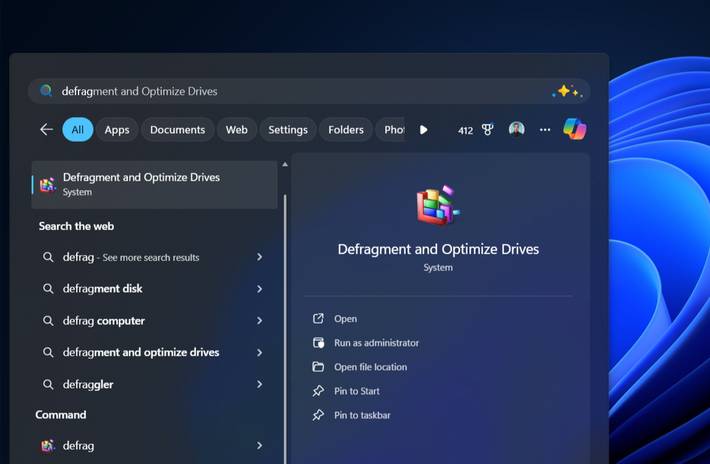
If defragmenting an SSD is bad, why does Windows still include a defragmentation tool? The answer is, it's not what it used to be.
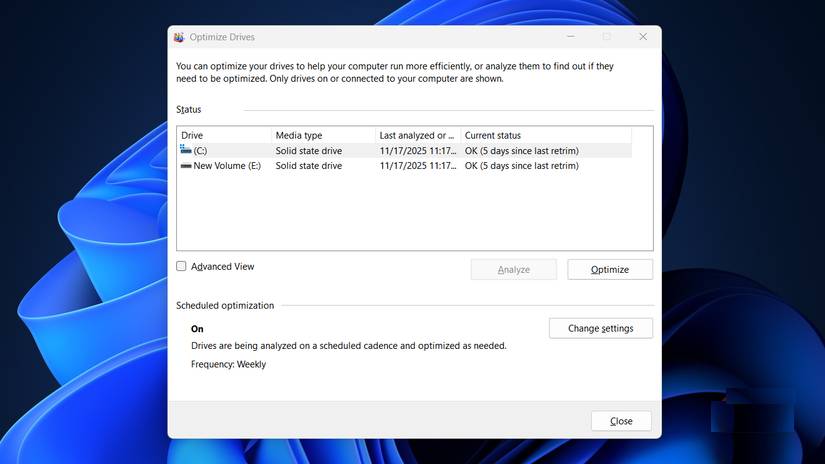
Microsoft has renamed this tool to 'Optimize Drives.' More importantly, it now automatically detects your drive type and applies different maintenance measures based on what you have installed. When you run Optimize on an SSD, Windows doesn't defragment anything. Instead, it executes the TRIM command, which is specifically designed for flash memory.
Here's what TRIM actually does: When you delete a file, the operating system marks those blocks of storage as available, but doesn't erase them immediately. On an HDD, this isn't a problem—the drive can overwrite the old data immediately. But an SSD has to erase a block before writing new data to it, which slows down writes over time. TRIM tells the SSD which blocks contain deleted data so it can erase them during idle time. That way, when you need to write a new file, the drive has clean blocks ready to go without having to erase the old data first. The trade-off is that deleted data can't be recovered—but that's the whole point.
Windows defaults to a weekly schedule for this optimization, which works well for most people. It has 'defragment' in its name because some people still use HDDs in different ways alongside SSDs, but it applies the appropriate maintenance to each type of drive.
Final Thoughts
Understanding why you really shouldn't defragment your ssd makes it easier to evaluate the information and apply the most relevant recommendations. Focus on the key points above and verify details that may change over time.
FAQ
What is why you really shouldn't defragment your ssd?
Discover why you really shouldn't defragment your ssd and explore the main causes, risks, practical effects, and recommended actions.
What key points does this article cover?
The article focuses on What is defragmentation?, HDDs scatter your files everywhere, This is why SSDs make defragmentation obsolete and harmful!, with practical explanations and examples.
How can you use this information in practice?
Use the explanations to compare options, verify important details, and make a more informed decision. Apply the recommendations that best match your goals and situation.
Related Articles
 Why Doesn't Mac Hard Drive Need to Defragment?4 minutes read
 Added the Option to Defragment to the Menu When Right-clicking on7 minutes read
 Defragment the Hard Drive with Disk Defragment2 minutes read
 When and How to Defragment Hard Drives on Windows 10?4 minutes read
 How to Defrag a Hard Drive with the Disk Defragmenter3 minutes readHow to Defragment the Windows 10 Hard Drive4 minutes read
Reader Comments 0
Sign in with email or Google to join the discussion.