Table of Contents
Android users want a browser that is lighter, faster, and smoother. That's where Via Browser, one of the most compact and powerful Android browsers, outperforms Chrome in every aspect, really makes a difference.
If you've been using Chrome for years, especially on Android, it's easy to believe it's the best option out there. It's fast, syncs with your Google account, and comes pre-installed on most phones out of the box. But after a while, bugs start to creep in. Scrolling starts to feel a little sluggish, background processes start to eat up memory, and an ad or two creeps in somehow. Eventually, you have a choice: Tweak Chrome to make it faster, or switch to a better browser.
Android users want a browser that is lighter, faster, and smoother. That's where Via Browser, one of the most compact and powerful Android browsers, outperforms Chrome in every aspect, really makes a difference.
Download from Google Play Store Download from App Store Download from Via
Via Browser removes all the bloat you never wanted on Chrome
Minimalism is not lacking in features.
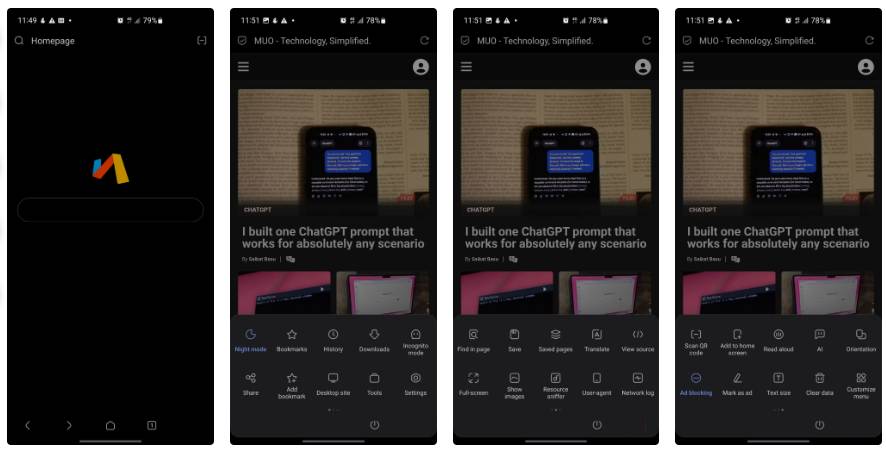
The size difference between the two browsers really says it all. Via is about 2.7 MB, while Chrome is over 200 MB, and that contrast perfectly sums up the long-standing frustrations with modern Chrome. Over the years, Google has built account syncing, background services, recommendation feeds, and tracking systems into it that users never asked for. Yet when you open Via, you're met with a simple black screen with a search bar and logo. That's it! No algorithmic news feed, content recommendations, or login prompts, which is a relief if you're struggling to maintain a less phone-intensive lifestyle.
This simple approach yields noticeable speed gains. Via launches almost instantly, while Chrome takes its time loading background services, syncing data, and waking up all the extra features it needs to run. The difference is even more pronounced on my old backup phone, which only has about 2 or 3GB of RAM. Chrome almost limps there, while Via feels as fast and responsive as it does on a new phone.
You can finally customize your browser
Everything will be exactly as you want it.
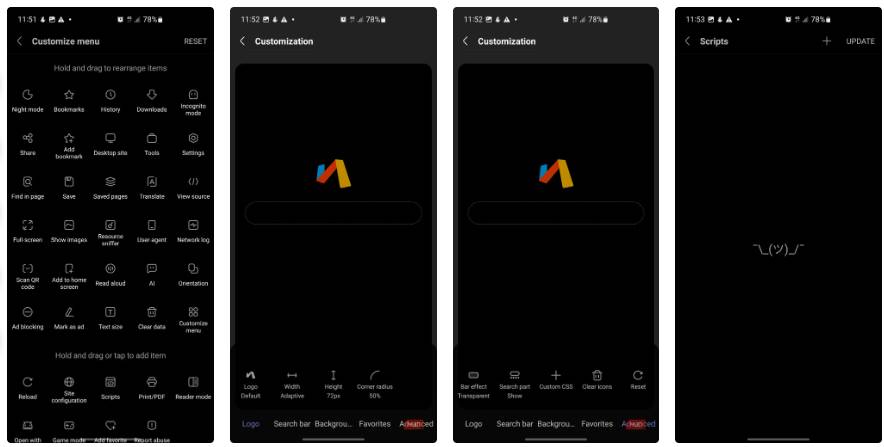
The idea of Chrome customization has always been confusing to many people. The toolbar remains the same, the menus are fixed, and the so-called 'customization options' are basically limited to choosing a theme color. You can't really change how the browser works because Google ultimately decides that for them.
Via turns that entire philosophy on its head. Its 'Customize menu' screen lists every function you can imagine—from common ones like bookmarks and history to more in-depth tools like resource monitoring, network logging, and page debugging. You can rearrange everything to fit your workflow, choosing what's in the main menu and what's not.
There's also script control, which is a much-appreciated feature. Like Chrome, Via has built-in support for enabling/disabling JavaScript globally or on a per-site basis. This is ideal if you're browsing shady content or want maximum privacy. While the answer to the question "Does disabling JavaScript protect you from hackers?" is a bit subtle, it certainly helps mitigate many the risks.
Going back to the homepage differences, Chrome automatically pushes the Google search bar and its 'Discover' news feed unless you dig into the settings to turn it off. Meanwhile, Via greets you with a plain background, a centered search bar, and no unwanted content. You can add shortcuts if you want, but nothing is forced on you.
You no longer provide your browsing data to Google
No more subscriptions to Chrome products
Chrome's approach to privacy seems to always be more in Google's interest than its users'. By default, Chrome syncs your history, passwords, bookmarks, and open tabs to Google's servers. That sounds helpful, but in practice it means your browsing activity goes through Google's ecosystem, feeding advertising data to them.
This is a core part of Google's "Web & App Activity" and how it tracks you. Chrome constantly prompts you to sign in, displays notifications across the interface, and locks certain features down to your Google account.
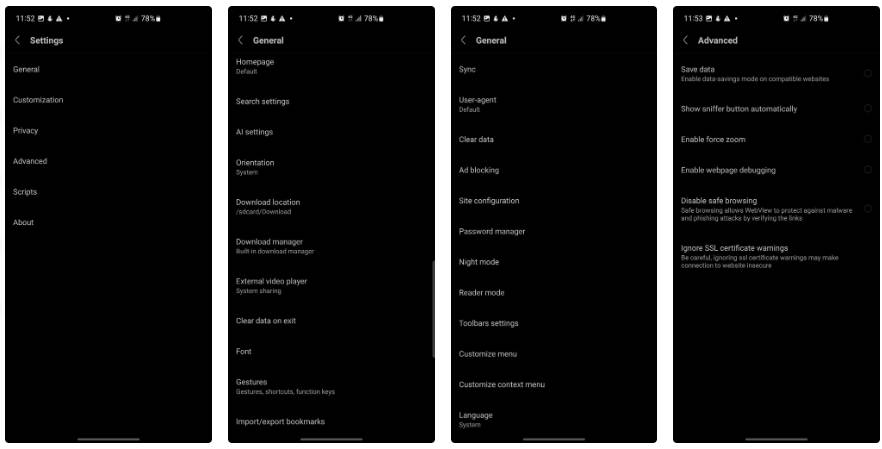
Via avoids most of that. It doesn't require a Google account to use, there's no cloud syncing required, and you mostly store your data locally on your device. The developer emphasizes that it won't push news or forced content. You can also manually export/import your bookmarks and settings.
You'll definitely lose some conveniences by moving away from Google's ecosystem. Passwords don't sync automatically across devices, your browsing history doesn't automatically show up everywhere you go, and you can't open a tab on your laptop that you left running on your phone. But that's better than being tracked on other platforms all the time. Via still offers a built-in password manager with biometric protection, and it's all on your device. It's a much better option.
FAQ
Why Should You Use via Browser Instead of Chrome on Android: Explained?
In practical terms, Android users want a browser that is lighter, faster, and smoother. That's where Via Browser, one of the most compact and powerful Android browsers, outperforms Chrome in every aspect, really makes a difference.
What factors are most important?
The article highlights that that's where Via Browser, one of the most compact and powerful Android browsers, outperforms Chrome in every aspect, really makes a difference.
What is the main takeaway?
The main takeaway is that download from Google Play Store Download from App Store Download from Via Via Browser removes all the bloat you never wanted on Chrome Minimalism is not lacking in features.
Related Articles
 Tips to Help Use Chrome on Android Effectively May Not Know You13 minutes read
 The Best Browser for Android TV8 minutes read
 Top 5 Best Browsers for Android: Explained7 minutes read
 4 Useful Tricks for Chrome Browser on Android5 minutes read
 Google Chrome Browser on Android Has a New Interface, Invite Experience3 minutes read
 Which Browser Is the Fastest on Android: Chrome, Firefox, Samsung4 minutes read
Reader Comments 0
Sign in with email or Google to join the discussion.