Table of Contents
This guide answers "Why Use EXE Installer Instead of Trusting Microsoft Store?" with a clear explanation, practical context, and the details that matter most.
- Should you download desktop apps or Microsoft Store apps?
Why do so many people not trust the Microsoft Store?
When Microsoft first launched its store, it made a lot of promises. Users were told it would be a one-stop shop for safe, easy app downloads. In reality, the experience has been disappointing.
The Microsoft Store is really unreliable. I can't count how many times a download has been stuck in Pending for no reason. Sometimes the store claims that the app is downloading even though it's already installed and running. I've even had to restart my PC to get some of the processes working again. It feels like the Store could crash at any moment.
The user interface is another headache. Sometimes buttons are unresponsive or take a long time to do anything. If you try to pause or resume a download, nothing happens or it takes so long that you wonder if the Store is frozen. Even the basic act of browsing apps can be slow and clunky compared to other app stores.
Sometimes it feels like Microsoft doesn't pay attention to the ongoing issues with the Store. Even in 2025, people are still complaining about stuck downloads, unresponsive buttons, and sluggish interfaces that make the whole experience feel unfinished. People have had trouble with apps from the Microsoft Store, and sometimes it feels like they're testing an unfinished product.
While Microsoft does perform security and compliance checks before releasing apps, most of these checks are automated and focus on basic requirements rather than deep quality control. For something that's supposed to make life easier, the Microsoft Store seems to do the opposite.
Main advantages of EXE installer
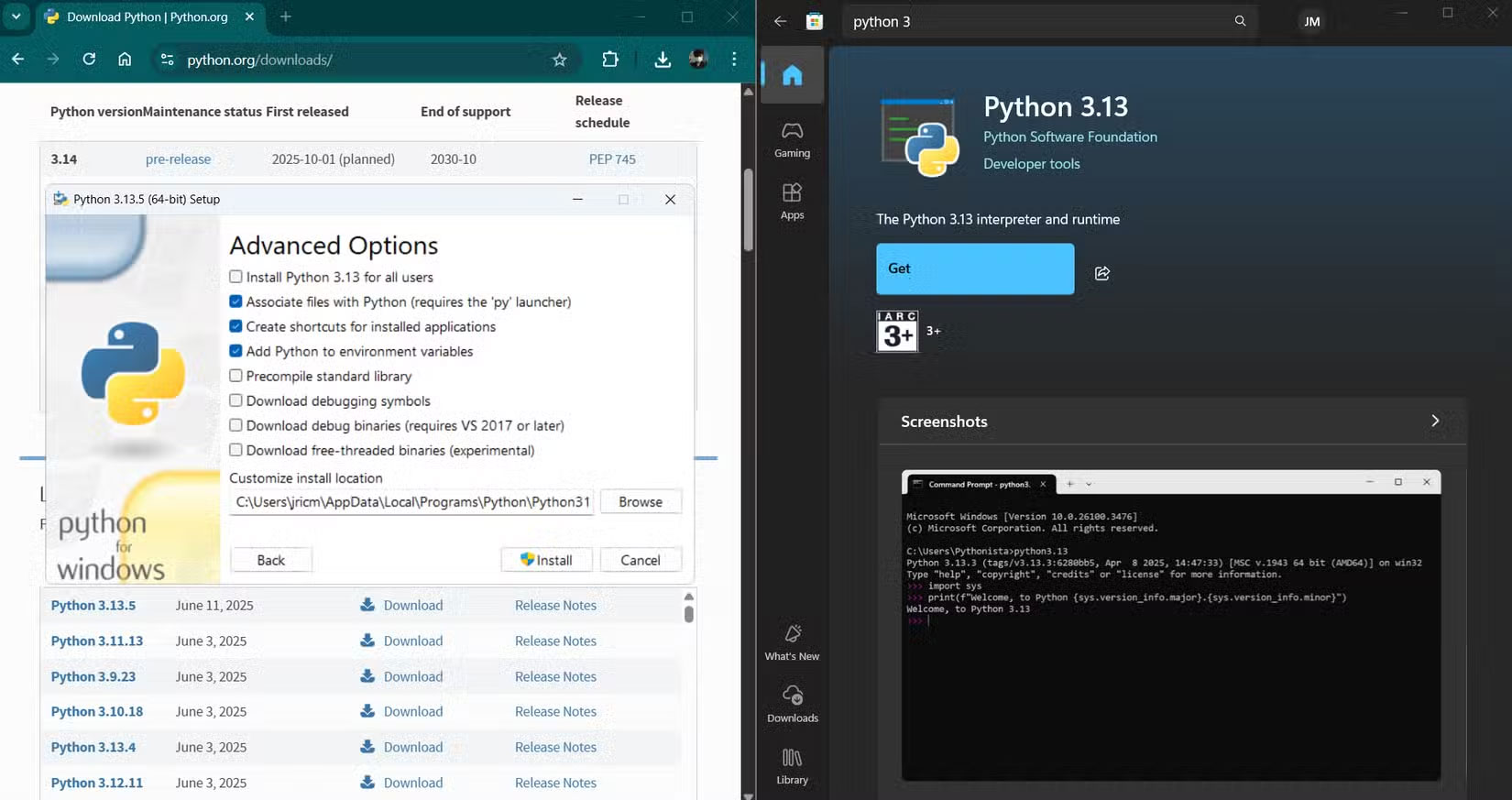
After being bothered by the Microsoft Store so many times, many people have gone back to using the old EXE installer. While not perfect, it's much better than using the built-in Windows app store:
Here's why EXE installers are still the #1 choice:
|
Benefit |
Explain |
|---|---|
|
Total control |
When using the EXE installer, you can choose where the app goes, what features you want, and how to set it up. You're not forced into default settings or locked folders. |
|
Speed |
The EXE installer works instantly. You don't have to wait for Microsoft servers or deal with random Store errors. If you need an app right now, you can get it in minutes. |
|
No intermediaries |
You download it directly from the developer's website. There are no additional layers that can break or slow down the process. |
|
Works anywhere |
EXE installers are not picky. They work on any Windows machine, and with the right tools, you can even use them on other platforms. |
|
Offline installation |
You can save the installer and use it again later, even when offline. This is important when setting up multiple PCs or working in places with patchy internet connections. |
Another important benefit is a much wider selection of apps, as not every app you need is available in the Microsoft Store. In particular, many specialized or open source programs are not listed there, either because the developers do not want to address the Store's requirements or because the app is not compatible. With many EXE package managers, such as Winget, you will have a much wider selection of apps, including different versions of the software.
For power users and anyone who likes to tinker, EXE installers are a dream. You can archive old versions, reinstall applications without re-downloading, and keep your software setup just the way you like it.
Security and control with traditional installers

Many people assume that using an app store is always safer, but that's not always the case. The Microsoft Store, like other major mobile app stores, doesn't detect every security risk. Its checks mostly look for obvious warning signs, like malware or apps that clearly violate the rules. They don't dig deeper to find hidden risks or privacy issues.
That's why many people trust their own processes more. When you download an EXE installer from a developer you know and trust, you can see who signed the file. If the installer is actually signed by the developer, you know it hasn't been tampered with. Before running anything, always scan it with Windows Defender (or whatever antivirus software you're using at the time). If there's a problem, security software will usually catch it right away.
For truly critical applications, many people will even check the file hash against what the developer lists on their website. If those numbers match, you know the file is legitimate and hasn't been tampered with. When dealing with installers from smaller, less well-known developers, you take extra steps to ensure the EXE files are safe before trusting them to your system.
While it may seem like a lot of extra work, it gives you peace of mind. You get to decide what's safe for your computer, rather than trusting an automated system that might miss problems or let suspicious apps slip through. Plus, if you want to go further, you can use advanced tools like Windows' built-in sandboxing feature or run installers through a full virtual machine first. That's a level of control that the app store doesn't give you.
For anyone who takes security seriously, being able to set your own rules, keep your own logs, and ensure only approved software is installed is a big deal.
FAQ
Why do so many people not trust the Microsoft Store?
When Microsoft first launched its store, it made a lot of promises. Users were told it would be a one-stop shop for safe, easy app downloads. In reality, the experience has been disappointing.
What should you know about main advantages of EXE installer?
After being bothered by the Microsoft Store so many times, many people have gone back to using the old EXE installer. While not perfect, it's much better than using the built-in Windows app store:
What should you know about security and control with traditional installers?
Many people assume that using an app store is always safer, but that's not always the case. The Microsoft Store, like other major mobile app stores, doesn't detect every security risk. Its checks mostly look for obvious warning signs, like malware or apps that clearly violate the rules. They don't dig deeper to find hidden.
Related Articles
 Microsoft Allows Users to Reactivate Windows App Installer4 minutes read
 Apple Officially Released ITunes on Microsoft Store, Download and Experience2 minutes read
 Microsoft Deletes Google Chrome from the Windows Store4 minutes read
 How to Upgrade Kodi on PC or Mac5 minutes read
 How to Fix Corrupted macOS Installer Errors3 minutes read
 The Windows Store Will Be Renamed to Microsoft Store in Windows3 minutes read
Reader Comments 0
Sign in with email or Google to join the discussion.