Table of Contents
This guide provides a clear overview of app installer, including how to Re-Enable the Ms-Appinstaller. Protocol, Ms-Appinstaller Misused to Spread Malware. Use it to understand the topic, compare the available options, and make a more informed decision.
Microsoft has disabled the ms-appinstaller map in response to reports that the Emotet malware is exploiting a zero-day vulnerability that impersonates Windows AppX Installer, forcing users to download application packages to their devices before they can. install them using App Installer.
"We recognize that this feature is very important to many organizations and businesses. We are taking the time to conduct thorough testing to ensure that re-enabling this protocol can be done without delay. safely," said Dian Hartono, program manager at Microsoft.
"We are looking at rolling out a Group Policy that will allow IT admins to re-enable the protocol and control its use within their organization."
How to Re-Enable the Ms-Appinstaller. Protocol
According to an update from Hartano, Microsoft has finally figured out how to fix the problem and now they've allowed administrators to re-enable the ms-appinstaller protocol handler. To do this, you need to update to the latest App Installer version (1.17.10751.0) and enable a group policy.
On systems that cannot update the App Installer using the internet-connected installer, you can also download the offline version from the Microsoft Download Center site.
The App Installer feature will be re-enabled after downloading the update and implementing the Desktop App Installer policy and selecting "Enable App Installer ms-appinstaller protocol".
You can do this via the Group Policy Editor by going to Configuration > Administrative > Templates > Windows Components > Desktop App Installer.
Ms-Appinstaller Misused to Spread Malware
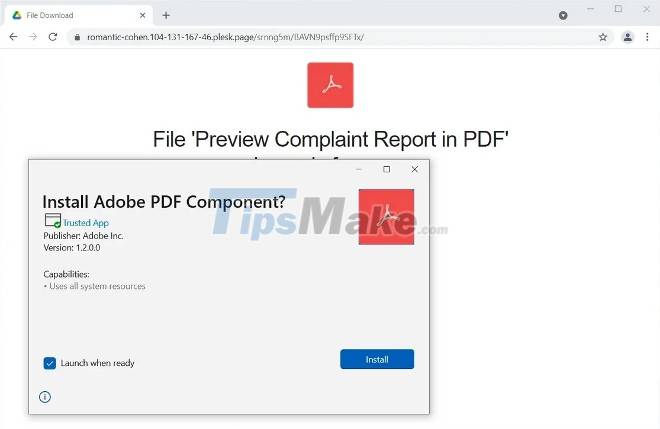
Since the beginning of December 2021, the Emotet malware has started using Windows AppX Installer packages containing malicious code disguised as Adobe PDF software to infect Windows computers.
Phishing botnets spread emails into reply strings they steal. The phishing email instructs victims to open PDFs designed to look related to the previous chat thread.
However, instead of opening the PDF file, the link will Windows App Installer and ask the user to install "Adobe PDF Component" containing the malicious code. After the victim presses the Install button, the App Installer downloads and installs a malicious apk hosted on Microsoft Azure.
Conclusion
Understanding App Installer makes it easier to compare options, avoid common mistakes, and apply the information in this guide more effectively. Review the relevant requirements before making changes or choosing a solution.
FAQ
What is App Installer?
Microsoft has disabled the ms-appinstaller map in response to reports that the Emotet malware is exploiting a zero-day vulnerability that impersonates Windows AppX Installer, forcing users to download application packages to their devices before they can.
Why is App Installer important?
Understanding App Installer helps you evaluate features, compatibility, performance, and potential limitations before you choose a product or follow a procedure.
What should you consider when using or choosing App Installer?
Consider your specific goal, compatibility requirements, available features, cost, security, and the practical recommendations described in this guide.
Related Articles
 How to Turn Off Windows Installer to Block MSI Package3 minutes read
 How to Delete the Windows Installer Folder on Windows5 minutes read
 How to Download a Windows Installer, Office Directly from8 minutes read
 Microsoft Patches Vulnerability in Windows Appx Installer3 minutes read
 How to Get the Key Back and Reactivate Copyrighted Windows5 minutes read
 Fix Opera Installer Crashes Downloading on Windows7 minutes read
Reader Comments 0
Sign in with email or Google to join the discussion.