Table of Contents
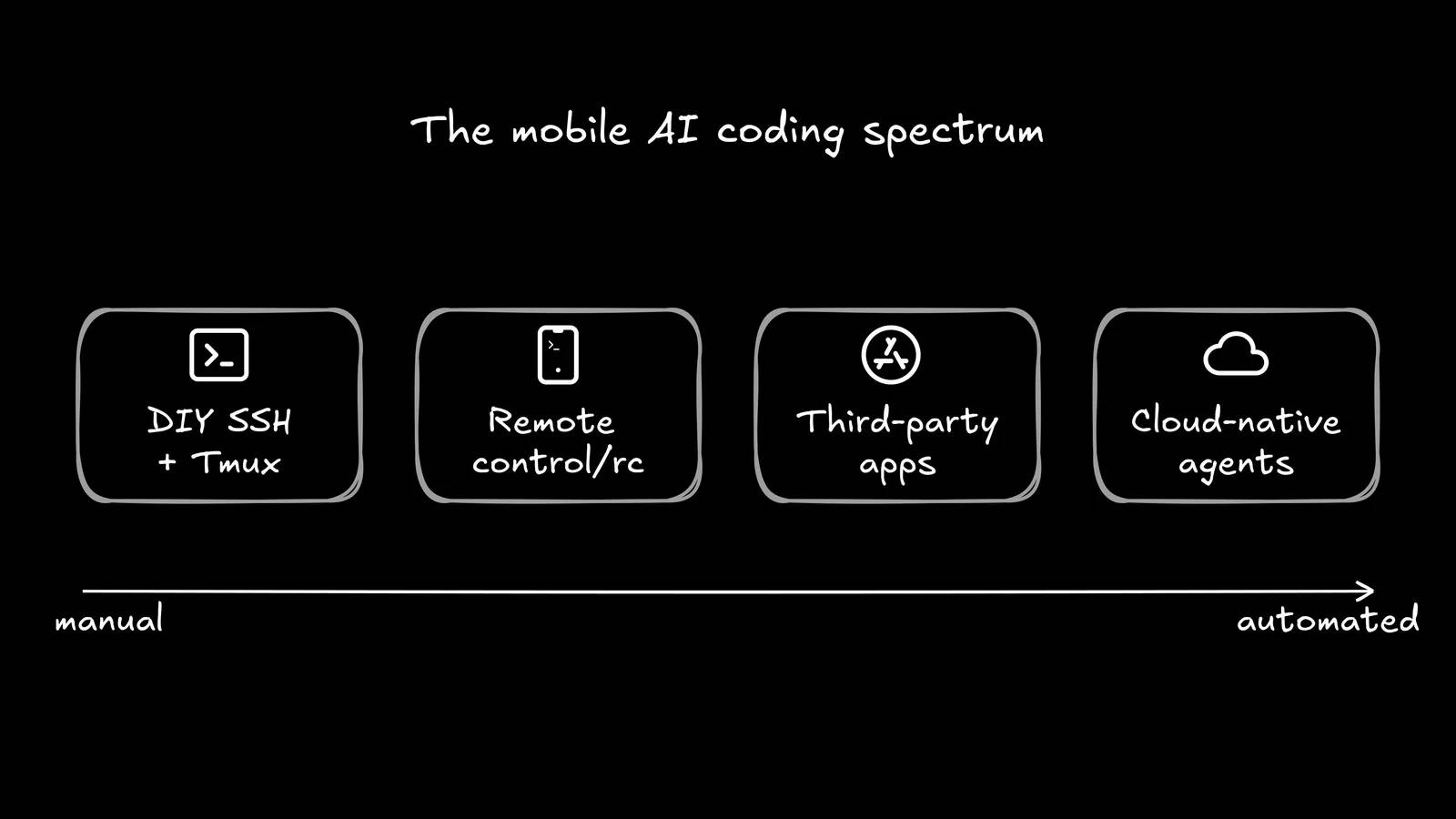
You can use Claude Code from a phone in three practical ways: connect to a local session with Anthropic's Remote Control, run a separate task with Claude Code on the web, or remotely access your own computer through SSH. For most people who want to continue an existing local task, Remote Control is the simplest official option.
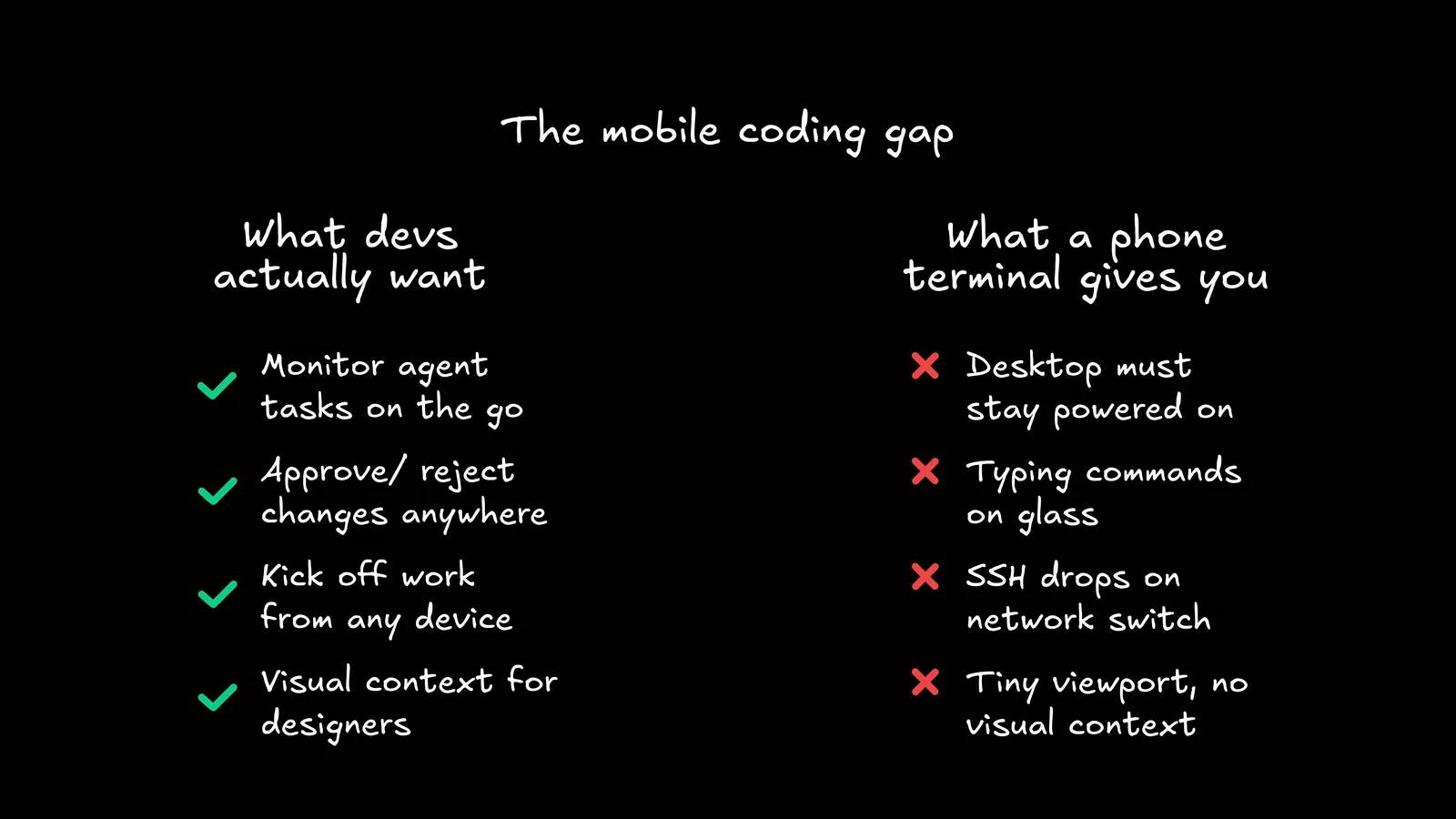
A phone is well suited to checking progress, answering a permission prompt, adding context, or reviewing a small diff. It is less suited to examining a large refactor, debugging a visual layout, or approving a high-risk change without the surrounding project context.
Option 1: Claude Code Remote Control
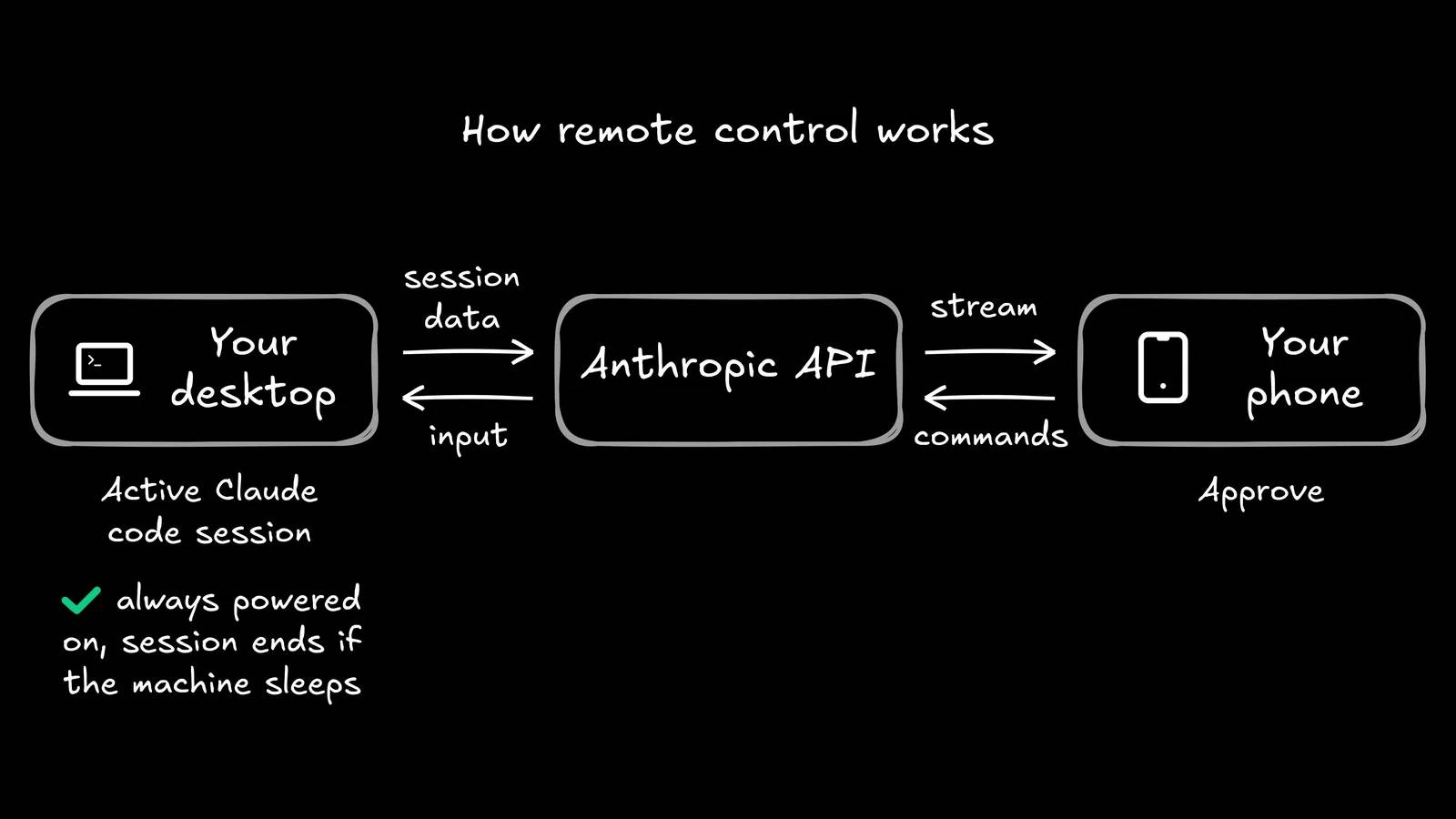
Remote Control connects the Claude mobile app or claude.ai/code to a Claude Code session that continues to run on your own computer. The local filesystem, tools, MCP servers, project configuration, and command execution remain on that computer; the phone or browser is another interface to the session.
Check Anthropic's current Remote Control documentation for plan, version, organization, and authentication requirements. Team and Enterprise owners may need to enable the feature.
Start server mode
From the project directory on your computer, run:
claude remote-controlAccept the one-time Remote Control confirmation after reviewing what it enables. The terminal displays a session URL, and you can show a QR code for quick access from the phone. Server mode can provide sessions from the selected directory according to its configured capacity and spawn mode.
Start an interactive local session with remote access
claude --remote-controlThis opens an ordinary interactive terminal session that is also available remotely. You can optionally give the session a descriptive name so it is easy to identify on another device.
Continue a session that is already running
Inside Claude Code or its supported VS Code interface, run:
/remote-controlThe shorter /rc alias is also supported. Use the displayed link or QR code, or open the Code area in the Claude mobile app and select the named session.
What you can do from the connected phone
- Read the shared conversation and current progress.
- Send follow-up instructions while the local session is active.
- Review supported diffs when the project is in Git.
- See background agents or workflows exposed by the current Claude Code version.
- Respond to permission prompts with the same care you would use at the terminal.
- Attach an image or file when that input is needed for the task.
Connected surfaces remain tied to the local session. If you change models, stop work, or approve a tool action from the phone, that decision affects the process on your computer.
What happens if the computer sleeps or disconnects?
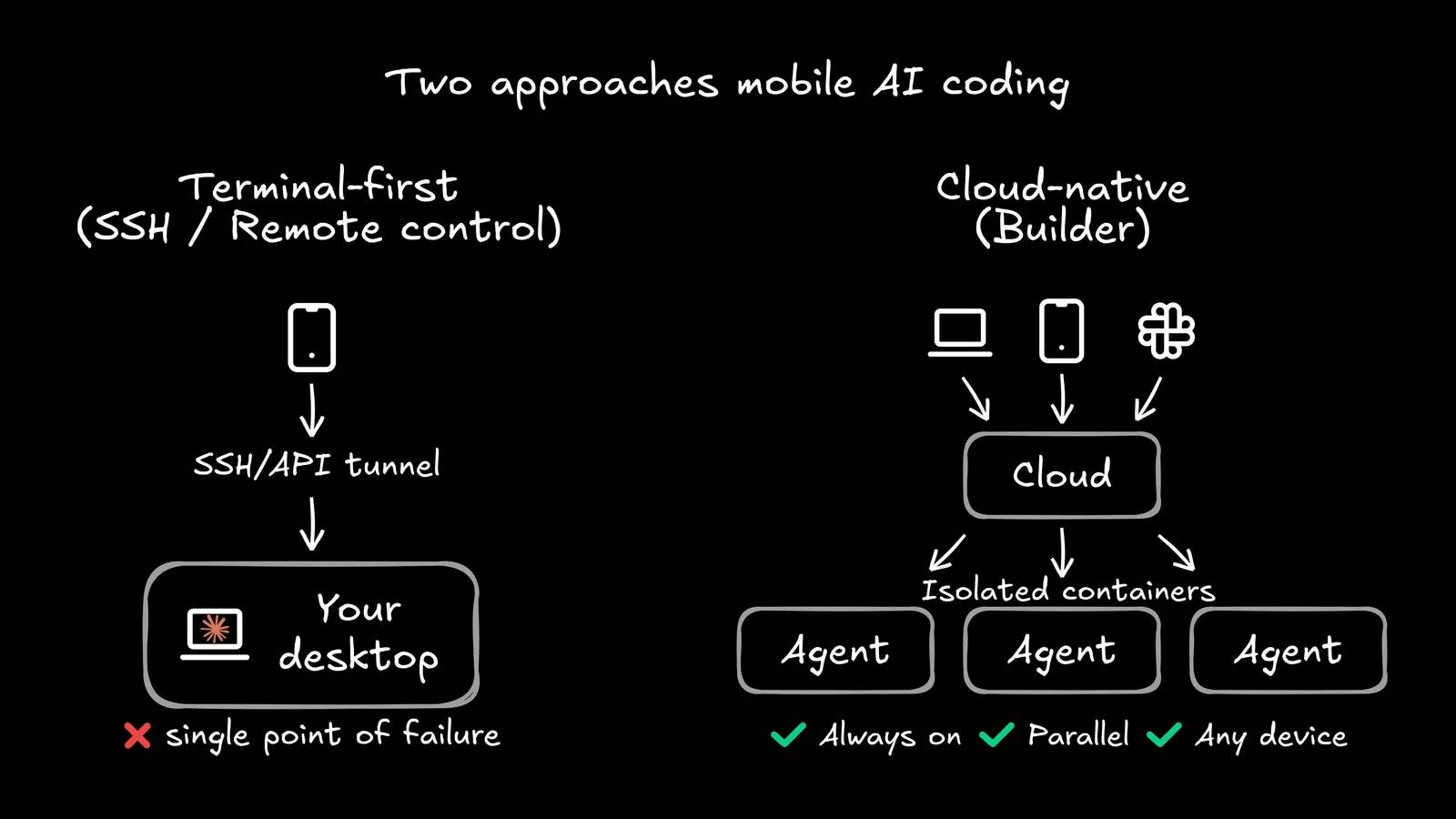
Remote Control does not move local execution into the cloud. If the computer sleeps, powers off, loses its network, or closes Claude Code, local work cannot continue normally. Current versions can reconnect after the machine returns and can queue some messages or prompts while the connection is rebuilding.
Keep the machine powered, connected, and secured if you expect a long-running local task. Do not disable important security controls merely to keep a session alive.
Remote Control security checklist
- Start it only inside the intended project directory.
- Use a clearly named session so you do not approve a command in the wrong repository.
- Keep the phone locked with a strong device credential.
- Do not share a session URL or QR code.
- Review command, file, and network permissions before approving them.
- Use worktrees or isolated directories for concurrent sessions that could edit the same files.
- Disconnect Remote Control when you no longer need it.
- Follow organization policy for source code, secrets, and remote access.
Option 2: Claude Code on the web
Claude Code on the web runs work in cloud infrastructure rather than controlling a local process. It can be a better choice when you want to start a task without leaving your laptop awake, provided the repository, credentials, organization policy, and required tools are available to the cloud environment.
| Remote Control | Claude Code on the web |
|---|---|
| Execution and files stay on your computer | Execution occurs in a cloud environment |
| Uses your local tools and project setup | Uses the tools and integrations configured for the cloud task |
| Requires the local machine and process to be available | Can continue independently of the laptop |
| Best for continuing local work | Best for dispatching suitable repository tasks to an isolated remote environment |
Do not assume the cloud environment is identical to your development machine. Verify dependencies, environment variables, network access, generated files, and test results before merging changes.
Option 3: SSH to your own computer
Experienced users can keep Claude Code running in tmux or zellij and connect through SSH from a mobile terminal. A private network overlay such as Tailscale can avoid exposing SSH directly to the public internet.
The architecture is:
- Run Claude Code inside a persistent terminal session on the computer.
- Connect the computer and phone through an authorized private network.
- Use a trusted SSH client on the phone.
- Reconnect to the persistent terminal session after a network interruption.
Do not copy sample IP addresses, usernames, or installation commands without adapting them to your system. Harden SSH, use key-based authentication, restrict accounts, install updates, and follow your network administrator's policy.
Why third-party relay apps require caution
A companion app, chat bot, webhook, or hosted container may relay prompts, source code, logs, credentials, or output through another provider. Before using one, inspect the publisher, source code when available, authentication model, data retention, repository permissions, secret handling, update history, and revocation process.
Convenience does not justify giving an unknown service access to a production repository or deployment key. Prefer official and organization-approved routes for sensitive work.
What works well on a phone
- Check whether tests passed.
- Answer a narrow clarification.
- Stop a task that is going in the wrong direction.
- Review a short, focused diff.
- Ask for a summary of changes and remaining risks.
- Capture a photo or screenshot that provides useful context.
What should wait for a larger screen
- Large or security-sensitive diffs.
- Database migrations and destructive commands.
- Permission changes, production deployment, and secret configuration.
- Visual QA that requires side-by-side comparison.
- Conflicts between concurrent agents or branches.
- Any approval whose impact you cannot explain from the mobile view.
A better mobile workflow
- Start with a bounded task and explicit acceptance criteria.
- Ask the agent to stop before deployment or destructive operations.
- Use the phone for progress, questions, and small corrections.
- Request a concise diff summary and verification evidence.
- Perform the final high-risk review from a full development environment.
The goal is not to reproduce an entire desktop terminal on a six-inch screen. It is to make the right parts of an agent workflow available remotely while keeping execution, permissions, review, and responsibility under control.
Related Articles
 What Is the Claude Code: Clear Explanation7 minutes read
 When Should You Not Use Claude Code?10 minutes read
 Things You Need to Know About Claude Code5 minutes read
 How to Use Claude to Code and Debug Code6 minutes read
 What Are Claude Code Channels?9 minutes read
 This Claude Code Mode Is a Worthy Competitor to Other Ides8 minutes read
Reader Comments 0
Sign in with email or Google to join the discussion.