Table of Contents
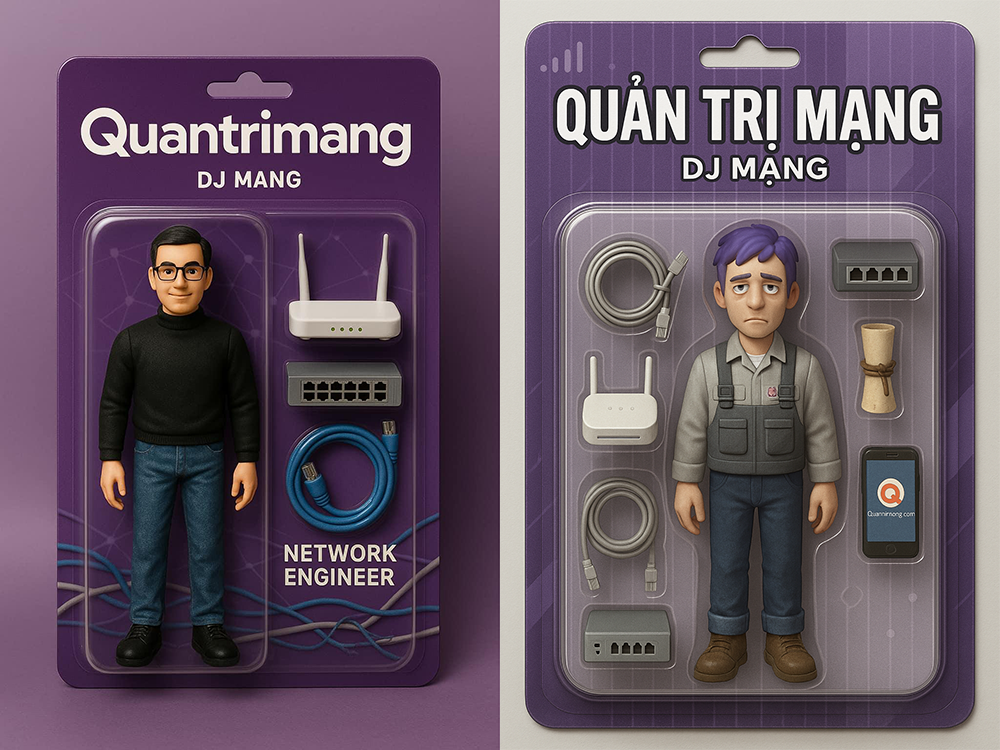
To create an action-figure image in ChatGPT, describe the character, packaging, accessories, camera angle, and printed text as separate details. Generate a first version, then correct one or two problems at a time instead of replacing the entire prompt.
The result is an illustration or product mockup, not proof that a physical toy exists. If you use a real person’s face, upload only an image you have permission to use and avoid including private information on the packaging.
What to decide before writing the prompt
Collect the important choices first:
- Character: name, profession or theme, approximate appearance, expression, and pose.
- Outfit: clothing, colors, shoes, and distinctive details.
- Accessories: three to five recognizable objects that fit the character.
- Packaging: card color, transparent blister, logo placement, and exact label text.
- Image style: realistic product photograph, stylized 3D render, retro toy design, or another visual direction.
- Composition: front-facing package, centered subject, studio background, and desired aspect ratio.
Fewer, more distinctive accessories usually produce a cleaner package than a long inventory of tiny objects. Avoid asking for trademarked logos unless you have the right to use them.
How to generate the image in ChatGPT
- Open a ChatGPT conversation that supports image generation.
- If the figure should resemble you, attach a well-lit, front-facing photo. Tell ChatGPT that you have permission to use it.
- Paste a completed version of the prompt template below.
- Review the first image for the face, hands, package text, accessory count, and layout.
- Request targeted changes, such as “Keep the figure unchanged, but correct the name to MAYA CHEN and replace the second camera with a notebook.”
- Download the version you want to keep. Generated images may also be available through the ChatGPT image library.
Reusable action figure prompt
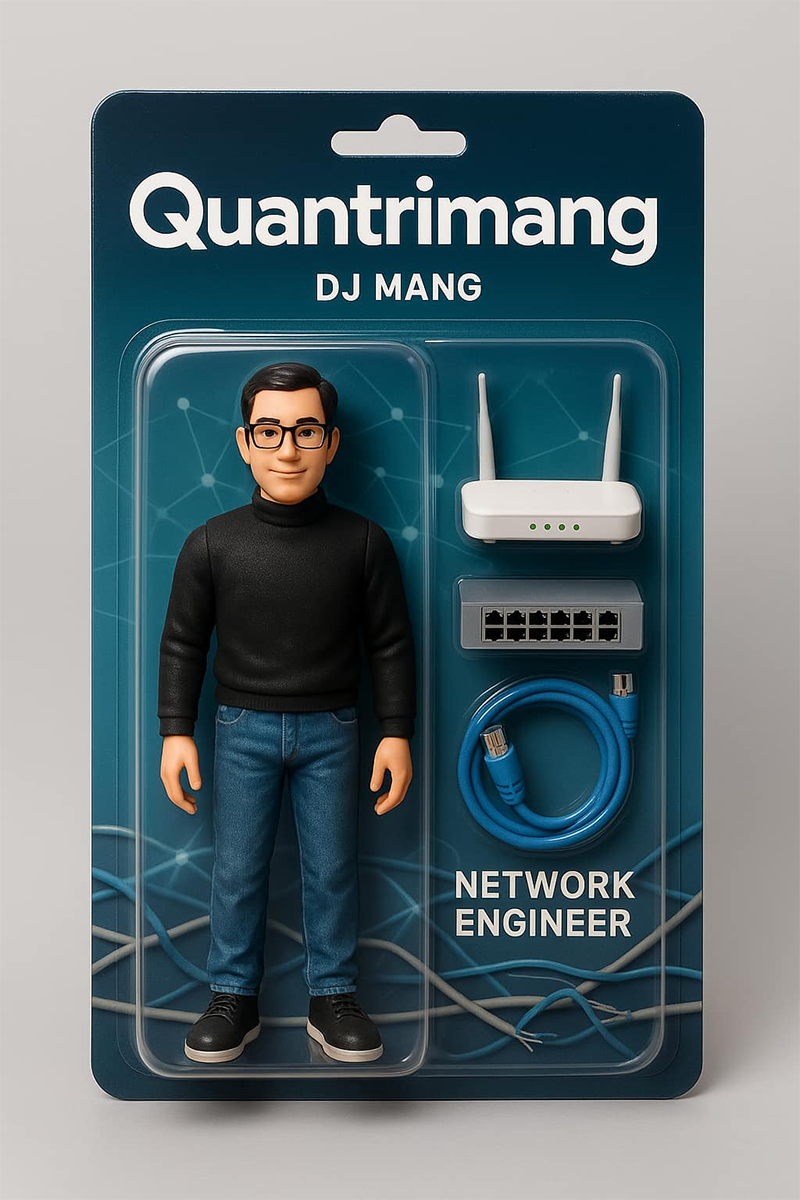
Create a polished product image of a collectible action figure sealed in retail blister packaging.

CHARACTER
- Name printed at the top: “[CHARACTER NAME]”
- Subtitle: “[ROLE OR TAGLINE]”
- Appearance: [HAIR, FACE, AGE RANGE, AND OTHER VISIBLE DETAILS]
- Expression and pose: [EXPRESSION AND POSE]
- Outfit: [CLOTHING, COLORS, SHOES, AND DETAILS]

ACCESSORIES
Place these items in separate fitted compartments beside the figure:
1. [ACCESSORY]
2. [ACCESSORY]
3. [ACCESSORY]
4. [OPTIONAL ACCESSORY]

PACKAGING
- [BACKGROUND COLOR OR PATTERN] cardboard backing
- Clear molded plastic blister
- Large, readable character name at the top
- Smaller subtitle directly below it
- [OPTIONAL SMALL ICON OR ORIGINAL BRAND MARK]
- Clean spacing; no duplicate accessories

CAMERA AND STYLE
Front-facing premium product photography, centered package, soft studio lighting, realistic plastic and cardboard textures, sharp details, neutral background, no hands holding the package.

Use the quoted text exactly. Do not add extra labels, logos, accessories, or characters.
Replace every bracketed field and remove unused lines before submitting the prompt. Keeping the structure helps the image model understand which details belong to the figure and which belong to the package.
Example prompt
Create a polished product image of a collectible action figure sealed in retail blister packaging.

The character is Maya Chen, an urban photographer with short black hair, round glasses, and a confident smile. She wears a dark green field jacket, black jeans, and white sneakers. Pose her standing upright with one hand holding a compact camera.

Place four accessories in separate fitted compartments: a 35mm camera, a small notebook, a red camera strap, and a travel mug.

Use a warm cream cardboard backing with a subtle geometric pattern and a clear molded blister. Print “MAYA CHEN” in large dark-green letters at the top and “STREET PHOTOGRAPHER” below it. Keep all text readable and do not add other words.

Front-facing premium product photography, centered package, soft studio lighting, realistic plastic and cardboard textures, sharp details, neutral background, no hands holding the package.
How to use a reference photo
A reference photo can help with hair, face shape, glasses, or clothing, but it does not guarantee an exact likeness. Use a sharp image with even lighting and an unobstructed face. In the prompt, state which details should carry over and which should change.
For example: “Use the attached photo only as the facial and hairstyle reference. Keep the person recognizable, but render the body and clothing as a stylized collectible figure.” If the first result drifts, continue from the best generated image rather than starting from a new conversation. For larger projects, use a consistent reference-and-prompt workflow like the one described in this guide to maintaining consistent AI-generated characters and products.
Fix common problems
| Problem | Useful revision request |
|---|---|
| Misspelled name | “Change only the top label to ‘MAYA CHEN’. Preserve the figure, accessories, and package layout.” |
| Duplicate or missing items | “Show exactly four accessories: camera, notebook, red strap, and mug. One of each.” |
| Accessories mixed with the figure | “Move every accessory into its own molded compartment to the right of the figure.” |
| Face no longer resembles the reference | “Restore the face and hairstyle from the attached reference while leaving the packaging unchanged.” |
| Package is shown at an angle | “Use a straight-on catalog photograph with the full rectangular package visible.” |
| Extra logos or text | “Remove all text except the character name and subtitle; use no commercial logos.” |
Image models can struggle with small typography. Keep labels short, use high contrast, and correct one text element at a time. For final commercial artwork, recreate critical text and logos in a design editor rather than relying on generated lettering.
Quality and usage checklist
- The full package is visible and not cropped.
- The character’s pose and outfit match the request.
- Each requested accessory appears once.
- The name and subtitle are legible and correctly spelled.
- No unwanted brand names, signatures, or watermarks appear.
- The face is appropriate to use and does not misleadingly depict someone endorsing a product.
- The image is labeled as a concept or mockup when viewers could mistake it for a real product.
A strong result comes from a specific first prompt and careful revisions. Define the package as deliberately as the character, limit the number of small objects, and preserve successful details while correcting only what is wrong.
Related Articles
 How to Create a YouTube Thumbnail with ChatGPT8 minutes read
 What Is ChatGPT Images 2?6 minutes read
 How to Create Quizzes on ChatGPT5 minutes read
 How to Creating Chibi Couple Images, Creating Chibi Images in ChatGPT4 minutes read
 How to Create Stickers Using ChatGPT4 minutes read
 Create a Piercing Image on Your Facebook Profile Using AI6 minutes read
Reader Comments 0
Sign in with email or Google to join the discussion.