Table of Contents
This updated guide explores Microsoft offers AI video creation tool for free with bing video creator with practical details, clear explanations, and useful takeaways. Two years ago, Bing Image Creator became one of the first major online services to let users generate images from text using OpenAI's DALL-E model. Today, Microsoft introduced Bing Video Creator, powered by OpenAI's Sora, to help users create videos using only text descriptions.
Despite announcing Sora last year, OpenAI has yet to make it available to millions of ChatGPT users because of the massive AI infrastructure required. It is currently only available to users who subscribe to ChatGPT Pro, which costs around $200/month.
Google recently announced its Veo video generation model for all Gemini paid subscribers. Veo outperforms OpenAI's Sora and is even available on the Gemini Pro plan for just $20/month.
Microsoft is democratizing access to video creation by making Bing Video Creator available to all Bing users for free. it is rolling out globally today (except China and Russia) on the Bing Mobile App, and will soon be available on the Bing desktop experience in Copilot Search.
Bing Video Creator users can choose between Fast and Standard creation speeds. Each user gets 10 Fast creations; after that, they can redeem 100 Microsoft Rewards points for each Fast creation or continue on Standard speed.
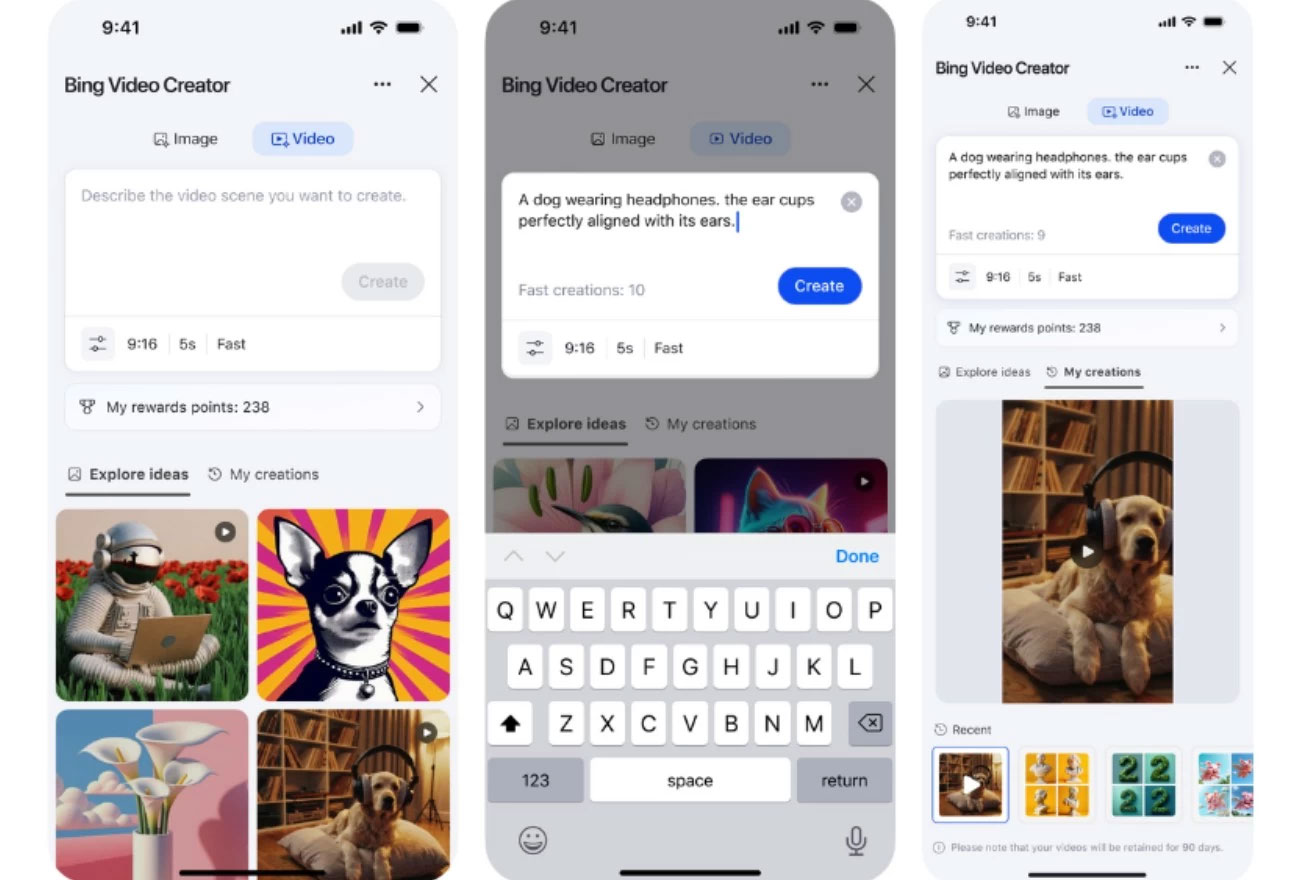
After downloading the Bing mobile app, you can access the Video Creator feature as follows:
- Open Video Creator in the app by clicking on the bottom right corner menu and selecting " Video Creator ".
- Enter a text description of the video you want to create into the command prompt box.
- Once ready, press ' Create '.
- Or you can type directly into the app search bar: " Create a video of. ".
- You will receive a notification when the video is ready to watch.
If needed, you can download the video or share it via social media/email. You can copy a direct link to the video for easy sharing elsewhere. Microsoft will store the created video in your account for up to 90 days for easy access later.
Microsoft notes that Bing Video Creator videos are currently 5 seconds long and can only be created in 9:16 (portrait) format. 16:9 (landscape) format will be added soon. While you wait for your video to be created, you can queue up two more videos. When a slot becomes available, you can add a new video to the queue.
Once Bing Video Creator is available on desktop, you can open Bing.com/create to create both images and videos.
FAQ
What is the main takeaway about Microsoft Offers AI Video Creation Tool for Free with Bing Video Creator?
The key is to understand the core idea, compare the available options, and apply the practical guidance that matches your situation.
What should beginners know about Microsoft Offers AI Video Creation Tool for Free with Bing Video Creator?
Start with the essential steps and terminology. Avoid changing advanced settings until you understand how they affect performance, privacy, cost, or compatibility.
How can I use this information in practice?
Follow the relevant section in order, test one change at a time, and confirm the result before moving to the next step or recommendation.
Related Articles
 Microsoft Launches Bing Video Creator to Compete with Veo3 minutes read
 Best AI Tools for Creating Short Videos9 minutes read
 Bing Image Creator Integrates the Latest GPT-4o Image Generation Model3 minutes read
 How to Create Themed Images Based on Clothing Using Microsoft AI Tools3 minutes read
 TOP AI Tools for Creating the Best Presentations8 minutes read
 9 Best AI Video Creation Tools12 minutes read
Reader Comments 0
Sign in with email or Google to join the discussion.