Table of Contents
Explore stop choosing between Windows and Linux —— dual booting offers more benefits.
Use Linux without having to abandon your favorite applications
When switching from Windows to Linux, the biggest hurdle is often applications. Many Windows software programs don't run well on Linux, forcing users to find alternatives or completely switch from their usual tools. To be fair, Linux doesn't lack powerful options: Photoshop has GIMP or Affinity that run on Linux, Premiere Pro has DaVinci Resolve, and Microsoft Office has OnlyOffice with fairly good compatibility.
However, that's still just an alternative. Different interface, different workflow, and while the learning curve might not be too steep, there's still a chance you. won't like it. So, completely switching from Windows to Linux is a pretty big decision.
Dual booting makes things much smoother. You can use Linux for everyday tasks, enjoy better privacy, no ads, and no forced telemetry. When you need those familiar Windows applications, just restart and switch back to Windows.
Experience a new workflow while staying within your comfort zone
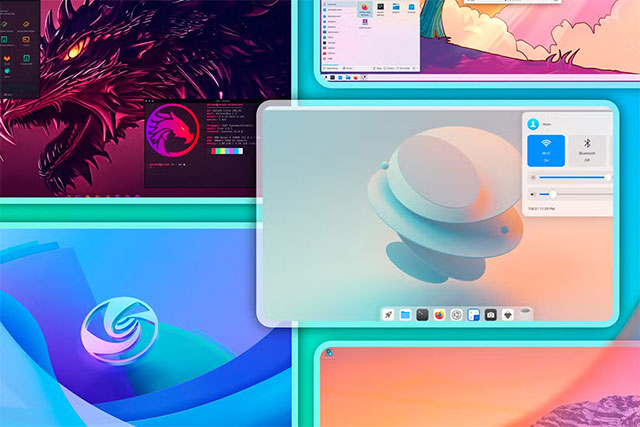
One of the most appealing aspects of Linux is its diverse range of desktop environments. These not only offer different interfaces but also provide entirely different ways of working. For those who enjoy customizing Windows, Linux is truly a paradise.
GNOME offers a workflow centered around virtual desktops, ideal if you prefer focusing on individual application windows. KDE Plasma defaults to Windows 7, but can be customized to Windows 10, Windows 11, macOS, or a completely custom interface. If you dislike using a mouse or have wrist problems, tiling window managers like Hyprland allow you to control almost everything with the keyboard, especially effective with multi-monitor systems.
Experimenting with these workflows is fun, but applying them directly to the main operating system can sometimes be counterproductive, impacting productivity. Dual booting solves that problem: Windows remains for familiar tasks, while Linux becomes a 'playground' for you to freely explore. For many, this is how they find the most suitable desktop environment for themselves.
Clearly separate each operating system for each purpose

Windows can do everything: work, personal projects, gaming, watching movies, programming. But when an operating system takes on too many roles, it also becomes a source of distraction.
Steam notifications pop up during work hours, and the blinking Discord icon distracts attention from the task at hand. Conversely, Slack or work emails interrupt leisure time. You could turn off notifications, empty the system tray, or create multiple Windows accounts, but none of these solutions are foolproof.
Dual booting goes a long way. Each operating system is a 'separate space,' with its own applications and workflows, without any mixing. Restarting the computer also creates a 'deliberate friction,' helping the brain shift to a work or entertainment state. Many people even use multi-boot, with each operating system serving a specific purpose.
Play games with the best possible experience
After years of dual-booting Windows and Linux, it's safe to say that gaming on Linux is now really good, at least with supported titles. Currently, about 80 out of the top 100 games on Steam are playable on Linux.
Because Linux is lighter and has fewer background processes than Windows, games often utilize system resources more efficiently, resulting in higher FPS or better stability. For games that run well on both platforms, Linux is often the optimal choice.
Of course, there are exceptions, mainly games that use kernel-level anti-cheat systems like Call of Duty, Valorant, League of Legends, or Fortnite. But with dual booting, that's almost no longer a problem: competitive games run on Windows, while everything else can be played on Linux.
A 'backup PC' is available right in the machine
Anyone who uses Windows has probably experienced their computer suddenly slowing down due to background updates, or worse, being forced to restart right when they're under a tight deadline. In such situations, having another operating system to switch to is incredibly valuable.
With dual boot, you simply reboot into Linux and continue your work. Linux can directly access Windows files, making it easy to copy data and continue. The same is true in reverse: if you accidentally mess up your Linux system while tinkering and don't have time to fix it, you still have Windows to work with.
In short, dual booting saves you from having to switch between Windows and Linux. If you're worried about complicated setup, it's actually not; just follow the instructions and it'll be done very quickly.
Final Thoughts
Understanding stop choosing between windows and linux —— dual booting offers more benefits than you think makes it easier to evaluate the information and apply the most relevant recommendations. Focus on the key points above and verify details that may change over time.
FAQ
What is stop choosing between windows and linux —— dual booting offers more benefits than you think?
Explore stop choosing between Windows and Linux —— dual booting offers more benefits.
What key points does this article cover?
The article focuses on Use Linux without having to abandon your favorite applications, Experience a new workflow while staying within your comfort zone, Clearly separate each operating system for each purpose, with practical explanations and examples.
How can you use this information in practice?
Use the explanations to compare options, verify important details, and make a more informed decision. Apply the recommendations that best match your goals and situation.
Related Articles
 No Need to Give up Windows: Dual Booting Linux Is Easier Than You Think!10 minutes read
 Advantages and Disadvantages of Dual Boot (Dual Boot)7 minutes read
 Fix Windows and Linux Errors Showing Different Time at Dual Boot7 minutes read
 Windows 8 Security Feature Prevents Dual Booting with Linux4 minutes read
 How to Install Kali Linux Dual Boot on macOS16 minutes read
 7 Risks When Booting Dual Operating Systems Windows and Linux9 minutes read
Reader Comments 0
Sign in with email or Google to join the discussion.