Table of Contents
Explore don't charge your phone using your laptop, here's why, including the key concepts, practical examples, important considerations, and useful guidance.
Laptops are a terrible charger
Plugging your phone or headphones into your laptop to charge can be convenient, and almost everyone has done it at some point. However, a laptop is not a power bank, nor is it a suitable replacement for a charger.
The biggest reason is simple: charging via laptops is usually very slow. This is also true for desktop computers. The issue isn't how much power the PC consumes, but how much power the USB port can supply – and the answer is often 'negligible'.
Additionally, charging behavior can change when the laptop is in sleep mode or turned off. If the laptop is not plugged in, supplying power to other devices will cause the laptop battery to drain faster, reducing its usable time when used for work.
In other words, you're charging other devices inefficiently, while also impacting the performance and battery life of your laptop. It all comes down to the power limit of the USB port.
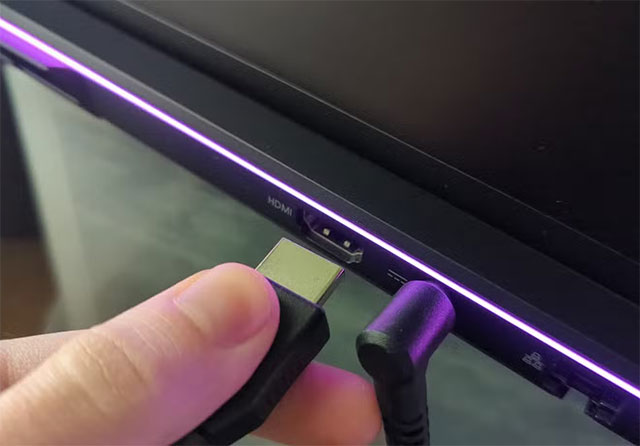
Charging via USB port is inherently inefficient
With USB-A, the default power output typically ranges from 2.5W (5V/500mA) to 4.5W (5V/900mA). The phone will still charge, but it will take considerably longer. USB-C might be better, but if it doesn't support USB Power Delivery, it usually only reaches around 15W. Many laptops don't even function like wall chargers, which can provide multiple voltage levels for faster charging.
Charging via a laptop will almost certainly be slower than using a wall charger, and significantly slower than fast charging. Even with the right cable, your laptop will often not meet the requirements. For fast charging to work, the power source, device, and cable must all support it. For example, Apple states that to fast charge an iPhone, you need a USB-C charger that supports USB-PD.
What about the accessories?
Headphones and mice are typically designed to operate within standard USB power limits, but there's an important distinction to make: wired or wireless accessories.
Wireless accessories can still be charged from a laptop, but the process is often very slow. The USB ports on laptops are often the bottleneck, because when these devices are plugged into a separate charger, the charging speed is significantly faster.
What should I use instead?
The solution is simple: use the device it was designed for to charge. Plug your phone and accessories into a wall outlet instead of your laptop, and both will have a much easier time.
A compact USB-C PD charger can handle most smartphones. If your device supports it, fast charging is still the better option. Devices that don't support fast charging aren't affected – they simply don't take full advantage of the extra power.
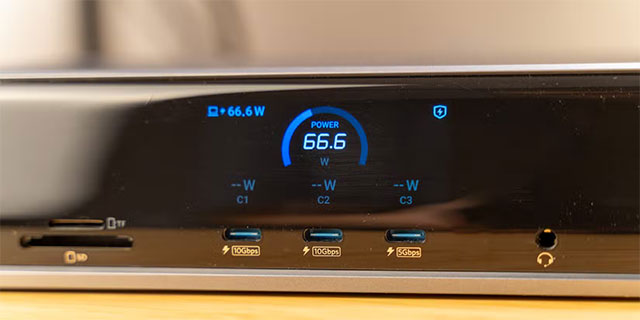
When on the go, a power bank that supports USB PD is a sensible choice. USB PD can deliver up to 240W via USB-C. While many power banks don't reach this level, they are still significantly more powerful than the USB ports on laptops. Some can even charge laptops, provided the power output is compatible.
Additionally, an expansion dock is also an option if you need more ports and higher power. A good dock can provide better power than the laptop, although they are usually not cheap.
If you are forced to charge using a laptop
Everyone forgets their charger sometimes. If you find yourself in a difficult situation, plug your laptop into a power source first to reduce battery drain and possibly speed up charging (depending on the port type).
Between USB-C and USB-A, the USB-C port on laptops generally provides more power, allowing for faster charging. Avoid charging multiple devices simultaneously if you don't want charging speeds to become incredibly slow. For phones, limit usage while charging to maximize the limited power your laptop provides.
Finally, remember that some laptops will stop charging USB ports when the computer goes to sleep or shuts down. If you want the USB ports to always be powered, you can go into the BIOS and look for an option like 'USB always on'. Not all machines support this, and these ports are sometimes color-coded for easy identification.
Final Thoughts
Understanding don't charge your phone using your laptop, here's why makes it easier to evaluate the information and apply the most relevant recommendations. Focus on the key points above and verify details that may change over time.
FAQ
What is don't charge your phone using your laptop, here's why?
Explore don't charge your phone using your laptop, here's why, including the key concepts, practical examples, important considerations, and useful guidance.
What key points does this article cover?
The article focuses on Laptops are a terrible charger, Charging via USB port is inherently inefficient, What about the accessories?, with practical explanations and examples.
How can you use this information in practice?
Use the explanations to compare options, verify important details, and make a more informed decision. Apply the recommendations that best match your goals and situation.
Related Articles
 Tips for Charging Your Phone When the Laptop Is in Sleep Mode4 minutes read
 We Have Been Charging the Wrong Way for a Long Time5 minutes read
 How to Charge Your Laptop Quickly and Conveniently without a Charger6 minutes read
 Device to Charge the Phone with Water and Wind for Phượt People2 minutes read
 iPhone Battery Charger: Complete Guide3 minutes read
 Is It Okay to Charge the Battery While Using the Laptop? Do7 minutes read
Reader Comments 0
Sign in with email or Google to join the discussion.