Table of Contents
Most of the AI tools we use run in the cloud and require an Internet connection. While it is possible to use local AI tools installed on your computer, you need powerful hardware to do so.
At least, that's what people often think, until they try running some local AI engines on their nearly decade-old hardware and see that it actually works.
How to Use Local LLM with Nvidia GTX 1070 and LM Studio
Please note in this section that the author of this article is not an expert on local LLM, nor is he an expert on the software used to setup and run this AI model on his machine. This is just what was done to run the local AI chatbot on a GTX 1070 and it worked really well.
Download LM Studio
To run LLM locally, you need some software. Specifically, LM Studio, a free tool that allows you to download and run LLM locally on your machine. Go to the LM Studio homepage and select Download for [operating system] (this article is using Windows 10).
This is the standard Windows installation process. Run the setup and complete the installation process, then launch LM Studio. You should select the Power User option as it brings up some useful options that you may want to use.
Load the first local AI model
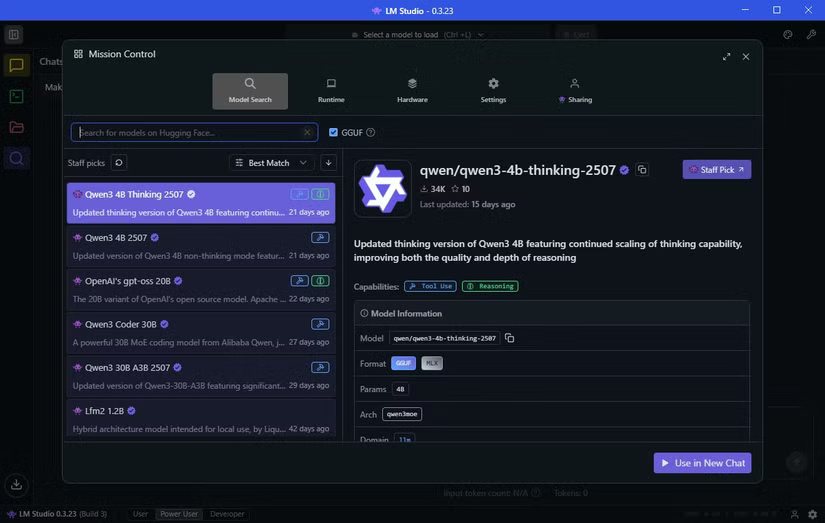
Once installed, you can download your first LLM. Select the Discover tab (the magnifying glass icon). Handily, LM Studio shows you the local AI models that work best on your hardware.
In this example case, it suggests downloading a model called Qwen 3-4b-thinking-2507. The model name is Qwen (developed by Chinese tech giant Alibaba), and this is the third version of the model. The value '4b' means that the model has 4 billion parameters that it calls upon to respond to you, while 'thinking' means that the model will spend some time considering its answer before responding. Finally, 2507 is the last update of the model, on July 25.
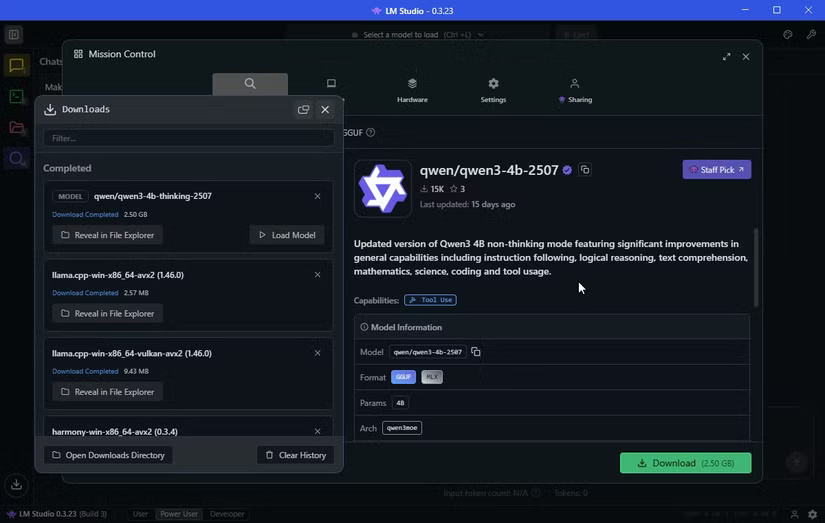
Qwen3-4b-thinking is only 2.5GB, so it won't take long to download. The author previously downloaded OpenAI/gpt-oss-20b, which is larger at 12.11GB. It also has 20 billion parameters, so it should give a "better" answer, though it will come at a higher resource cost.
Putting aside the complexity of the AI model name, once you download LLM, you are almost ready to start using it.
Before launching the AI model, switch to the Hardware tab and make sure LM Studio recognizes your system correctly. You can also scroll down and adjust Guardrails here. I have Guardrails set on my machine to Balanced , which prevents any AI model from consuming too many resources, which could overload the system.
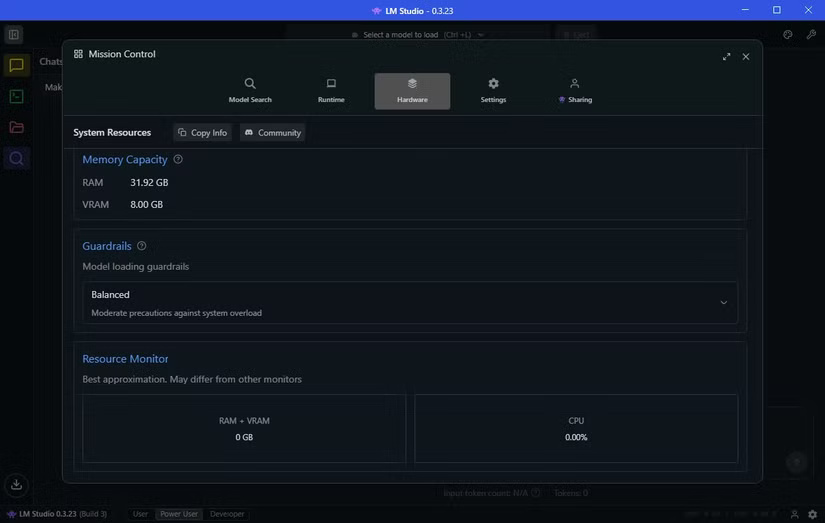
In Guardrails, you'll also see a Resource Monitor . This is a handy way to see how much system resources your AI model is consuming. You should pay attention to this if you're running limited hardware, as you don't want your system to crash unexpectedly.
Load AI model and start generating prompts
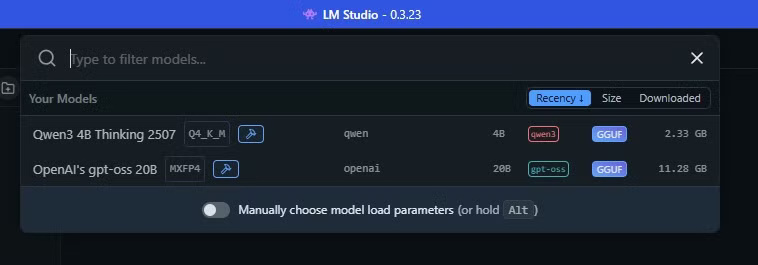
Now you're ready to start using your local AI chatbot on your machine. In LM Studio, select the top bar, which acts as a search engine. Selecting the AI name will load the AI model into your machine's memory and you can start creating prompts.
Old hardware can run AI models too
Running an LLM locally on legacy hardware depends on choosing the right AI model for your machine. While the Qwen version works perfectly and is the top recommendation in LM Studio, OpenAI's gpt-oss-20b is clearly a much better choice.
It's important to balance your expectations. While gpt-oss will answer the questions correctly (and faster than GPT-5), it won't be able to handle large amounts of data. Hardware limitations will quickly become apparent.
Before trying, many believed that running an AI chatbot locally on legacy hardware was impossible. But thanks to quantized models and tools like LM Studio, it's not only possible, but surprisingly useful.
That said, you won't get the same speed, completeness, or depth of inference as GPT-5 in the cloud. Running locally comes with tradeoffs: You get privacy, offline access, and control over your data, but you sacrifice some performance.
Still, it's pretty cool that a 7-year-old GPU and a 4-year-old CPU can handle modern AI. If you're hesitant because you don't have cutting-edge hardware, don't worry - local quantization models could be your path to offline AI.
Final Thoughts
The key takeaway is that Is It Possible to Run AI Chatbots Locally on Legacy Hardware is easier to evaluate when its benefits, limitations, and real-world use are considered together. Review the details above before applying the information to a specific situation.
FAQ
What is the main point of Is It Possible to Run AI Chatbots Locally on Legacy Hardware?
Most of the AI tools we use run in the cloud and require an Internet connection. While it is possible to use local AI tools installed on your computer, you need powerful hardware to do so.
What should you know about How to Use Local LLM with Nvidia GTX 1070 and LM Studio?
Please note in this section that the author of this article is not an expert on local LLM, nor is he an expert on the software used to setup and run this AI model on his machine.
What limitations should readers keep in mind?
The answer can depend on the product version, source, use case, and date of publication. Review the article's context and confirm time-sensitive details before applying the information.
Related Articles
 Do You Need a Powerful PC to Play Hogwarts Legacy: Explained4 minutes read
 Exciting Classes in Hogwarts Legacy4 minutes read
 Code King Legacy 7.1 Latest Version 20252 minutes read
 How to Play the Latest Gura No Mi King Legacy Fruit9 minutes read
 How to Switch from Legacy to UEFI in Your Computer's BIOS6 minutes read
 Some Features and Tips for Playing Legacy of Discord for Newbies6 minutes read
Reader Comments 0
Sign in with email or Google to join the discussion.