Table of Contents
Yes, a Raspberry Pi can run a small AI language model locally, but it is best treated as an experiment or a lightweight offline tool—not as a replacement for a cloud AI service or a computer with a dedicated GPU. The main constraints are RAM, storage speed, sustained CPU load and heat.
A carefully chosen quantized model can produce stable responses on a Raspberry Pi 4 or Pi 5. Expect generation to be slow, especially with longer prompts. The practical goal is privacy, offline access and learning how local inference works rather than high throughput.
Choose a model that fits the hardware
Model size matters more than the interface used to run it. Large models may fail to load, trigger the Linux out-of-memory killer or leave too little RAM for the operating system and supporting services. Small models such as TinyLlama are more realistic starting points.

Prefer a quantized model and begin with a short context window. Both reduce memory demand. If the model loads but the device freezes or the process disappears during generation, check memory pressure before assuming the AI software itself is broken.
A practical software stack
One workable setup combines three components:
- Ollama downloads and runs compatible local models.
- Open WebUI provides a browser-based chat interface.
- Docker keeps services isolated and makes the deployment easier to reproduce.
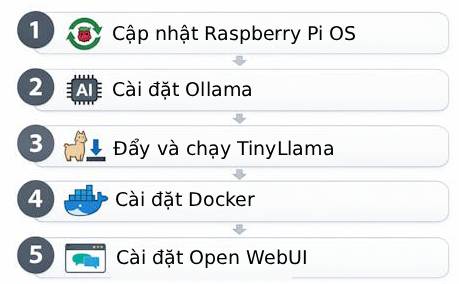
Containers also consume memory and storage, so they are not automatically the lightest option. On a low-memory board, running only the model service first is a useful way to establish a stable baseline before adding a web interface.
The three limits to address first
| Constraint | Typical symptom | Practical response |
|---|---|---|
| Memory | The model or container exits during loading or generation | Use a smaller quantized model, close other services and configure swap carefully |
| Storage | Downloads fail, containers behave unpredictably or updates cannot complete | Keep ample free space and prefer reliable, faster storage for repeated use |
| Temperature | Responses become slower during long sessions | Use active cooling and verify that the CPU is not thermally throttling |
Memory and swap
Swap can prevent an abrupt crash when RAM is briefly exhausted, but it is much slower than physical memory. Heavy swapping on an SD card also creates a poor user experience. Treat swap as a stability buffer, not as a substitute for choosing a model that fits.
Storage
Model files, container images and update layers can consume more space than expected. A nearly full card can cause failures that appear unrelated to storage. Check free space before downloading a model and remove unused images or models when necessary.
Cooling
Language-model inference keeps the processor busy for extended periods. Passive cooling may allow the CPU to throttle under sustained load. A suitable heatsink and fan help the board maintain consistent performance.
Test the system in stages
- Update the operating system and confirm the board is stable under normal CPU load.
- Install the model runtime and start with one small, quantized model.
- Monitor RAM, swap use, free storage and temperature while sending short prompts.
- Increase prompt length gradually. If the process fails, reduce the model or context size before adding more services.
- Add Docker or Open WebUI only after command-line inference works reliably.
This staged approach makes faults easier to isolate. A container that exits without a clear application error may have been terminated because the host ran out of memory; system logs and resource monitors are more useful than repeatedly restarting it.
What performance should you expect?
A Raspberry Pi can support a simple offline assistant, a local automation endpoint or an educational demonstration. Responses from a small model will generally be slower and less capable than those from larger cloud models. The board is a poor choice for training a modern language model and is limited for multi-user workloads.
The project becomes worthwhile when local processing, low power use or hands-on learning matters more than speed. With a suitably small model, sufficient free storage and active cooling, the system can remain stable through repeated inference runs.
Related Articles
 Raspberry Pi Zero vs Model a and B, How Are They Different?11 minutes read
 What Is the Difference Between Raspberry Pi 4 and Other Models?8 minutes read
 How to Run Qwen 3.5 Locally on a Single GPU: Step-by-Step Guide15 minutes read
 How to Setup and Run Qwen 3 Locally with Ollama9 minutes read
 7 Best Tools for Running LLM Models Locally: Practical Guide7 minutes read
 How to Add an ADC to Raspberry Pi: What You Need to Know: Clear Instructions11 minutes read
Reader Comments 0
Sign in with email or Google to join the discussion.