Table of Contents
A step-by-step guide to help you avoid five mistakes when building your own PC — from choosing RAM, CPU, power supply, to heatsink and motherboard — for optimal performance and maximum durability.
Building a new PC yourself can be daunting — there are so many components to choose from, and the investment can be daunting. Here are five key things to keep in mind to avoid mistakes that could lead to poor performance, expensive costs, or premature obsolescence.
1. Choose the right type of RAM
RAM is often overlooked when building a computer. Many people think that choosing the right DDR5 standard is enough, but in fact, ignoring RAM specifications can significantly reduce performance.
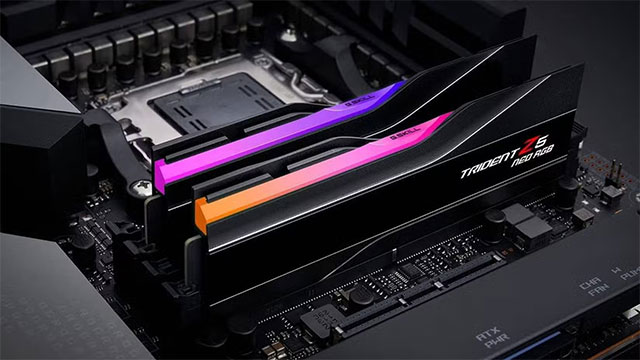
RAM speed is important.
DDR5 is currently available in speeds ranging from 4800MHz to over 8200MHz. For AMD Ryzen 7000 or 9000 CPUs, the optimal range is around 6000MHz — both stable and to avoid overclocking errors. For Intel CPUs, around 6000MHz is also recommended to balance cost and performance, but Intel often makes better use of higher-speed RAM.
Don't miss EXPO and XMP.
These are two automatic RAM overclocking technologies from AMD (EXPO) and Intel (XMP). While they are similar, they are not always fully compatible between the two platforms. The safest way is to choose RAM from the motherboard's recommended list (QVL) to ensure compatibility and stability.
Choose the appropriate capacity.
16GB of RAM is still enough for basic tasks, but for AAA games or heavy work, you should choose at least 32GB. If you do graphics, film editing or 3D, invest in 64GB to keep the system running smoothly.
2. Don't rely too much on AIO water cooling
'All-in-One' (AIO) water coolers were once all the rage, but in reality, their cooling efficiency often fell short of high-end air coolers, while their price was significantly higher.
Takes up space and is difficult to maintain.
The radiator of a water cooler takes up many space, making it difficult to install or clean. Some people even have to cut the case to fit the radiator.
Risk of leakage.
Water cooling is always a potential source of leaks. Although coolant is not electrically conductive, no one wants to see water in their case. When an AIO fails, it is almost impossible to fix.
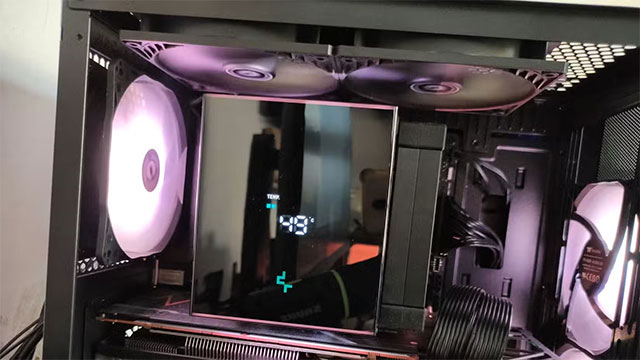
Air coolers are still the safer and more durable choice.
A good radiator lasts for decades, the fan is easy to replace, has less risk and costs a lot less.
3. Invest in the most powerful CPU possible
The CPU is the component that lasts the longest and is the least upgradeable. A mid-range CPU from 5 years ago can still run modern games well. So invest in the best CPU you can afford.
The number of cores is important.
Most software and games today take advantage of multiple CPU cores. The minimum should be 8 cores — the same as the CPUs on consoles like the PS5 or Xbox Series X.
With Intel, it is important to distinguish between P-Core (high-performance cores) and E-Core (power-saving cores). AMD only has high-performance cores equivalent to P-Core.
The AMD X3D chip is the 'performance king' for gaming.
Thanks to the expanded L3 cache, the X3D CPUs offer a significant boost in gaming performance. If gaming is your primary goal, this is a worthy choice.
4. Don't underestimate the power supply (PSU)
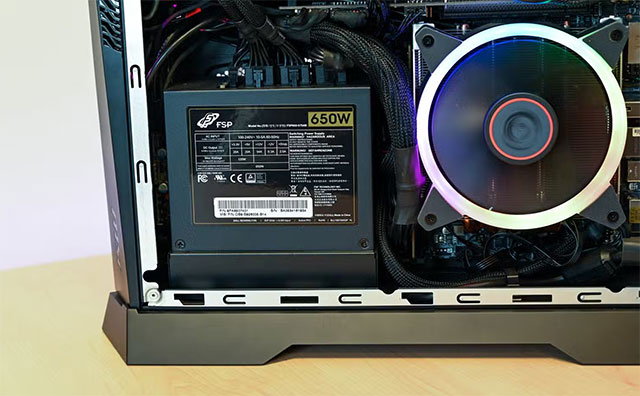
The power supply supplies power to your entire system, so don't take it lightly. A weak or poor quality PSU can not only cause instability, but can also damage expensive components.
Choose a little extra power.
Total power required = total consumption of CPU, GPU, RAM, hard drive. multiplied by 1.2 to 1.3. For example, if the system needs 540W, choose a PSU around 650–700W. If that is not available, it is okay to choose higher.
Choose a reputable brand.
Cheap, poor quality power supplies can cause electrical short circuits or fires. Reputable brands like Seasonic, Corsair or EVGA are often highly regarded for their durability and safety.
5. Don't overspend when buying a motherboard
The motherboard is the foundation of your system, but there's no need to buy an expensive one if you don't really need one.
Many high-end motherboards have dozens of USB ports, high-speed Ethernet, multiple PCIe slots, and even support for 3–4 NVMe drives. But in reality, very few users need that much.
It's about having enough features, not the most.
Instead of spending a few hundred extra dollars on a high-end motherboard, invest that money in a more powerful GPU or CPU — the real-world performance will be much higher.
Also, don't forget to check the number of PCIe lanes Supported by the CPU and motherboard to avoid plugging in too many NVMe drives or expansion cards, which can limit performance.
Summary
Building a PC is more than just assembling components, it's a matter of balancing performance, cost, and durability. By avoiding these mistakes, you'll have a stable, cool, and powerful system that will last for years.
FAQ
What should you know about avoid 5 common mistakes when assembling your own PC?
In practical terms, a step-by-step guide to help you avoid five mistakes when building your own PC — from choosing RAM, CPU, power supply, to heatsink and motherboard — for optimal performance and maximum durability.
Why does avoid 5 common mistakes when assembling your own PC matter?
The article highlights that here are five key things to keep in mind to avoid mistakes that could lead to poor performance, expensive costs, or premature obsolescence.
What is the main takeaway?
The main takeaway is that choose the right type of RAM RAM is often overlooked when building a computer.
Related Articles
 3 Reasons Why You Might Regret Buying a Cheap PC Power Supply (PSU)9 minutes read
 4 Things to Note Before Choosing to Buy a PSU Power Supply7 minutes read
 Common Mistakes When Buying Shoes That Harm Your Feet5 minutes read
 9 Common Mistakes About Technology Need to Stop Immediately9 minutes read
 7 Common Mistakes with Gaming Laptops and How to Avoid Them11 minutes read
 5 Things to Know When Buying Computer Power Supplies9 minutes read
Reader Comments 0
Sign in with email or Google to join the discussion.