Table of Contents
Apple 'Transferred' the Camera of the iPhone 16 to the iPhone 16e, but There is easier to approach with a clear overview and reliable steps. This guide organizes the essential information, highlights practical details, and explains what to check along the way.
Key Takeaways
- Follow the recommended steps in order to avoid common mistakes with Apple 'transferred' the camera of the iPhone 16 to the iPhone 16e, but there.
- Review compatibility, settings, or requirements before making changes.
- Use the troubleshooting notes to confirm the final result.
First of all, the iPhone 16e comes with all the premium features that the previous SE models lacked. The phone is equipped with a powerful A18 chipset with Apple Intelligence support, Apple's first in-house C1 modem, an Action Button, a notch, an OLED display, and a 2-in-1 camera system.
The 2-in-1 camera system sounds 'big and mighty' but in fact, this is a 48MP sensor, 'lifted' from the basic iPhone 16 model, supporting both Night and Portrait photography modes at the same time. Thanks to the much higher camera resolution than previously released models, the iPhone 16e can crop photos to capture photos equivalent to a 2x telephoto lens. In addition, the ability to record 4K@60fps video with spatial audio support is also a highlight worth mentioning.
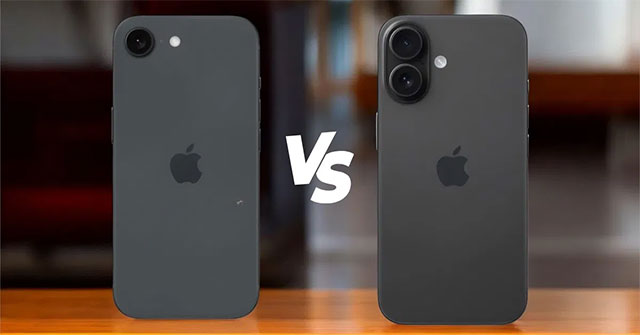
However, although the camera cluster on the iPhone 16e has the same hardware configuration as the regular iPhone 16, it lacks some important features that are quite popular on the iPhone 16 series. For instance, the iPhone 16e doesn't have the Photographic Styles feature, which is present on the entire remaining iPhone 16 series.
Additionally, despite having the same camera resolution and A18 chipset, the iPhone 16e still lacks the latest version of Photographic Styles. According to Apple's official comparison page, all iPhone 16 models—except the iPhone 16e—support the latest version of Photographic Styles. The good news, however, is that the iPhone 16e still supports Photographic Styles, albeit presumably the older version introduced with the iPhone 13.
With the iPhone 16, Apple introduced a new version of the Photographic Styles feature and added some upgrades to the original version. The new version lets you conveniently edit these styles after taking a photo.
Additionally, the iPhone 16e's camera also lacks features like Focus Control, Cinematic Mode, and Action Mode. On the front, while it has the same 12MP selfie camera as the iPhone 16, the iPhone 16e doesn't support Cinema Mode, Depth Control for portraits, or the latest version of Photographic Styles.
Of course, the iPhone 16e starts at just $599 compared to the $799 price of the iPhone 16, but do you think these trade-offs are worth it? Let us know in the comments below.
Final Thoughts
The most reliable way to handle Apple 'transferred' the camera of the iPhone 16 to the iPhone 16e, but there is to follow the process in order, verify each important setting, and test the result before moving on. Use the guidance above as a practical reference, then adjust the details for your device, software version, or specific goal.
FAQ
What should I know first about Apple 'Transferred' the Camera of the iPhone 16 to the iPhone 16e, but There?
The iPhone SE line finally has a successor—a new model with a completely new name and hardware configuration after more than two years of waiting.
How do I get the best results with Apple 'Transferred' the Camera of the iPhone 16 to the iPhone 16e, but There?
Use current software or equipment, follow the steps in order, review the recommended settings, and test one change at a time so you can identify what improves the result.
What should I do if Apple 'Transferred' the Camera of the iPhone 16 to the iPhone 16e, but There doesn't work as expected?
Check compatibility, permissions, connectivity, and version-specific settings. Restart the relevant device or app, then repeat the process carefully before trying a more advanced fix.
Related Articles
 How to Use the Camera Filter on Iphone 11, Iphone 11 Pro and3 minutes read
 It Seems That the 'Extreme' Square Camera Cluster on Iphone Xi Is6 minutes read
 3 Camera Apps Should Be Uninstalled on Iphone 118 minutes read
 How to Access the Camera Timer on Iphone 11 and Iphone 11 Pro3 minutes read
 How to Control Iphone Camera with Apple Watch2 minutes read
 Turn on the Secret Feature of iPhone Camera on iOS 114 minutes read
Reader Comments 0
Sign in with email or Google to join the discussion.