Table of Contents
5 Common Mistakes When Backing Up Email brings together practical options worth considering. Below, you'll find clear explanations, useful context, and tips for deciding which choices best match your needs.
Key Takeaways
- Review waiting too long between backups.
- Explore back up only selected folders.
- Understand not checking if the backup is restoreable.
5. Waiting Too Long Between Backups
It's easy to assume that your emails are safe in your inbox and put off backing up longer than necessary. But things can go wrong in the meantime. For instance, you might get locked out of your Google account or accidentally delete one or more emails and attachments. In fact, many people who think they can back up for months end up losing an entire important email thread.
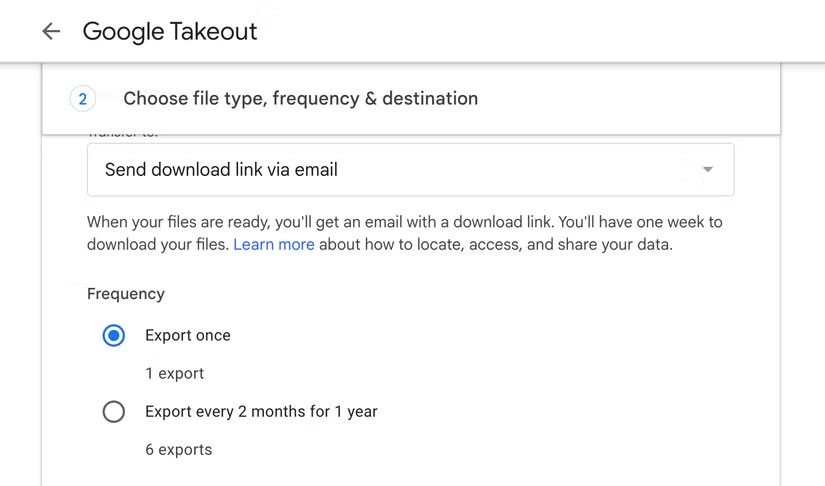
Fortunately, it's easy to get into the habit of backing up your email daily or even weekly. The steps for doing so will vary depending on your email provider. However, for Gmail, one of the most popular email providers, you can use Google Takeout to export your data. You can then store it on an external hard drive, cloud service, or another similar location that's easily accessible.
4. Back Up Only Selected Folders
It may seem like a good idea to back up only selected emails or emails in a specific folder, but sometimes this can backfire. Important details can get lost in emails in places you wouldn't think to back up, like your Promotions or Sent Folder.
Of course, only you can decide what is worth backing up. But a good rule of thumb is to back up important data twice (once in the cloud and once locally), while less important stuff gets backed up just once. You can also choose to back up all your larger files twice, as they are often the hardest to recover if lost. Attachments like contracts and multi-page documents, in particular, should be prioritized so you can always access them.
3. Not Checking If the Backup Is Restoreable
You don't realize that your files are exporting incorrectly when you start backing up. You assume that you have downloaded the files and they are ready to be backed up to your storage location. You only realize that something is wrong when you try to restore some of the emails.
You might catch this error fairly early and not lose any important data if you're lucky. So if you're new to backing up your email, make sure you check to see if you can restore your data over time. Open the contents of your backup files and check that everything loads correctly and you can access all of your data.
2. Count on a Single Backup Location
Relying on a single backup method can be disastrous. Think about it: What would you do if all your backups were stored on your laptop and that laptop suddenly crashed or was lost? That's the kind of situation you don't want to find yourself in, especially if you really need to retrieve an old email.

Even the most secure storage locations can fail. Hard drives can fail, for instance, and cloud services can be hacked. That's why it's best to have backups in at least a few different places. Ideally, you want one to be a physical location and the other to be a cloud service. You can also apply the 3-2-1 rule, which basically means:
- You make 3 copies of all important emails and attachments periodically.
- You choose 2 types of storage locations to minimize the possibility of data loss due to hardware failure or any account/connection issues.
- Finally, a copy of your data must be sent to an offsite physical location.
1. Don't Encrypt Backups
Any type of data you back up should be encrypted to protect against unauthorized access. Many people like to keep things simple, so they leave their email backups unencrypted for the longest time. But if you're dealing with sensitive information, this isn't something you should put off. It may seem like an unnecessary step, but it can go a long way toward protecting your data if someone tries to access your files.
Make sure to store your encryption key in a safe place, separate from your backups, so you don't lose it if you decide to encrypt your data. Remember, without the key, your data is as good as lost.
Many people think they never need to back up their emails because they are safe in their inbox and they don't want to make things difficult for themselves. It's only when you start backing up your emails that you realize it's actually not that difficult. The peace of mind that comes from knowing you can access any email or attachment at any time is worth the effort. Here are some quick-to-setup backup tips to help you stay on track if you've been putting off backing up your emails or any other data.
Final Thoughts
The most reliable way to handle common mistakes when backing up email is to follow the process in order, verify each important setting, and test the result before moving on. Use the guidance above as a practical reference, then adjust the details for your device, software version, or specific goal.
FAQ
What should I know first about Common Mistakes When Backing Up Email?
You start backing up your emails after an accidental deletion.
How do I get the best results with Common Mistakes When Backing Up Email?
Use current software or equipment, follow the steps in order, review the recommended settings, and test one change at a time so you can identify what improves the result.
What should I do if Common Mistakes When Backing Up Email doesn't work as expected?
Check compatibility, permissions, connectivity, and version-specific settings. Restart the relevant device or app, then repeat the process carefully before trying a more advanced fix.
Related Articles
 10 Common Mistakes When Shopping Make You Spend More Money6 minutes read
 9 Common Mistakes About Technology Need to Stop Immediately9 minutes read
 Top 5 Most Common Errors When We Learn a New Skill8 minutes read
 12 Common Mistakes When Cooking That You Should Avoid7 minutes read
 9 Common Mistakes When Using Washing Machines and How to Fix Them7 minutes read
 15 Mistakes That Trainees Often Make13 minutes read
Reader Comments 0
Sign in with email or Google to join the discussion.