Table of Contents
A convincing scam email can use correct grammar, a familiar logo and real personal details. The most useful question is not whether it looks professional, but whether the request is expected and can be verified through a separate trusted channel.
Watch for pressure to pay, sign in, reveal a code, open an attachment or give someone remote access. Our phishing-signal guide explains how to assess these requests without relying on a single visual clue.
1. Blackmail messages claiming webcam access
Mass-mailed extortion messages may claim that the sender recorded you, controls your device or will contact everyone you know unless you pay cryptocurrency. Some display an old password, address or other exposed personal detail to make the threat seem credible.
An apparent message from your own address is not proof that your mailbox was accessed: sender information can be spoofed. An old password is a reason to replace it anywhere it is still used, not proof that the sender has the claimed video. At the same time, do not assume every threat is a bluff if there is specific evidence of account compromise or real intimate-image abuse.
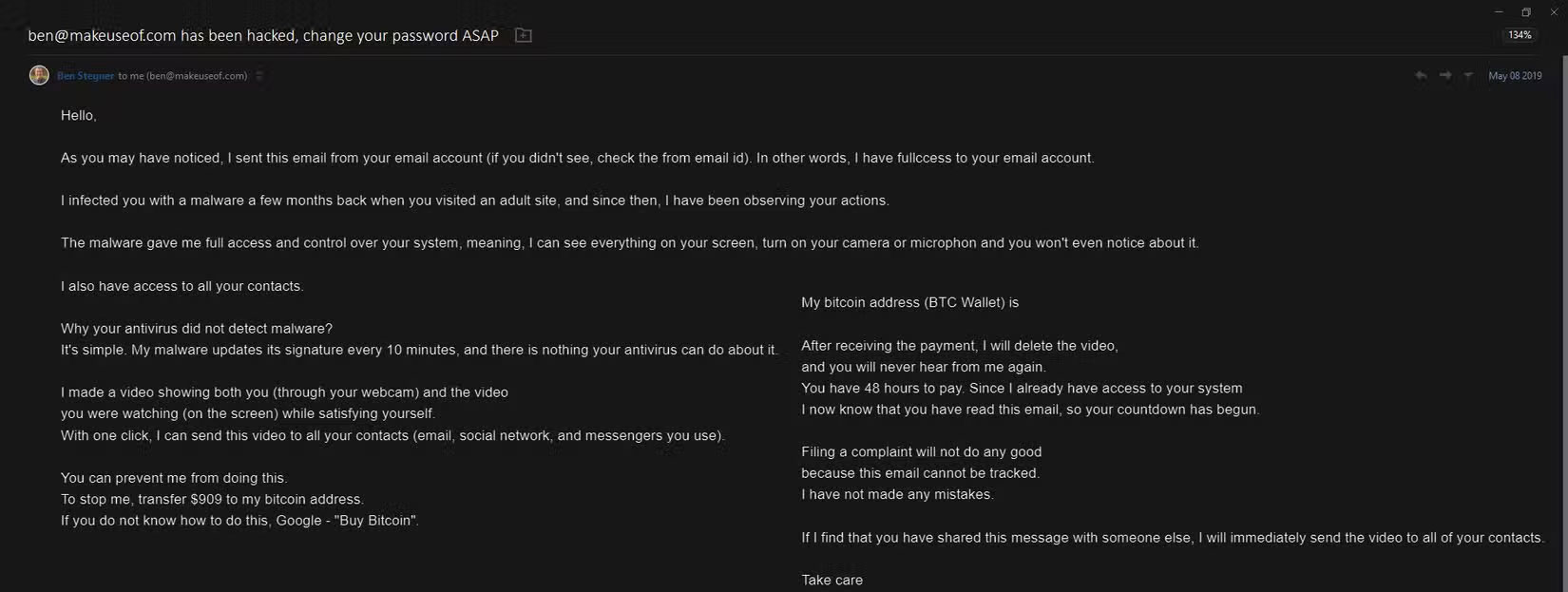
Do not pay or engage with the sender. Preserve relevant evidence, report the message through your mail provider and contact appropriate authorities for a credible threat. The FTC also warns about paid services promising to stop sextortion. Avoid giving a second stranger access to your devices or financial accounts in the hope of fixing the first threat.
2. Fake invoices and refund phone numbers
Another common lure is a large bill for a purchase or subscription you do not recognize. The email urges you to call its “cancellation” number. The person answering may then request card details, a verification code or remote-control access to your computer.
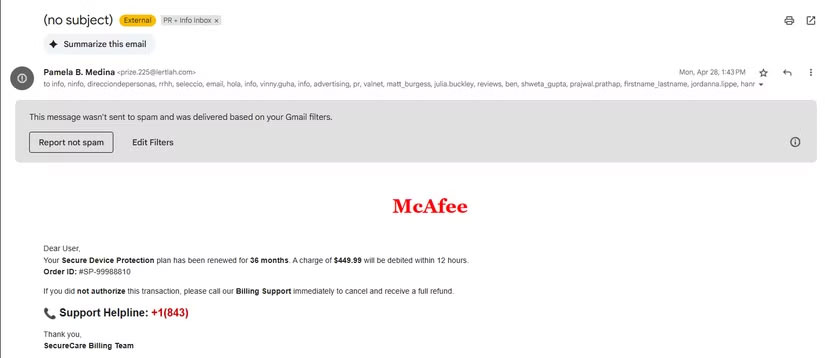
Do not call the number in the unexpected invoice. Open the retailer's app or type its known website address yourself, check your order history and review your payment account through its normal route. If necessary, use contact details from the official site or the back of your card.
Missing card digits, a generic greeting or poor grammar can be clues, but none is a reliable rule. A scam may include accurate details, and legitimate receipts vary. The independent account record is a stronger check than the appearance of the message.
3. AI-assisted impersonation
AI can help create polished messages and plausible images. A photo supplied by a stranger claiming to have found a lost pet, for example, should not be treated as proof of possession. Ask for independent verification and arrange any handover safely; do not send money solely on the strength of an image.
The same principle applies to a supposed friend, colleague or romantic contact: use a phone number or channel you already trust. A request for secrecy or unusual payment deserves extra scrutiny even when the language sounds familiar.
A quick verification routine
- Pause before acting on a deadline or threat.
- Check the complete sender address and link destination, recognizing that neither alone establishes legitimacy.
- Open the service through a known app, bookmark or independently typed address.
- Verify the requested action with the organization or person through a trusted channel.
- Report the suspicious message and avoid its links and attachments.
If you already responded
If you entered a password, change it through the real service and replace it anywhere else it was reused. Review recent sign-ins and recovery settings, and enable supported multifactor protection. A password manager helps maintain unique account passwords.
If you paid or shared financial details, contact your bank or payment provider promptly. If you installed software or granted remote access, disconnect that session, contact IT on a work device and follow trusted security-recovery guidance. The FTC phishing guidance provides further reporting and response steps.
Related Articles
 How to identify phishing emails
 Be wary of disguised Microsoft OneNote Audio phishing emails
 25% of 'over-the-counter' phishing emails are the default security of Office 365
 Beware of phishing emails impersonating Facebook
 [Infographic] How to recognize and prevent Phishing attacks
 How to report phishing emails in Outlook.com
Reader Comments 0
Sign in with email or Google to join the discussion.